> ## Documentation Index
> Fetch the complete documentation index at: https://docs.tracecat.com/llms.txt
> Use this file to discover all available pages before exploring further.
# Custom LLM providers
> Configure custom OpenAI-compatible model providers for Tracecat agents: add a custom source, discover models, and enable them for presets and defaults.
Use a custom LLM provider when an agent should call your own OpenAI-compatible gateway instead of Tracecat's managed LiteLLM gateway.
Custom providers are managed as custom sources in organization agent settings.
## Routing model
Each agent uses its own model configuration to decide where its LLM requests go.
| Agent model configuration | Request route |
| ----------------------------- | -------------------------------------------- |
| `passthrough: true` | Direct to that agent's configured `base_url` |
| `passthrough: false` or unset | Tracecat's managed LiteLLM gateway |
Root agents and subagents follow the same rule. A root agent can use a custom passthrough gateway while a subagent uses managed LiteLLM, or a subagent can use its own passthrough gateway while the root agent uses managed LiteLLM.
Tracecat strips the trailing version segment from the base URL before forwarding sandbox requests because SDK clients append paths such as `/v1/messages`. This prevents doubled paths such as `/v1/v1/messages`.
## Root agents
For a root agent, Tracecat keys direct passthrough routing by the model string the root agent sends.
```yaml theme={null}
model_name: customer-alias
model_provider: custom-model-provider
base_url: https://customer-litellm.example/v1
passthrough: true
```
Requests with `model: customer-alias` go directly to `https://customer-litellm.example`.
## Subagents
For a subagent, Tracecat keys direct passthrough routing by the subagent's scoped model route. This lets Tracecat route each preset agent independently, even when several agents share the same sandbox process.
```yaml theme={null}
model_name: child-alias
model_provider: custom-model-provider
base_url: https://child-litellm.example/v1
passthrough: true
```
Requests for that subagent go directly to `https://child-litellm.example`. Requests for other subagents fall back to managed LiteLLM unless those subagents also enable passthrough.
## Credentials
Tracecat resolves passthrough credentials from the custom provider selected by the agent's model configuration. If a root agent and subagent use different passthrough providers, each route uses its own provider credentials.
Managed LiteLLM requests keep the sandbox's managed gateway token.
## Add a custom source
Go to Organization settings, open Agent, then go to Custom sources and click Add custom source.
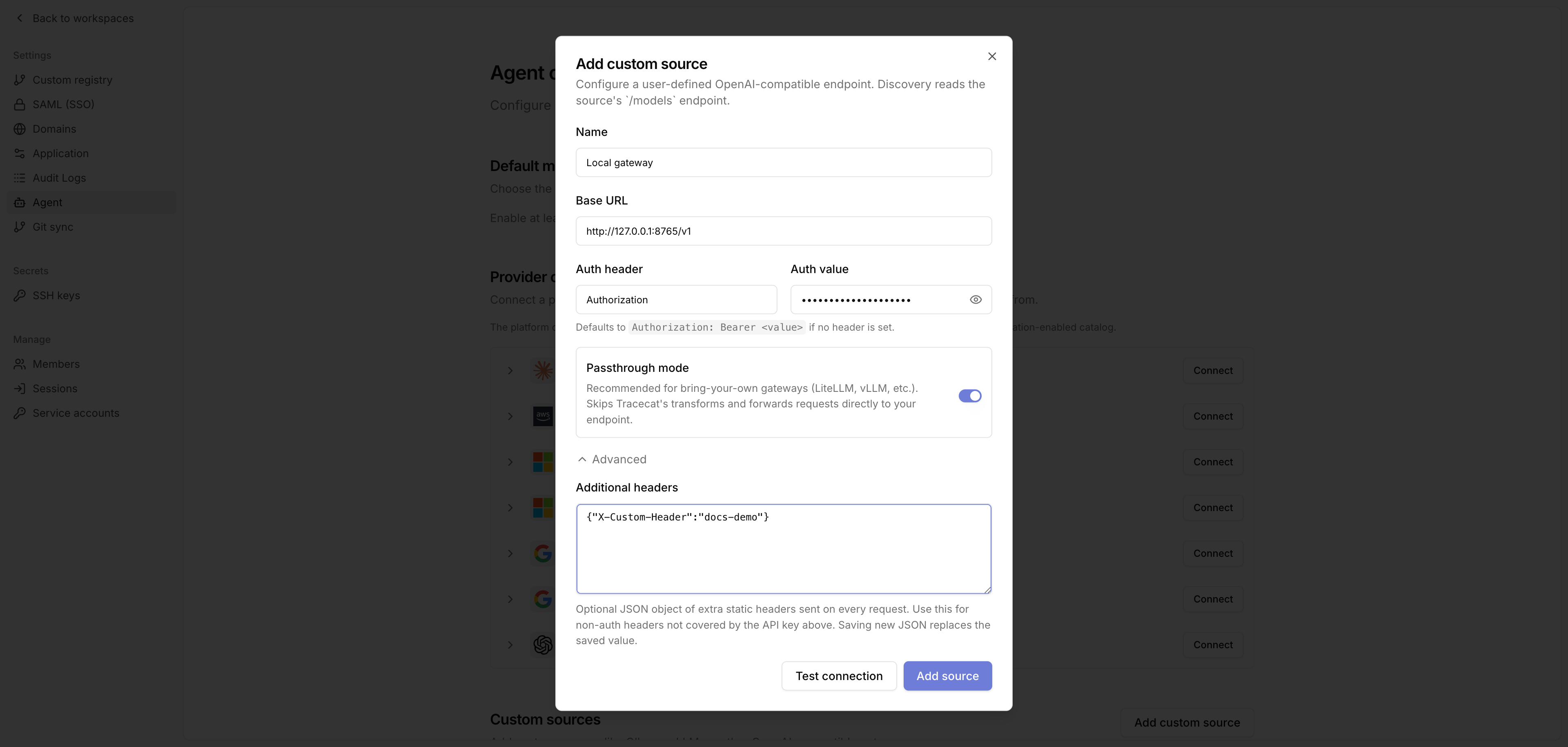 Set the source fields:
* **Name**: A readable label, such as `Local gateway`.
* **Base URL**: The OpenAI-compatible API base URL, e.g. `https://gateway.example/v1`.
* **Auth header**: Leave blank to use `Authorization`.
* **Auth value**: The provider credential. If Auth header is blank, Tracecat sends `Authorization: Bearer `.
* **Passthrough mode**: Enable this to route agent requests directly to this gateway instead of Tracecat's managed LiteLLM. Required for bring-your-own gateways such as LiteLLM, vLLM, and Ollama-compatible endpoints.
Use Advanced > Additional headers only for static non-auth headers. The value must be a JSON object with string keys and string values.
```json theme={null}
{
"X-Custom-Header": "value"
}
```
Click Test connection to verify the source before saving it, then click Add source.
## Discover and enable models
After you save the source, click Refresh.
Tracecat calls the source's `/models` endpoint and adds the returned models to the organization catalog.
Set the source fields:
* **Name**: A readable label, such as `Local gateway`.
* **Base URL**: The OpenAI-compatible API base URL, e.g. `https://gateway.example/v1`.
* **Auth header**: Leave blank to use `Authorization`.
* **Auth value**: The provider credential. If Auth header is blank, Tracecat sends `Authorization: Bearer `.
* **Passthrough mode**: Enable this to route agent requests directly to this gateway instead of Tracecat's managed LiteLLM. Required for bring-your-own gateways such as LiteLLM, vLLM, and Ollama-compatible endpoints.
Use Advanced > Additional headers only for static non-auth headers. The value must be a JSON object with string keys and string values.
```json theme={null}
{
"X-Custom-Header": "value"
}
```
Click Test connection to verify the source before saving it, then click Add source.
## Discover and enable models
After you save the source, click Refresh.
Tracecat calls the source's `/models` endpoint and adds the returned models to the organization catalog.
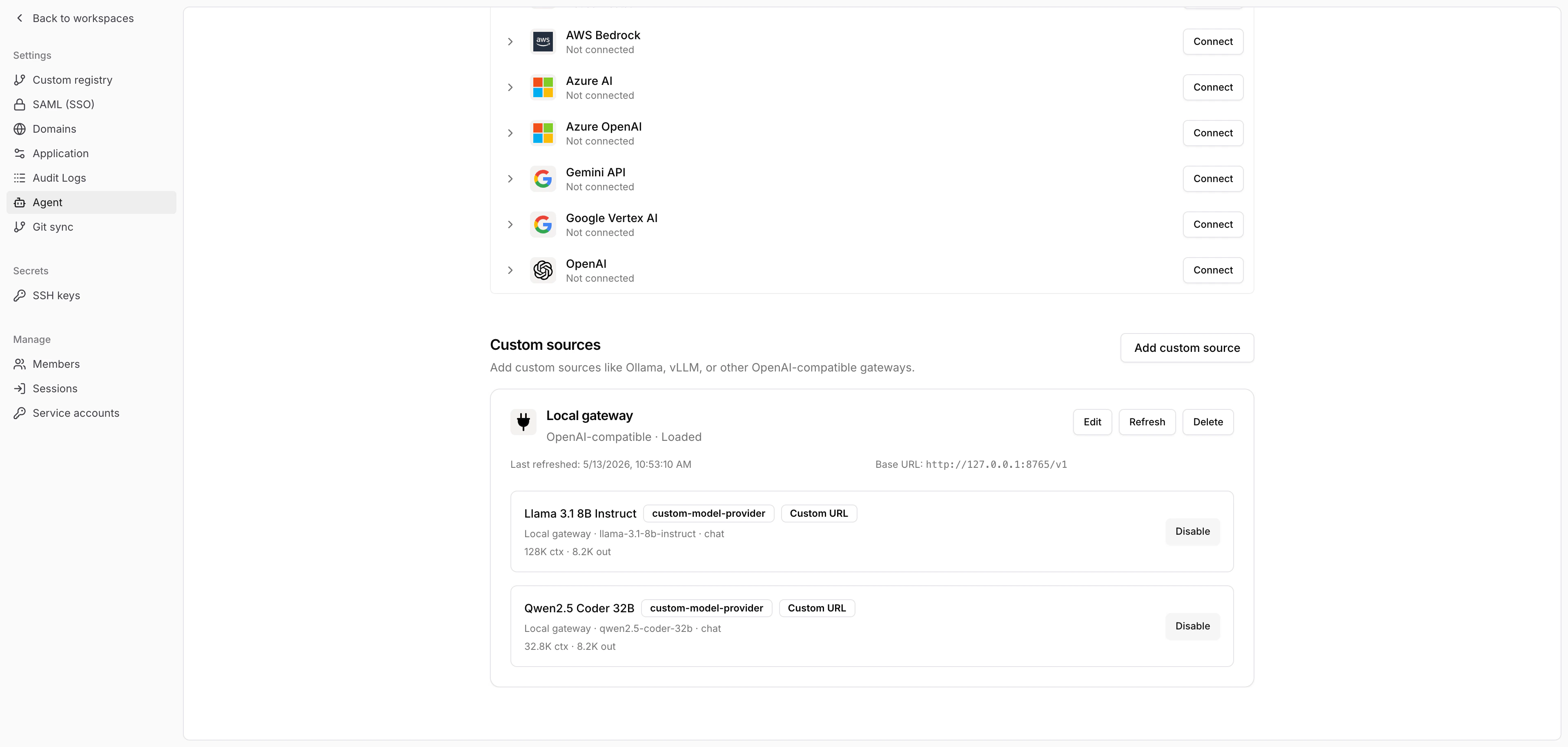 Enable the models you want available to agent presets and organization defaults.
If your organization does not have agent add-ons enabled, Tracecat enables discovered custom source models automatically after refresh.
## Use the provider
Choose the enabled custom source model anywhere Tracecat lets you select an agent model, such as the default model selector or a preset agent configuration.
Refresh the source again after you add or remove models from the upstream gateway.
Edit the source when you rotate credentials, change the base URL, or update static headers.
## Related pages
* See [AI agent](/agents/ai-agent) for the `ai.agent` and `ai.preset_agent` action reference.
* See [AI action](/agents/ai-action) for single-call LLM workflow actions.
* See [Secrets and variables](/agents/secrets-variables) for agent secret handling.
* See [MCP servers](/automations/integrations/mcp-integrations) for connecting MCP tools to agents.
Enable the models you want available to agent presets and organization defaults.
If your organization does not have agent add-ons enabled, Tracecat enables discovered custom source models automatically after refresh.
## Use the provider
Choose the enabled custom source model anywhere Tracecat lets you select an agent model, such as the default model selector or a preset agent configuration.
Refresh the source again after you add or remove models from the upstream gateway.
Edit the source when you rotate credentials, change the base URL, or update static headers.
## Related pages
* See [AI agent](/agents/ai-agent) for the `ai.agent` and `ai.preset_agent` action reference.
* See [AI action](/agents/ai-action) for single-call LLM workflow actions.
* See [Secrets and variables](/agents/secrets-variables) for agent secret handling.
* See [MCP servers](/automations/integrations/mcp-integrations) for connecting MCP tools to agents.