> ## Documentation Index
> Fetch the complete documentation index at: https://docs.tracecat.com/llms.txt
> Use this file to discover all available pages before exploring further.
# Actions
> Connect Tracecat actions to build workflows: configure inputs and outputs, reference upstream results, and chain core, integration, and custom actions.
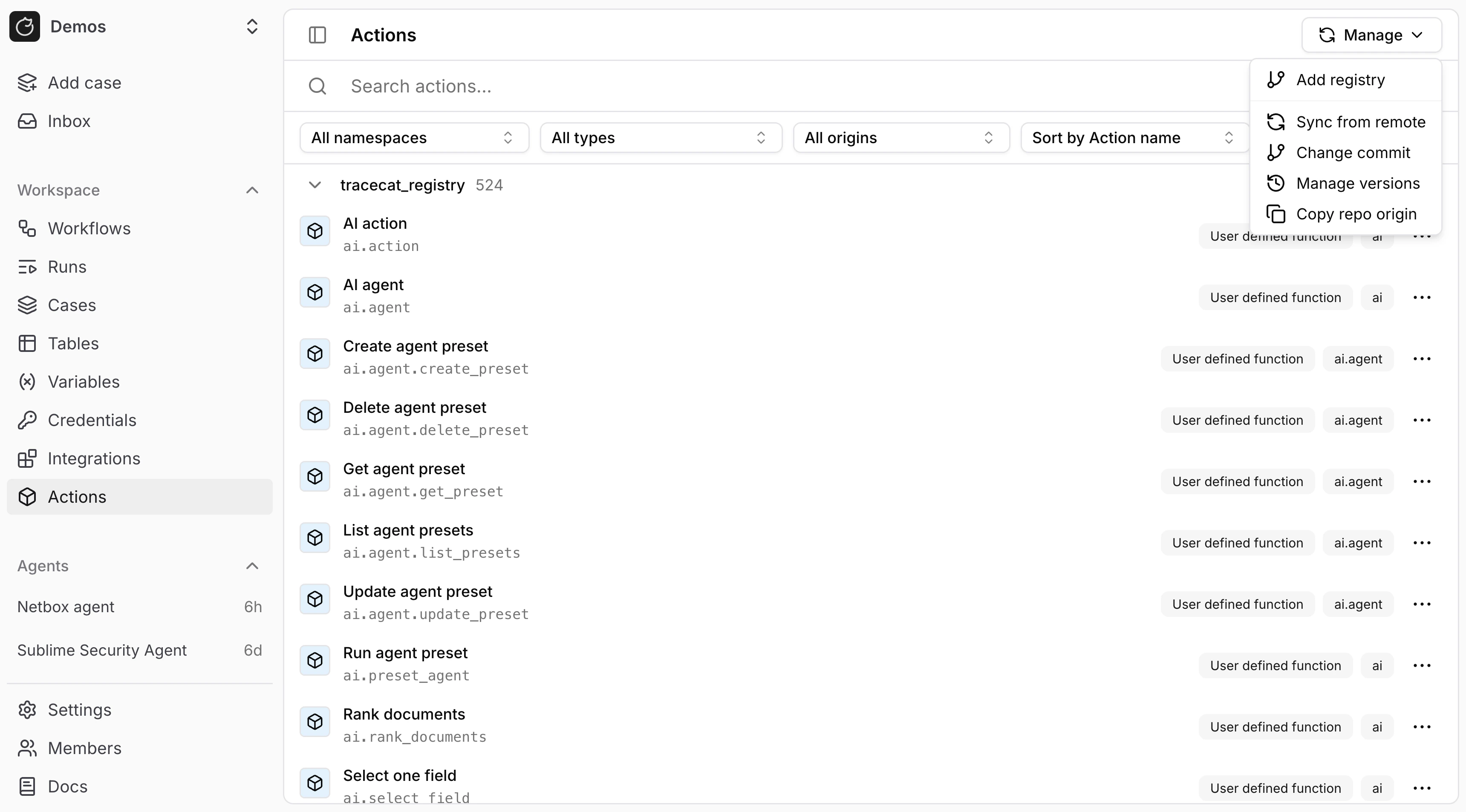
You can view all available actions in the `/actions` page.
 ## Action names
Every Tracecat action has a title, namespace, and name.
Actions IDs are defined as `.`. For example, `tools.slack.post_message` uses the `tools.slack` namespace and the `post_message` name.
## Action types
Tracecat actions are defined in either Python UDFs (user-defined functions) or YAML templates (domain-specific language for actions).
See [Custom actions](/custom-actions/custom-registry) for more details.
## Action toolbar
If you're building workflows in the UI, you can quickly find actions by namespace using the actions toolbar:
## Action names
Every Tracecat action has a title, namespace, and name.
Actions IDs are defined as `.`. For example, `tools.slack.post_message` uses the `tools.slack` namespace and the `post_message` name.
## Action types
Tracecat actions are defined in either Python UDFs (user-defined functions) or YAML templates (domain-specific language for actions).
See [Custom actions](/custom-actions/custom-registry) for more details.
## Action toolbar
If you're building workflows in the UI, you can quickly find actions by namespace using the actions toolbar:
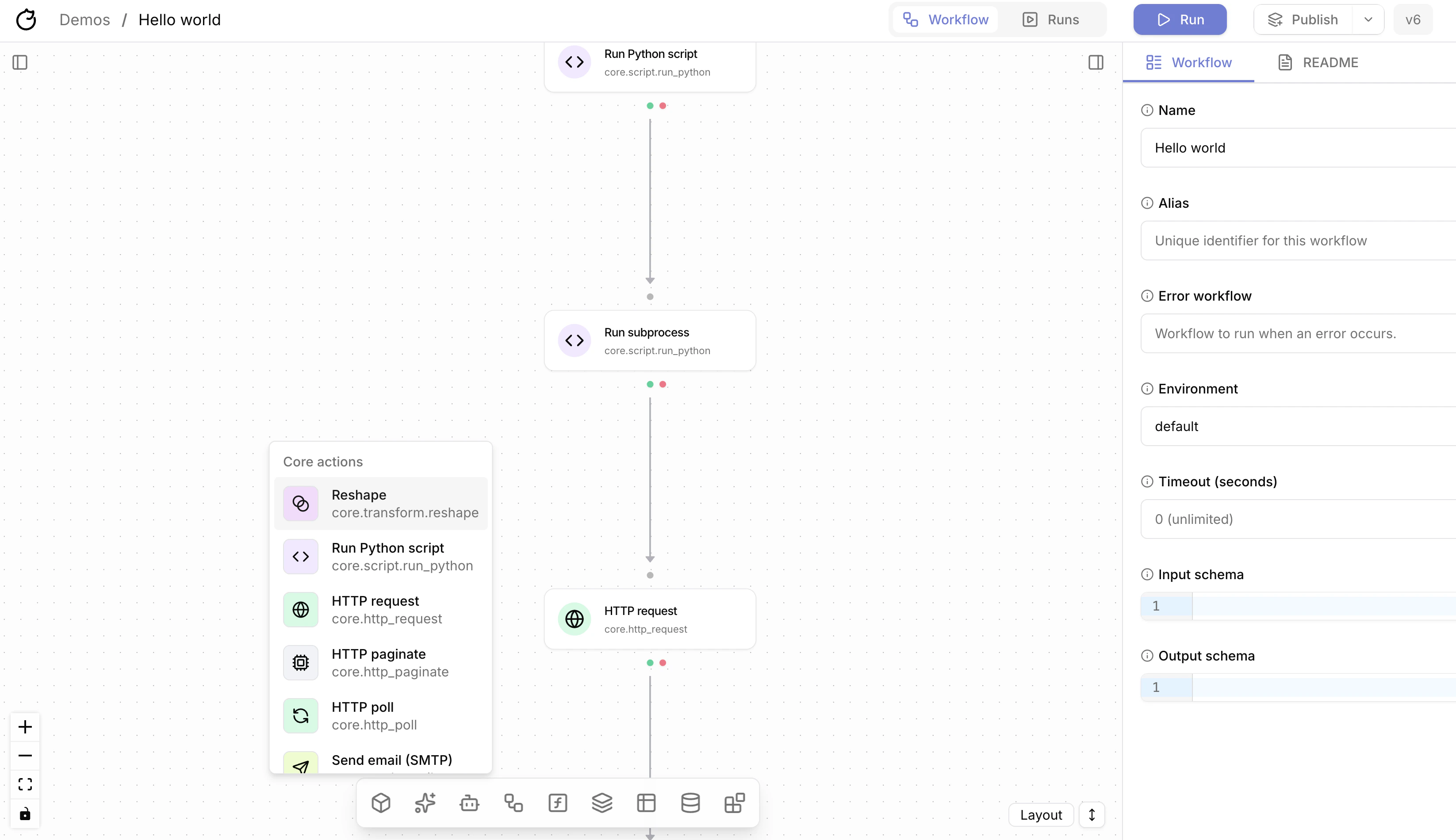 * `core` for built-in utilities such as HTTP requests, Python scripts, email, and gRPC actions
* `ai` for non-agent AI actions
* `ai` also powers the separate `Agent` group for actions such as `ai.agent` and `ai.preset_agent`
* `core.workflow` for workflow actions, plus scatter and gather helpers
* `core.transform` for transform actions
* `core.cases` for case actions
* `core.table` for table actions
* `core.sql` and `core.duckdb` for SQL actions
* `tools.*` for installed integrations; this menu also supports search
## Expressions
Expressions use `${{ ... }}`.
Use these references inside expressions:
* `TRIGGER.`
* `ACTIONS.
* `core` for built-in utilities such as HTTP requests, Python scripts, email, and gRPC actions
* `ai` for non-agent AI actions
* `ai` also powers the separate `Agent` group for actions such as `ai.agent` and `ai.preset_agent`
* `core.workflow` for workflow actions, plus scatter and gather helpers
* `core.transform` for transform actions
* `core.cases` for case actions
* `core.table` for table actions
* `core.sql` and `core.duckdb` for SQL actions
* `tools.*` for installed integrations; this menu also supports search
## Expressions
Expressions use `${{ ... }}`.
Use these references inside expressions:
* `TRIGGER.`
* `ACTIONS.[.result`
* `SECRETS..`
* `VARS..`
* `ENV.`
* `var.`
* `FN.(...)`
See [Expressions](/automations/core-concepts/expressions) for syntax, operators, and literals.
See [JSONPath](/automations/core-concepts/jsonpath) for field access and array access.
See [Functions](/automations/core-concepts/functions) for the full function list.
## Success and error paths
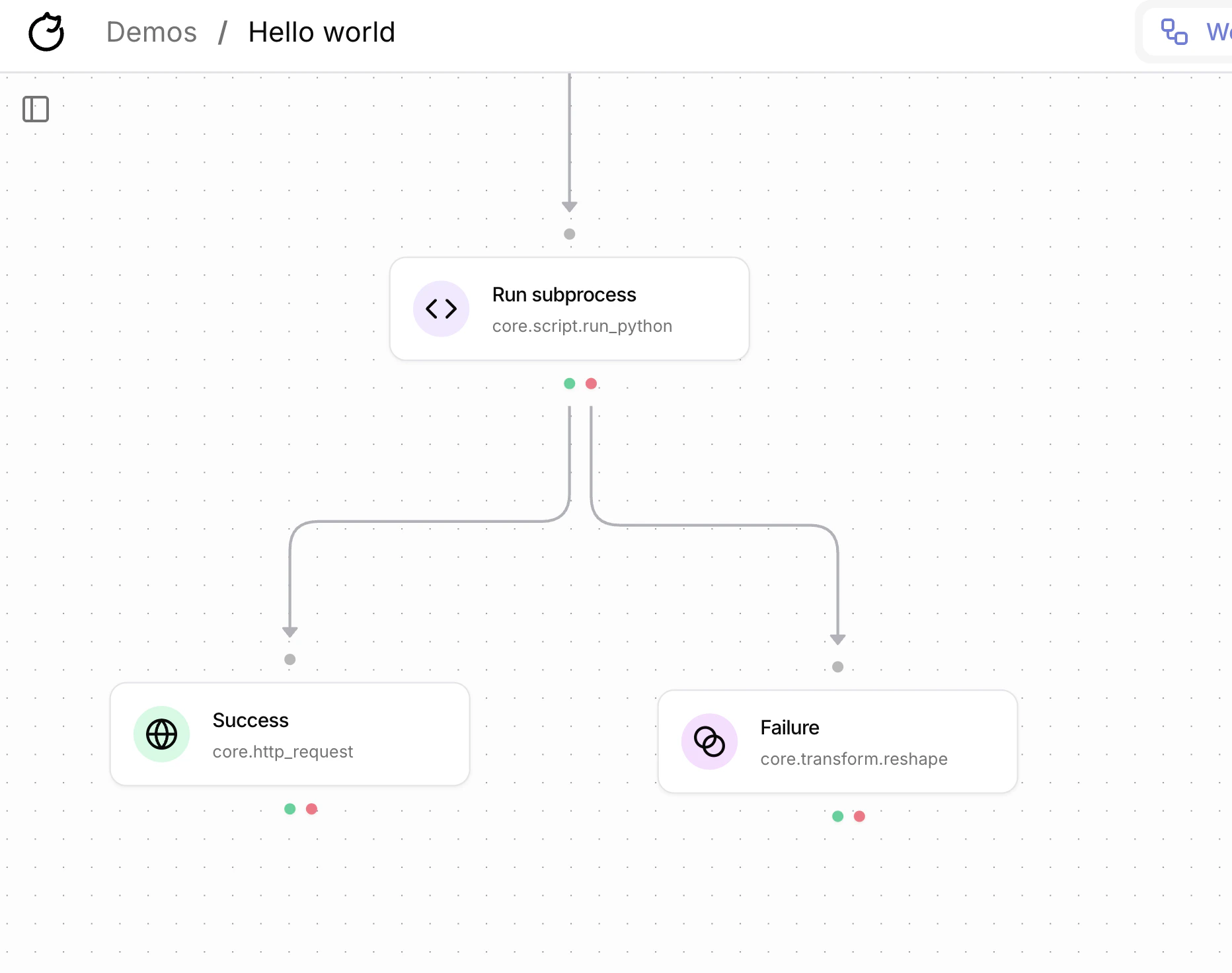
Every action has a success and error path.
The success path, which is represented by the green dot, runs when the action succeeds.
The error path, which is represented by the red dot, runs when the action fails.
] ## Control flow
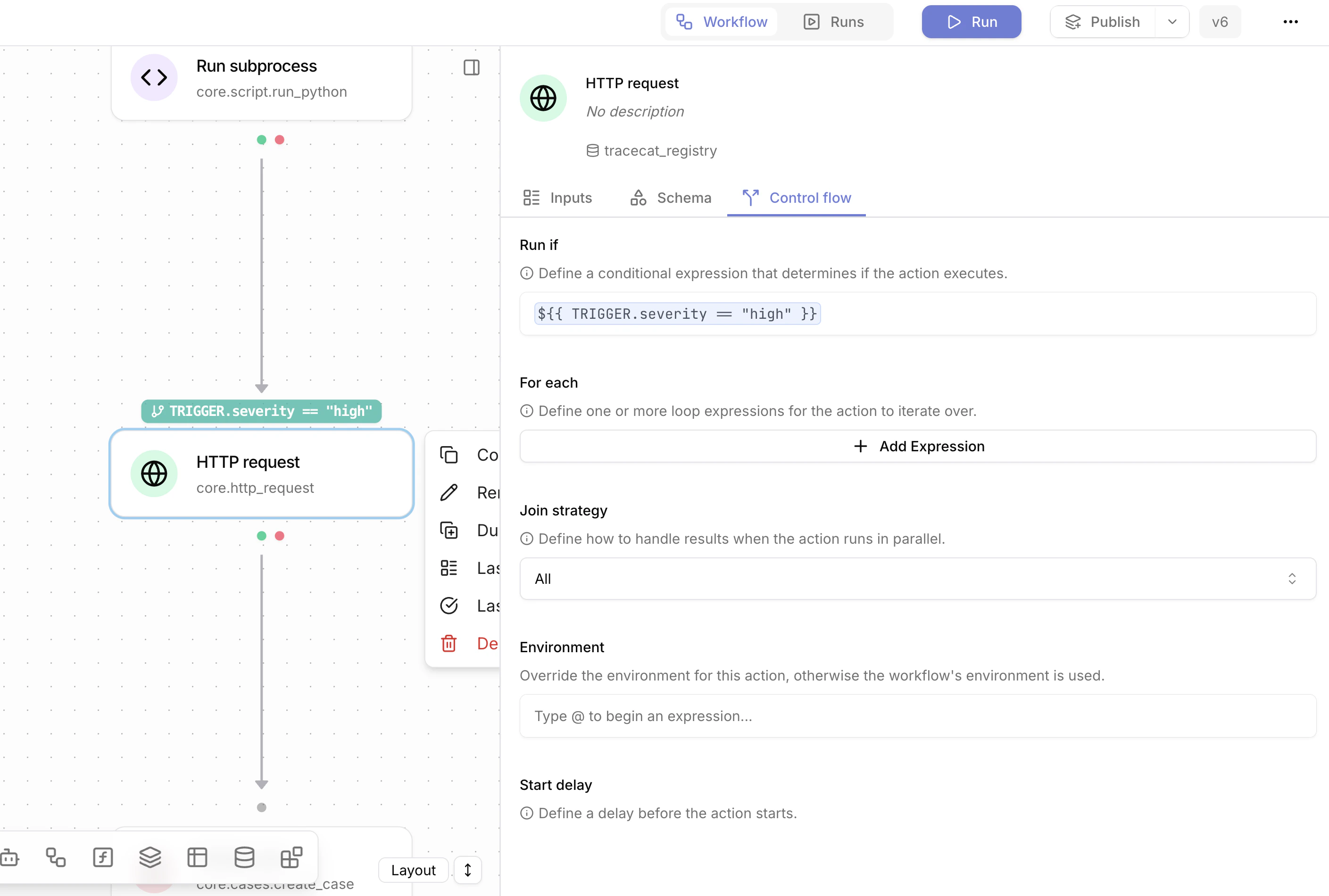
You can configure how an action runs from the "Control flow" tab in the action panel.
## Control flow
You can configure how an action runs from the "Control flow" tab in the action panel.
 ### Mask output
Use `mask_output` to hide an action's result in workflow execution views and execution API responses. Tracecat keeps the object and array shape, but replaces each individual value with `[REDACTED]`.
You can still copy JSONPath references from the displayed structure. `mask_output` only affects display; downstream actions can still use the original result with expressions such as `${{ ACTIONS.lookup_user.result.id }}`.
```yaml theme={null}
- ref: lookup_user
action: core.http_request
mask_output: true
args:
url: "https://api.example.com/users/${{ TRIGGER.user_id }}"
method: GET
```
### Run if
Use `run_if` to execute an action only when a condition evaluates to a truthy value. If the condition is falsy, Tracecat skips the action.
```yaml High severity only theme={null}
- ref: notify_team
action: tools.slack.post_message
run_if: ${{ TRIGGER.severity == "high" }}
args:
channel: ${{ SECRETS.slack.SECURITY_CHANNEL }}
text: "High severity alert: ${{ TRIGGER.alert_id }}"
```
```yaml Status and owner check theme={null}
- ref: escalate_case
action: core.cases.update
run_if: ${{ TRIGGER.status == "open" && TRIGGER.owner != None }}
args:
case_id: ${{ TRIGGER.case_id }}
status: in_progress
```
```yaml Retry on empty result theme={null}
- ref: fetch_user
action: core.http_request
run_if: ${{ ACTIONS.lookup_user.result == None }}
args:
url: "https://api.example.com/users/${{ TRIGGER.user_id }}"
method: GET
```
### For each
Use `for_each` to run the same action once per item in a collection. If `items` contains `N` values, Tracecat runs the action `N` times.
Inside the action inputs, reference the current item with `var.`. For example, `for_each: ${{ for var.user in TRIGGER.users }}` runs the action `len(TRIGGER.users)` times, and each run reads the current item from `var.user`.
```yaml Send one email per user theme={null}
- ref: email_user
action: core.email.send
for_each: ${{ for var.user in TRIGGER.users }}
args:
recipients:
- ${{ var.user.email }}
subject: "Tracecat notification"
body: "Hello ${{ var.user.name }}"
```
```yaml Fetch one record per alert theme={null}
- ref: fetch_alert
action: core.http_request
for_each: ${{ for var.alert in TRIGGER.alerts }}
args:
url: "https://api.example.com/alerts/${{ var.alert.id }}"
method: GET
headers:
Authorization: "Bearer ${{ SECRETS.alerts.API_TOKEN }}"
```
```yaml Create one case comment per finding theme={null}
- ref: comment_on_case
action: core.cases.create_comment
for_each: ${{ for var.finding in ACTIONS.parse_findings.result }}
args:
case_id: ${{ TRIGGER.case_id }}
comment: "Finding: ${{ var.finding.title }}"
```
### Join strategy
`join_strategy` controls how a downstream action waits on multiple upstream branches. Use `all` to wait for every branch, or `any` to continue after the first branch completes.
### Environment
Use `environment` to override which secrets or variables environment an action reads from.
This is useful to target different secrets or variables for the same pre-built action (e.g. different Slack apps for `tools.slack.post_message`).
### Start delay
Use `start_delay` to wait a fixed number of seconds before an action starts.
### Timeout
Use `timeout` to cap how long Tracecat waits for an action attempt to finish.
Defaults to 300 seconds.
### Max attempts
Use `max_attempts` to control how many times Tracecat retries the action if it fails.
Defaults to 1 attempt.
## FAQ
Most validation errors come from expression shape rather than action behavior:
* Wrap the whole expression once as `${{ ... }}`. Do not split one condition across multiple expression blocks.
* `run_if` must evaluate to a boolean value such as `${{ TRIGGER.severity == "high" }}`.
* Use comparison operators such as `==` and `!=`. A single `=` is not a valid comparison.
* `for_each` must use the iteration form `${{ for var.item in ... }}` and the value on the right side must be a list.
```yaml Valid run_if theme={null}
- ref: notify_team
action: tools.slack.post_message
run_if: ${{ TRIGGER.severity == "high" && TRIGGER.status != "closed" }}
args:
channel: ${{ SECRETS.slack.SECURITY_CHANNEL }}
text: "High-severity alert: ${{ TRIGGER.alert_id }}"
```
```yaml Valid for_each theme={null}
- ref: create_comment
action: core.cases.create_comment
for_each: ${{ for var.item in TRIGGER.findings }}
args:
case_id: ${{ TRIGGER.case_id }}
comment: "Finding: ${{ var.item.title }}"
```
### Mask output
Use `mask_output` to hide an action's result in workflow execution views and execution API responses. Tracecat keeps the object and array shape, but replaces each individual value with `[REDACTED]`.
You can still copy JSONPath references from the displayed structure. `mask_output` only affects display; downstream actions can still use the original result with expressions such as `${{ ACTIONS.lookup_user.result.id }}`.
```yaml theme={null}
- ref: lookup_user
action: core.http_request
mask_output: true
args:
url: "https://api.example.com/users/${{ TRIGGER.user_id }}"
method: GET
```
### Run if
Use `run_if` to execute an action only when a condition evaluates to a truthy value. If the condition is falsy, Tracecat skips the action.
```yaml High severity only theme={null}
- ref: notify_team
action: tools.slack.post_message
run_if: ${{ TRIGGER.severity == "high" }}
args:
channel: ${{ SECRETS.slack.SECURITY_CHANNEL }}
text: "High severity alert: ${{ TRIGGER.alert_id }}"
```
```yaml Status and owner check theme={null}
- ref: escalate_case
action: core.cases.update
run_if: ${{ TRIGGER.status == "open" && TRIGGER.owner != None }}
args:
case_id: ${{ TRIGGER.case_id }}
status: in_progress
```
```yaml Retry on empty result theme={null}
- ref: fetch_user
action: core.http_request
run_if: ${{ ACTIONS.lookup_user.result == None }}
args:
url: "https://api.example.com/users/${{ TRIGGER.user_id }}"
method: GET
```
### For each
Use `for_each` to run the same action once per item in a collection. If `items` contains `N` values, Tracecat runs the action `N` times.
Inside the action inputs, reference the current item with `var.`. For example, `for_each: ${{ for var.user in TRIGGER.users }}` runs the action `len(TRIGGER.users)` times, and each run reads the current item from `var.user`.
```yaml Send one email per user theme={null}
- ref: email_user
action: core.email.send
for_each: ${{ for var.user in TRIGGER.users }}
args:
recipients:
- ${{ var.user.email }}
subject: "Tracecat notification"
body: "Hello ${{ var.user.name }}"
```
```yaml Fetch one record per alert theme={null}
- ref: fetch_alert
action: core.http_request
for_each: ${{ for var.alert in TRIGGER.alerts }}
args:
url: "https://api.example.com/alerts/${{ var.alert.id }}"
method: GET
headers:
Authorization: "Bearer ${{ SECRETS.alerts.API_TOKEN }}"
```
```yaml Create one case comment per finding theme={null}
- ref: comment_on_case
action: core.cases.create_comment
for_each: ${{ for var.finding in ACTIONS.parse_findings.result }}
args:
case_id: ${{ TRIGGER.case_id }}
comment: "Finding: ${{ var.finding.title }}"
```
### Join strategy
`join_strategy` controls how a downstream action waits on multiple upstream branches. Use `all` to wait for every branch, or `any` to continue after the first branch completes.
### Environment
Use `environment` to override which secrets or variables environment an action reads from.
This is useful to target different secrets or variables for the same pre-built action (e.g. different Slack apps for `tools.slack.post_message`).
### Start delay
Use `start_delay` to wait a fixed number of seconds before an action starts.
### Timeout
Use `timeout` to cap how long Tracecat waits for an action attempt to finish.
Defaults to 300 seconds.
### Max attempts
Use `max_attempts` to control how many times Tracecat retries the action if it fails.
Defaults to 1 attempt.
## FAQ
Most validation errors come from expression shape rather than action behavior:
* Wrap the whole expression once as `${{ ... }}`. Do not split one condition across multiple expression blocks.
* `run_if` must evaluate to a boolean value such as `${{ TRIGGER.severity == "high" }}`.
* Use comparison operators such as `==` and `!=`. A single `=` is not a valid comparison.
* `for_each` must use the iteration form `${{ for var.item in ... }}` and the value on the right side must be a list.
```yaml Valid run_if theme={null}
- ref: notify_team
action: tools.slack.post_message
run_if: ${{ TRIGGER.severity == "high" && TRIGGER.status != "closed" }}
args:
channel: ${{ SECRETS.slack.SECURITY_CHANNEL }}
text: "High-severity alert: ${{ TRIGGER.alert_id }}"
```
```yaml Valid for_each theme={null}
- ref: create_comment
action: core.cases.create_comment
for_each: ${{ for var.item in TRIGGER.findings }}
args:
case_id: ${{ TRIGGER.case_id }}
comment: "Finding: ${{ var.item.title }}"
```