> ## Documentation Index
> Fetch the complete documentation index at: https://docs.tracecat.com/llms.txt
> Use this file to discover all available pages before exploring further.
# Closure requirements
> Require custom fields and dropdowns to have values before a case can be closed or resolved.
Enterprise Edition
Closure requirements make specific custom fields and dropdowns mandatory before a case moves to `Closed` or `Resolved`.
Use them to make sure every finished case records outcomes such as a verdict, determination, or root cause.
## Choose required fields
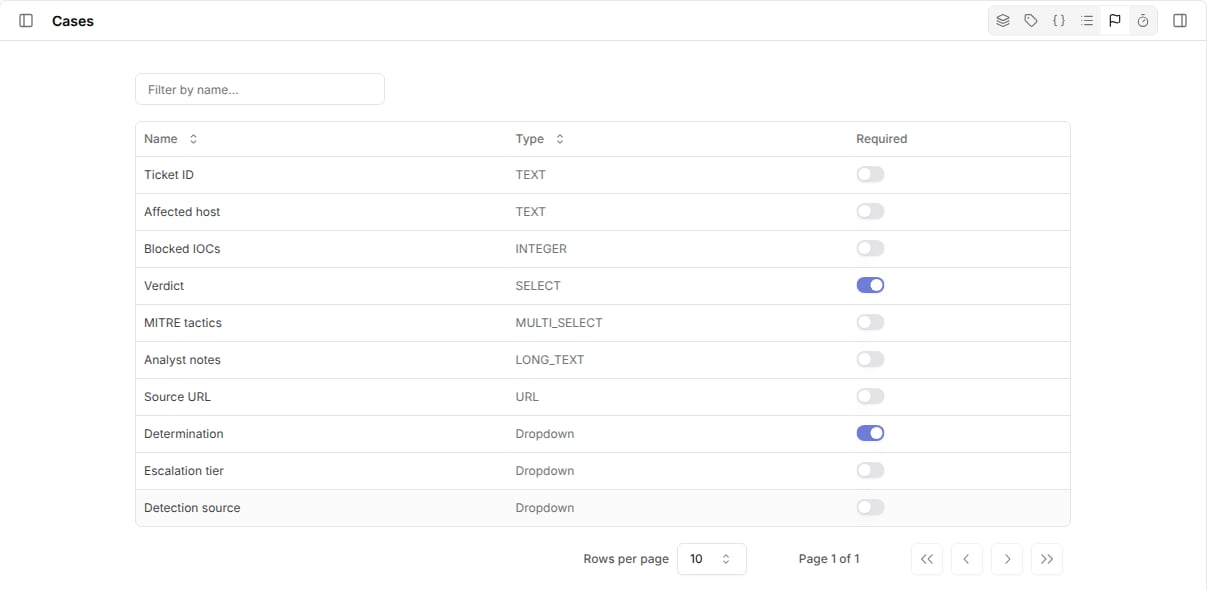
1. Go to `Cases` and open the closure requirements view from the header toolbar.
2. Turn on `Required` for each custom field or dropdown that must have a value.
The view lists every custom field and dropdown in the workspace.
Changes apply to every case, including open cases.
 ## Close a case in the UI
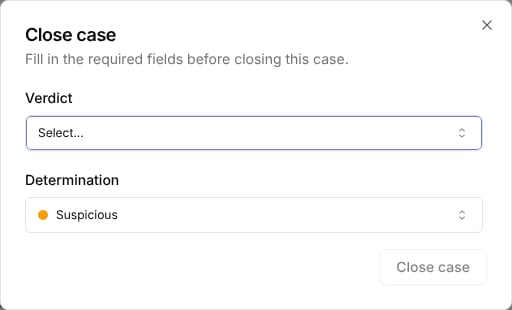
When you change a case to `Closed` or `Resolved` and a required value is missing, Tracecat opens a `Close case` or `Resolve case` dialog with every required field and dropdown.
Values that are already set are prefilled.
Fill in the missing values to finish the status change.
## Close a case in the UI
When you change a case to `Closed` or `Resolved` and a required value is missing, Tracecat opens a `Close case` or `Resolve case` dialog with every required field and dropdown.
Values that are already set are prefilled.
Fill in the missing values to finish the status change.
 ## Close a case from a workflow
Tracecat checks the same requirements when `core.cases.update_case` sets `status` to `closed` or `resolved`.
Pass the required values in the same call:
```yaml theme={null}
- ref: close_case
action: core.cases.update_case
args:
case_id: ${{ TRIGGER.case_id }}
status: closed
fields:
verdict: True positive
dropdown_values:
- definition_ref: determination
option_ref: malicious
```
If a value is still missing, the action fails with a `closure_requirements_not_met` error that lists `missing_fields` and `missing_dropdowns` by name.
The case keeps its previous status.
## What counts as a value
Tracecat treats `null`, whitespace-only text, empty lists, and empty objects as missing.
`false` and `0` count as values, so a required `Boolean` or `Integer` field accepts them.
Changes to other statuses, such as `On hold`, skip the check.
## Related pages
* See [Custom fields](/automations/cases/custom-fields) to create the fields you require.
* See [Dropdowns](/automations/cases/dropdowns) to create the dropdowns you require.
* See [Cases](/automations/core-actions/case-actions/cases) for the `update_case` inputs.
This documentation is built and hosted on [Mintlify](https://mintlify.com), a developer documentation platform.
## Close a case from a workflow
Tracecat checks the same requirements when `core.cases.update_case` sets `status` to `closed` or `resolved`.
Pass the required values in the same call:
```yaml theme={null}
- ref: close_case
action: core.cases.update_case
args:
case_id: ${{ TRIGGER.case_id }}
status: closed
fields:
verdict: True positive
dropdown_values:
- definition_ref: determination
option_ref: malicious
```
If a value is still missing, the action fails with a `closure_requirements_not_met` error that lists `missing_fields` and `missing_dropdowns` by name.
The case keeps its previous status.
## What counts as a value
Tracecat treats `null`, whitespace-only text, empty lists, and empty objects as missing.
`false` and `0` count as values, so a required `Boolean` or `Integer` field accepts them.
Changes to other statuses, such as `On hold`, skip the check.
## Related pages
* See [Custom fields](/automations/cases/custom-fields) to create the fields you require.
* See [Dropdowns](/automations/cases/dropdowns) to create the dropdowns you require.
* See [Cases](/automations/core-actions/case-actions/cases) for the `update_case` inputs.
This documentation is built and hosted on [Mintlify](https://mintlify.com), a developer documentation platform.