> ## Documentation Index
> Fetch the complete documentation index at: https://docs.tracecat.com/llms.txt
> Use this file to discover all available pages before exploring further.
# Sub-cases
> Group related cases under a parent case to track a campaign or incident as one investigation while keeping each alert's own status.
Enterprise Edition
Sub-cases group related cases under a single parent case.
Use them when several alerts belong to one investigation, such as phishing reports from the same campaign, while each alert keeps its own status, priority, and assignee.
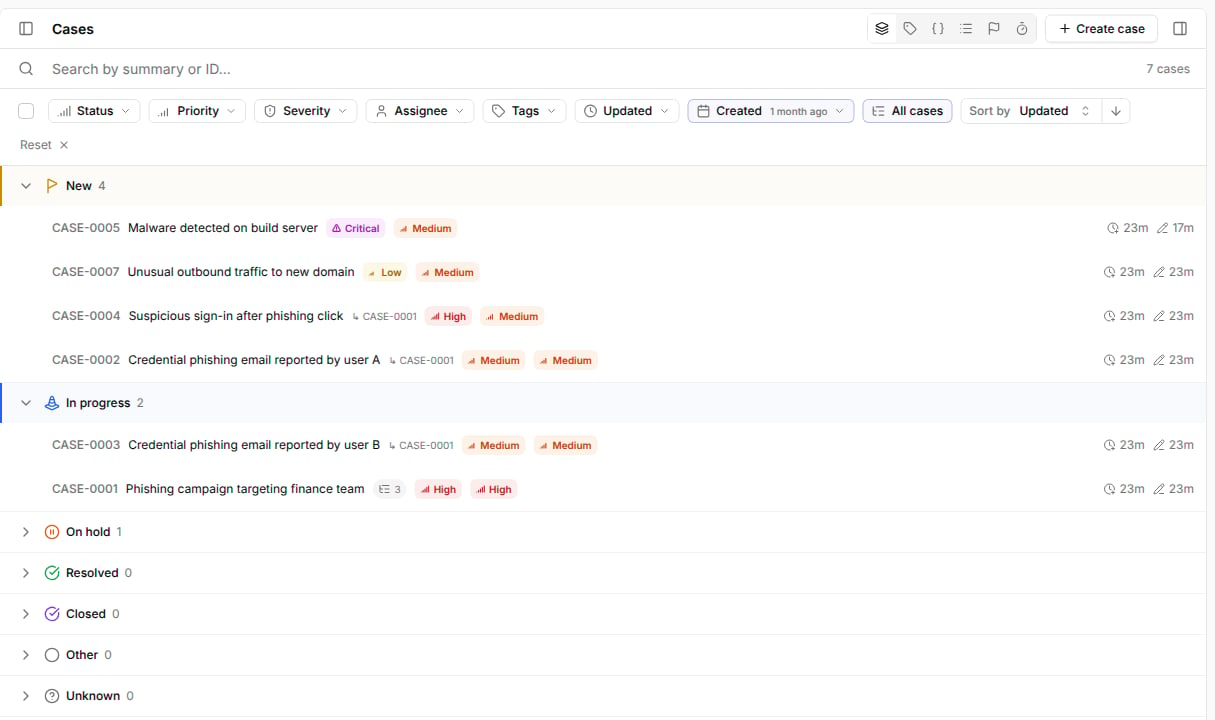 Sub-cases are one level deep:
* A parent must be a top-level case.
* A sub-case can't have its own sub-cases.
* A case that already has sub-cases can't become a sub-case.
## Group cases under a parent
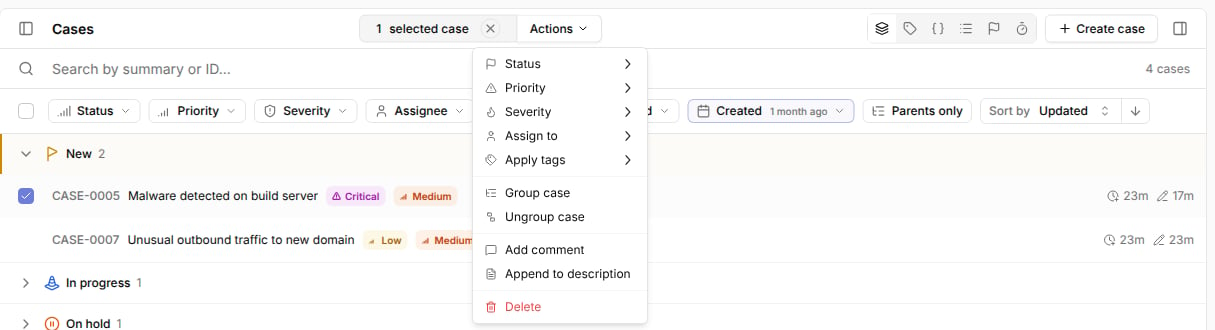
On the Cases page, tick the cases you want to group.
Click `Actions` and select `Group case`.
Sub-cases are one level deep:
* A parent must be a top-level case.
* A sub-case can't have its own sub-cases.
* A case that already has sub-cases can't become a sub-case.
## Group cases under a parent
On the Cases page, tick the cases you want to group.
Click `Actions` and select `Group case`.
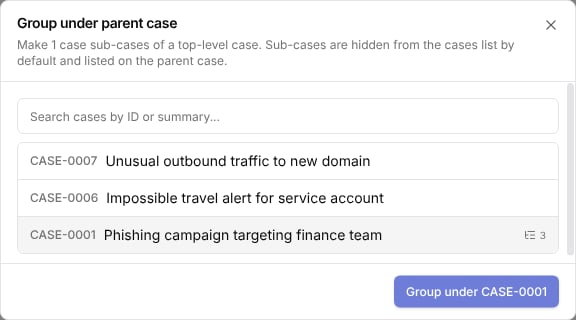
 Search for the parent case by ID or summary, select it, and click `Group under CASE-XXXX`.
Only top-level cases are listed. Cases that are already sub-cases of another parent move to the new parent.
Search for the parent case by ID or summary, select it, and click `Group under CASE-XXXX`.
Only top-level cases are listed. Cases that are already sub-cases of another parent move to the new parent.
 You can also add sub-cases from the parent: open the parent case, select the sub-cases tab, and click `Add sub-cases`.
## View sub-cases
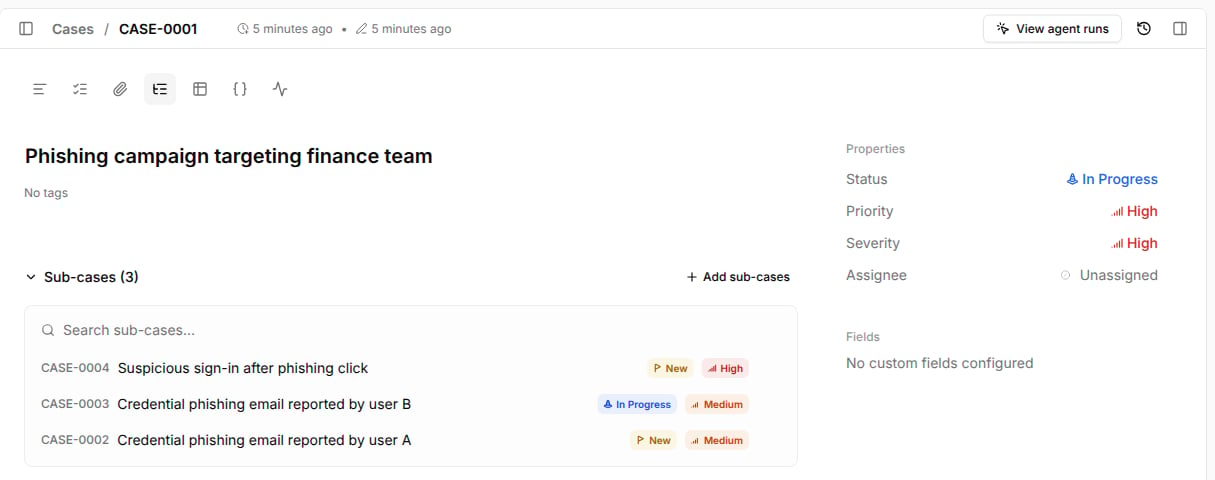
Open a parent case and select the sub-cases tab in the case toolbar.
The tab lists every sub-case with its status and priority. Use `Search sub-cases...` to filter by summary or ID, and click a row to open the sub-case.
You can also add sub-cases from the parent: open the parent case, select the sub-cases tab, and click `Add sub-cases`.
## View sub-cases
Open a parent case and select the sub-cases tab in the case toolbar.
The tab lists every sub-case with its status and priority. Use `Search sub-cases...` to filter by summary or ID, and click a row to open the sub-case.
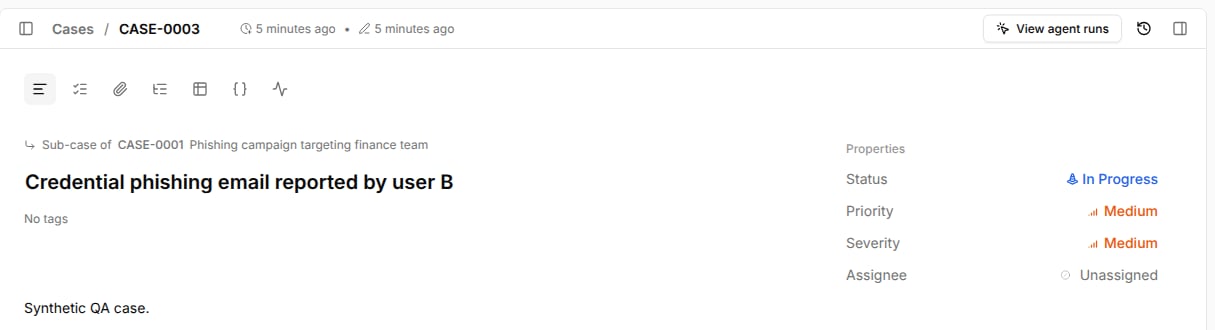
 A sub-case shows a `Sub-case of` link to its parent above the summary.
 ## Show sub-cases in the cases list
Sub-cases are hidden from the Cases page by default, so the list shows one row per investigation.
Click `Parents only` in the filter bar to switch to `All cases`.
Sub-cases then appear with their parent's ID next to the summary, and parent cases show their sub-case count.
While a search term is applied, results always include sub-cases and the toggle is disabled.
## Ungroup cases
To return sub-cases to the top level, show sub-cases in the list, tick the sub-cases, click `Actions`, and select `Ungroup case`.
You can also remove a single sub-case from the sub-cases tab of its parent.
## Closing a parent case
Closing or resolving a parent case does not change its sub-cases.
Sub-cases keep their own status, and open sub-cases don't block closing the parent.
Close each sub-case separately, or select them in the cases list and set `Status` in bulk.
## Use sub-cases from MCP
The [Tracecat MCP server](/automations/tracecat-mcp) supports sub-cases:
| Tool | Use |
| - | - |
| `search_cases` | Pass `parent_id` to list a parent's sub-cases, or `hierarchy="top_level"` to list only parent and standalone cases. |
| `create_case` | Pass `parent_id` to create the case as a sub-case. |
| `set_case_parent` | Group up to 1000 cases under a top-level parent. |
| `clear_case_parent` | Return up to 1000 sub-cases to the top level. |
`get_case`, `list_cases`, and `search_cases` return `parent` and `num_sub_cases` for each case.
## Related pages
* See [Case management](/automations/cases) for an overview of case features.
* See [Correlations](/automations/cases/correlations) to find other cases that link the same row.
This documentation is built and hosted on [Mintlify](https://mintlify.com), a developer documentation platform.
## Show sub-cases in the cases list
Sub-cases are hidden from the Cases page by default, so the list shows one row per investigation.
Click `Parents only` in the filter bar to switch to `All cases`.
Sub-cases then appear with their parent's ID next to the summary, and parent cases show their sub-case count.
While a search term is applied, results always include sub-cases and the toggle is disabled.
## Ungroup cases
To return sub-cases to the top level, show sub-cases in the list, tick the sub-cases, click `Actions`, and select `Ungroup case`.
You can also remove a single sub-case from the sub-cases tab of its parent.
## Closing a parent case
Closing or resolving a parent case does not change its sub-cases.
Sub-cases keep their own status, and open sub-cases don't block closing the parent.
Close each sub-case separately, or select them in the cases list and set `Status` in bulk.
## Use sub-cases from MCP
The [Tracecat MCP server](/automations/tracecat-mcp) supports sub-cases:
| Tool | Use |
| - | - |
| `search_cases` | Pass `parent_id` to list a parent's sub-cases, or `hierarchy="top_level"` to list only parent and standalone cases. |
| `create_case` | Pass `parent_id` to create the case as a sub-case. |
| `set_case_parent` | Group up to 1000 cases under a top-level parent. |
| `clear_case_parent` | Return up to 1000 sub-cases to the top level. |
`get_case`, `list_cases`, and `search_cases` return `parent` and `num_sub_cases` for each case.
## Related pages
* See [Case management](/automations/cases) for an overview of case features.
* See [Correlations](/automations/cases/correlations) to find other cases that link the same row.
This documentation is built and hosted on [Mintlify](https://mintlify.com), a developer documentation platform.