> ## Documentation Index
> Fetch the complete documentation index at: https://docs.tracecat.com/llms.txt
> Use this file to discover all available pages before exploring further.
# Secrets
> Create, scope, and reference Tracecat secrets in workflows and agents: store API keys safely and inject them into actions through expressions.
## Overview
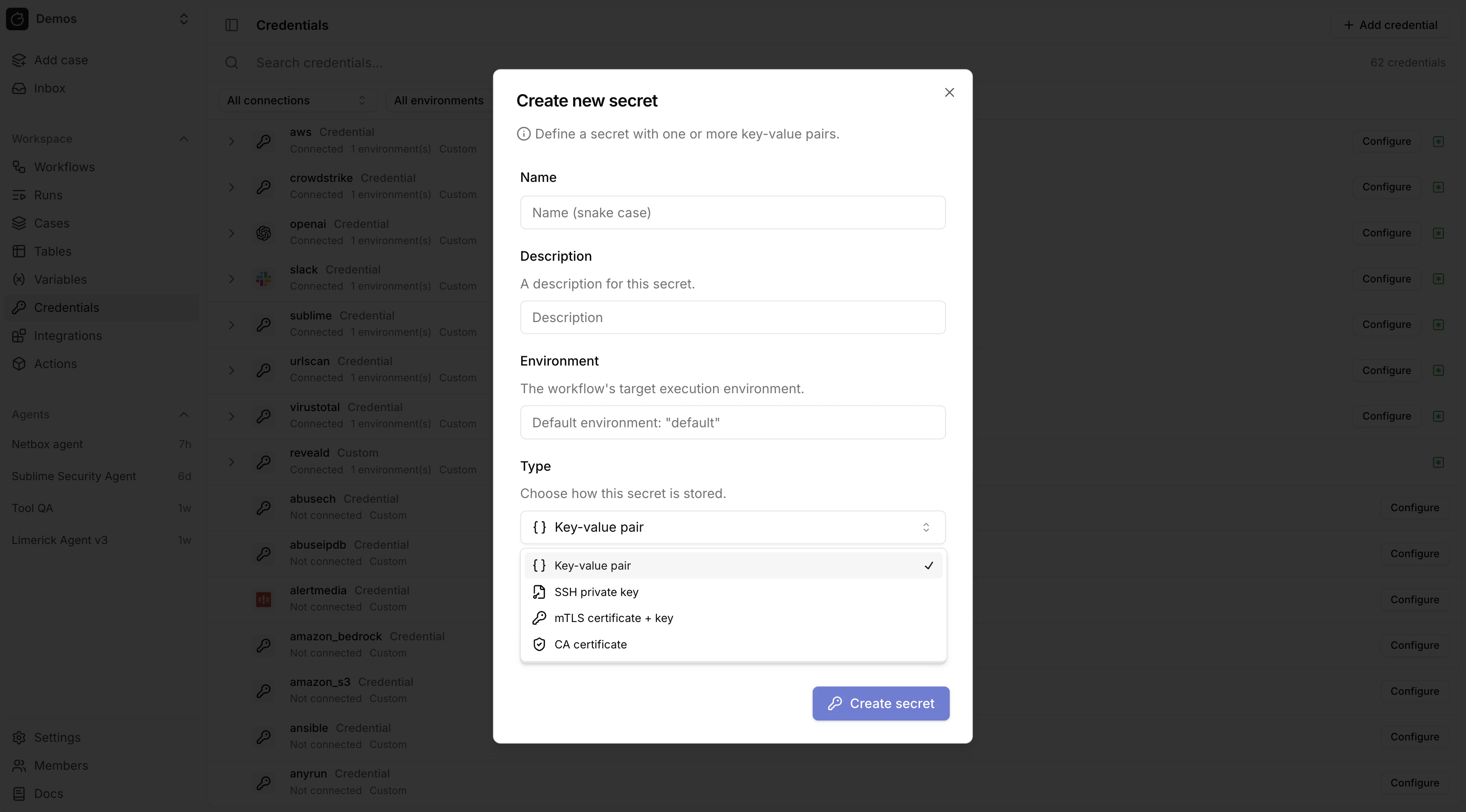
Secrets store sensitive values. Create them in `/credentials`.
 ## Using secrets in expressions
Access a secret in expressions with:
```yaml theme={null}
${{ SECRETS.. }}
```
## Secret types
Tracecat supports these workspace secret types:
| Type | Value | Description |
| -------------- | --------- | ---------------------------------------- |
| Custom | `custom` | Arbitrary key-value credentials |
| SSH key | `ssh_key` | A single SSH private key |
| mTLS | `mtls` | A TLS client certificate and private key |
| CA certificate | `ca_cert` | A CA certificate bundle |
### Custom credentials
Custom credentials store arbitrary key-value pairs. Any keys can be used.
### Structured secret types
SSH key, mTLS, and CA certificate secrets use fixed key names.
The credentials UI renders a specialized form for each type (e.g. a PEM textarea for SSH keys instead of generic key-value inputs).
| Type | Required keys |
| -------------- | ------------------------------------ |
| SSH key | `PRIVATE_KEY` |
| mTLS | `TLS_CERTIFICATE`, `TLS_PRIVATE_KEY` |
| CA certificate | `CA_CERTIFICATE` |
Structured secret types cannot have `optional_keys`. The key set is fixed by the type.
## SQL action credentials
`core.sql.execute_query` uses a secret named `sql` with one required key: `CONNECTION_URL`.
Set `CONNECTION_URL` as a SQLAlchemy database URL:
```text theme={null}
postgresql+psycopg://user:pass@db.example.com:5432/app
```
Common engine examples:
* PostgreSQL (psycopg3): `postgresql+psycopg://user:pass@db.example.com:5432/app`
* MySQL: `mysql+pymysql://user:pass@db.example.com:3306/app`
* ClickHouse: `clickhouse+http://user:pass@clickhouse.example.com:8123/default`
See SQLAlchemy Database URLs for supported dialect and driver formats:
[https://docs.sqlalchemy.org/20/core/engines.html#database-urls](https://docs.sqlalchemy.org/20/core/engines.html#database-urls)
## AWS credentials
### Protected secret names
`aws` and `amazon_s3` are **protected** secret names.
When a secret with either name contains `AWS_ROLE_ARN`, Tracecat automatically performs STS `AssumeRole` on the host before sandbox entry and injects temporary session credentials.
This applies to any registry action (built-in or custom) that declares a secret with one of these names.
`tools.aws_boto3` actions use the `aws` secret. `tools.amazon_s3` actions use the `amazon_s3` secret. Both follow the same key schema.
### Supported keys
* `AWS_ROLE_ARN` — recommended; Tracecat assumes the role on the host
* `AWS_ROLE_SESSION_NAME` — optional audit session label
* `AWS_ACCESS_KEY_ID`
* `AWS_SECRET_ACCESS_KEY`
* `AWS_SESSION_TOKEN`
* `AWS_REGION`
### Credential resolution order
1. `AWS_ROLE_ARN` (STS AssumeRole with auto-injected `TRACECAT_AWS_EXTERNAL_ID`)
2. `AWS_ACCESS_KEY_ID` + `AWS_SECRET_ACCESS_KEY` + `AWS_SESSION_TOKEN`
3. `AWS_ACCESS_KEY_ID` + `AWS_SECRET_ACCESS_KEY`
## Secret environments
Every secret belongs to a Workflow environment.
* Default source: the workflow default environment in [Workflows](/automations/workflows).
* Override: per action in [Actions](/automations/actions) control flow.
* Fallback: `default`.
Examples:
* Different CrowdStrike tenants for `prod`, `staging`, or `lab`
* Multiple Slack apps for separate workspaces or business units
* Separate sandbox and production API credentials for the same vendor
## Access secrets in agents
Agents can use secret expressions in tool arguments and integration configuration. Secret values are resolved during tool execution and are not sent to the LLM provider.
```text theme={null}
When you call Slack tools, use `${{ SECRETS.slack.SLACK_BOT_TOKEN }}`.
When you call Jira tools, use `${{ SECRETS.jira.JIRA_API_TOKEN }}`.
Do not print secret values in the final answer.
```
## Custom registry actions
Authors of [Python UDFs](/custom-actions/python-udf) and [YAML templates](/custom-actions/yaml-template) declare required secrets in the registry (including OAuth and structured secret types). The same `${{ SECRETS... }}` syntax applies; see [Use OAuth tokens in expressions](/automations/integrations/oauth-integrations#use-oauth-tokens-in-expressions) on the OAuth page for token paths, `RegistryOAuthSecret` and YAML `type: oauth`, and Custom OAuth `provider_id` rules.
## Related pages
* See [Pre-built credentials](/automations/integrations/prebuilt-credentials) for provider-specific credential templates for built-in integrations.
* See [OAuth](/automations/integrations/oauth-integrations) for integrations that authenticate with OAuth flows.
* See [MCP](/automations/integrations/mcp-integrations) for MCP integrations and secure environment-based settings.
* See [Expressions](/automations/core-concepts/expressions) for how expressions work across triggers, actions, secrets, and variables.
## Using secrets in expressions
Access a secret in expressions with:
```yaml theme={null}
${{ SECRETS.. }}
```
## Secret types
Tracecat supports these workspace secret types:
| Type | Value | Description |
| -------------- | --------- | ---------------------------------------- |
| Custom | `custom` | Arbitrary key-value credentials |
| SSH key | `ssh_key` | A single SSH private key |
| mTLS | `mtls` | A TLS client certificate and private key |
| CA certificate | `ca_cert` | A CA certificate bundle |
### Custom credentials
Custom credentials store arbitrary key-value pairs. Any keys can be used.
### Structured secret types
SSH key, mTLS, and CA certificate secrets use fixed key names.
The credentials UI renders a specialized form for each type (e.g. a PEM textarea for SSH keys instead of generic key-value inputs).
| Type | Required keys |
| -------------- | ------------------------------------ |
| SSH key | `PRIVATE_KEY` |
| mTLS | `TLS_CERTIFICATE`, `TLS_PRIVATE_KEY` |
| CA certificate | `CA_CERTIFICATE` |
Structured secret types cannot have `optional_keys`. The key set is fixed by the type.
## SQL action credentials
`core.sql.execute_query` uses a secret named `sql` with one required key: `CONNECTION_URL`.
Set `CONNECTION_URL` as a SQLAlchemy database URL:
```text theme={null}
postgresql+psycopg://user:pass@db.example.com:5432/app
```
Common engine examples:
* PostgreSQL (psycopg3): `postgresql+psycopg://user:pass@db.example.com:5432/app`
* MySQL: `mysql+pymysql://user:pass@db.example.com:3306/app`
* ClickHouse: `clickhouse+http://user:pass@clickhouse.example.com:8123/default`
See SQLAlchemy Database URLs for supported dialect and driver formats:
[https://docs.sqlalchemy.org/20/core/engines.html#database-urls](https://docs.sqlalchemy.org/20/core/engines.html#database-urls)
## AWS credentials
### Protected secret names
`aws` and `amazon_s3` are **protected** secret names.
When a secret with either name contains `AWS_ROLE_ARN`, Tracecat automatically performs STS `AssumeRole` on the host before sandbox entry and injects temporary session credentials.
This applies to any registry action (built-in or custom) that declares a secret with one of these names.
`tools.aws_boto3` actions use the `aws` secret. `tools.amazon_s3` actions use the `amazon_s3` secret. Both follow the same key schema.
### Supported keys
* `AWS_ROLE_ARN` — recommended; Tracecat assumes the role on the host
* `AWS_ROLE_SESSION_NAME` — optional audit session label
* `AWS_ACCESS_KEY_ID`
* `AWS_SECRET_ACCESS_KEY`
* `AWS_SESSION_TOKEN`
* `AWS_REGION`
### Credential resolution order
1. `AWS_ROLE_ARN` (STS AssumeRole with auto-injected `TRACECAT_AWS_EXTERNAL_ID`)
2. `AWS_ACCESS_KEY_ID` + `AWS_SECRET_ACCESS_KEY` + `AWS_SESSION_TOKEN`
3. `AWS_ACCESS_KEY_ID` + `AWS_SECRET_ACCESS_KEY`
## Secret environments
Every secret belongs to a Workflow environment.
* Default source: the workflow default environment in [Workflows](/automations/workflows).
* Override: per action in [Actions](/automations/actions) control flow.
* Fallback: `default`.
Examples:
* Different CrowdStrike tenants for `prod`, `staging`, or `lab`
* Multiple Slack apps for separate workspaces or business units
* Separate sandbox and production API credentials for the same vendor
## Access secrets in agents
Agents can use secret expressions in tool arguments and integration configuration. Secret values are resolved during tool execution and are not sent to the LLM provider.
```text theme={null}
When you call Slack tools, use `${{ SECRETS.slack.SLACK_BOT_TOKEN }}`.
When you call Jira tools, use `${{ SECRETS.jira.JIRA_API_TOKEN }}`.
Do not print secret values in the final answer.
```
## Custom registry actions
Authors of [Python UDFs](/custom-actions/python-udf) and [YAML templates](/custom-actions/yaml-template) declare required secrets in the registry (including OAuth and structured secret types). The same `${{ SECRETS... }}` syntax applies; see [Use OAuth tokens in expressions](/automations/integrations/oauth-integrations#use-oauth-tokens-in-expressions) on the OAuth page for token paths, `RegistryOAuthSecret` and YAML `type: oauth`, and Custom OAuth `provider_id` rules.
## Related pages
* See [Pre-built credentials](/automations/integrations/prebuilt-credentials) for provider-specific credential templates for built-in integrations.
* See [OAuth](/automations/integrations/oauth-integrations) for integrations that authenticate with OAuth flows.
* See [MCP](/automations/integrations/mcp-integrations) for MCP integrations and secure environment-based settings.
* See [Expressions](/automations/core-concepts/expressions) for how expressions work across triggers, actions, secrets, and variables.