> ## Documentation Index
> Fetch the complete documentation index at: https://docs.tracecat.com/llms.txt
> Use this file to discover all available pages before exploring further.
# OAuth
> Connect OAuth providers to Tracecat and reference managed OAuth tokens in expressions: configure scopes, refresh credentials, and call APIs from actions and agents.
## Overview
Tracecat supports built-in OAuth integrations and custom OAuth providers. OAuth integrations expose tokens through secret expressions.
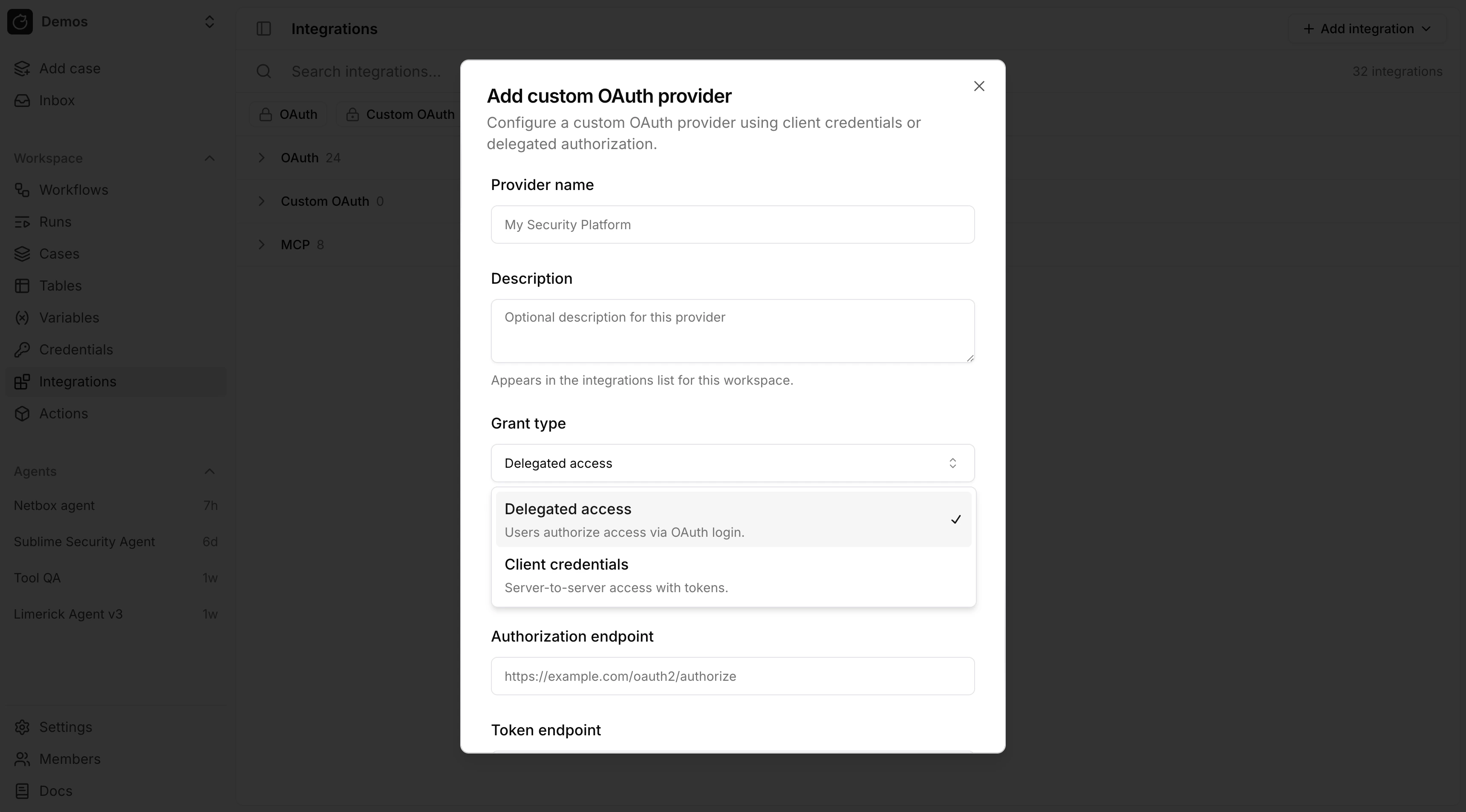 ## Grant types
OAuth grant types:
* Delegated access (`authorization_code`): Tracecat stores a user token after a user completes the OAuth login flow.
* Client credentials (`client_credentials`): Tracecat stores a service token for server-to-server access.
## Configure a provider
Built-in OAuth integrations are listed on the Integrations page. For custom OAuth, use Add integration → OAuth provider (or Add custom OAuth provider under Custom OAuth).
Most providers require these fields:
* Client ID
* Client secret
* Authorization endpoint
* Token endpoint
* Scopes
After you save a custom provider, connect it (complete the OAuth flow) when using delegated access so Tracecat can issue tokens.
## Use OAuth tokens in expressions
Use the same `${{ SECRETS... }}` syntax as workflow actions.
Custom secrets (API keys, SSH, mTLS, CA bundles, and so on):
```yaml theme={null}
${{ SECRETS.. }}
```
OAuth tokens live under `_oauth`. The key is the provider ID in uppercase plus `_USER_TOKEN` or `_SERVICE_TOKEN`:
* `authorization_code`: `${{ SECRETS._oauth._USER_TOKEN }}`
* `client_credentials`: `${{ SECRETS._oauth._SERVICE_TOKEN }}`
```yaml theme={null}
${{ SECRETS.slack_oauth.SLACK_USER_TOKEN }}
${{ SECRETS.google_docs_oauth.GOOGLE_DOCS_SERVICE_TOKEN }}
```
Optional fallback when either grant type is allowed:
```yaml theme={null}
${{ SECRETS.microsoft_sentinel_oauth.MICROSOFT_SENTINEL_USER_TOKEN || SECRETS.microsoft_sentinel_oauth.MICROSOFT_SENTINEL_SERVICE_TOKEN }}
```
## Python UDFs
Declare credentials in `@registry.register(..., secrets=[...])`.
* `RegistrySecret`: static keys; set `secret_type` to `ssh_key`, `mtls`, or `ca_cert` when needed ([secret types](/automations/core-concepts/secrets)). Optional: `optional`, `optional_keys`.
* `RegistryOAuthSecret`: declares a dependency on an existing OAuth integration. Pass the `provider_id` and `grant_type` that match the integration in your workspace (a mismatch — for example declaring `authorization_code` when the integration uses `client_credentials` — will not resolve).
Read values with `secrets.get("")` (key only, e.g. `GOOGLE_DRIVE_USER_TOKEN`), not a `SECRETS.` path.
```python theme={null}
from tracecat_registry import RegistryOAuthSecret, RegistrySecret, registry, secrets
api = RegistrySecret(name="exa", keys=["EXA_API_KEY"])
oauth = RegistryOAuthSecret(
provider_id="google_drive",
grant_type="authorization_code",
)
```
## YAML
Under `definition`, set a `secrets` list (same validator as Python).
Custom (optional `secret_type` for structured secrets):
```yaml theme={null}
definition:
secrets:
- name: exa
keys: ["EXA_API_KEY"]
- name: ansible
keys: ["PRIVATE_KEY"]
secret_type: ssh_key
```
OAuth:
```yaml theme={null}
definition:
secrets:
- type: oauth
provider_id: microsoft_teams
grant_type: authorization_code
```
The `provider_id` and `grant_type` must match an integration already configured in your workspace. Use `${{ SECRETS._oauth. }}` in `args`. Set `optional: true` on an OAuth entry when it is not always required.
## Example providers
See [`integrations/google_drive.py`](https://github.com/TracecatHQ/tracecat/blob/main/packages/tracecat-registry/tracecat_registry/integrations/google_drive.py) and [`integrations/slack_sdk.py`](https://github.com/TracecatHQ/tracecat/blob/main/packages/tracecat-registry/tracecat_registry/integrations/slack_sdk.py) for UDFs that use OAuth credentials. See [`tracecat_registry/core/ssh.py`](https://github.com/TracecatHQ/tracecat/blob/main/packages/tracecat-registry/tracecat_registry/core/ssh.py) for an `ssh_key` secret example.
For YAML templates, see [`microsoft_teams/send_message.yml`](https://github.com/TracecatHQ/tracecat/blob/main/packages/tracecat-registry/tracecat_registry/templates/tools/microsoft_teams/send_message.yml) (`authorization_code`), [`google_docs/create_document.yml`](https://github.com/TracecatHQ/tracecat/blob/main/packages/tracecat-registry/tracecat_registry/templates/tools/google_docs/create_document.yml) (`client_credentials`), and [`microsoft_sentinel/.../get_alert_rule_template.yml`](https://github.com/TracecatHQ/tracecat/blob/main/packages/tracecat-registry/tracecat_registry/templates/tools/microsoft_sentinel/alert_rules/get_alert_rule_template.yml) (optional dual grant). See [`templates/tools/exa/search.yml`](https://github.com/TracecatHQ/tracecat/blob/main/packages/tracecat-registry/tracecat_registry/templates/tools/exa/search.yml) for a simple API key template.
For the full list of built-in provider IDs, see [`tracecat/integrations/providers/__init__.py`](https://github.com/TracecatHQ/tracecat/blob/main/tracecat/integrations/providers/__init__.py).
## OAuth and actions
Registry actions reference OAuth integrations but do not create them. Configure a built-in or custom provider in Integrations first, then declare `RegistryOAuthSecret` (Python) or `type: oauth` (YAML) so the action requires that integration at runtime. Syntax and examples are in [Use OAuth tokens in expressions](#use-oauth-tokens-in-expressions) above.
## OAuth and MCP
Remote MCP integrations can use an existing OAuth integration. For custom remote MCP servers:
1. Create a custom OAuth provider.
2. Connect that provider.
3. Create an MCP integration and attach the connected OAuth integration.
## FAQ
When you save a custom provider, Tracecat derives a provider ID from the display name or the ID you enter (slugified). If that value does not already start with `custom_`, the server prepends `custom_` so it does not collide with [built-in providers](https://github.com/TracecatHQ/tracecat/blob/main/tracecat/integrations/providers/__init__.py). If the ID is already taken, a numeric suffix is added.
No. `RegistryOAuthSecret` and YAML `type: oauth` entries declare that the action *requires* an existing OAuth integration — they do not register one. Create the integration from [Configure a provider](#configure-a-provider) (or [contribute a built-in provider](#how-do-i-contribute-a-built-in-oauth-provider)). Once it exists, your action can reference its tokens via `${{ SECRETS._oauth... }}`.
Out-of-the-box providers are implemented in the Tracecat app and get stable IDs (for example `slack`, `google_drive`) without the UI `custom_` rule.
1. Subclass `AuthorizationCodeOAuthProvider` or `ClientCredentialsOAuthProvider` under [`tracecat/integrations/providers/`](https://github.com/TracecatHQ/tracecat/tree/main/tracecat/integrations/providers). See [`slack/oauth.py`](https://github.com/TracecatHQ/tracecat/blob/main/tracecat/integrations/providers/slack/oauth.py) for a full example.
2. Register the class in [`_PROVIDER_CLASSES`](https://github.com/TracecatHQ/tracecat/blob/main/tracecat/integrations/providers/__init__.py).
3. Keep the [registry package](https://github.com/TracecatHQ/tracecat/tree/main/packages/tracecat-registry) aligned: same `provider_id` and `grant_type` in `RegistryOAuthSecret` (Python) and `type: oauth` entries (YAML) so actions resolve the same integration as the UI.
## Related pages
* See [Prebuilt credentials](/automations/integrations/prebuilt-credentials) for static credentials such as API keys and bot tokens.
* See [Secrets](/automations/core-concepts/secrets) for how secret expressions are resolved at runtime.
* See [Python UDFs](/custom-actions/python-udf) and [YAML templates](/custom-actions/yaml-template) for custom registry actions.
* See [MCP servers](/automations/integrations/mcp-integrations) for remote and `stdio` MCP setup.
## Grant types
OAuth grant types:
* Delegated access (`authorization_code`): Tracecat stores a user token after a user completes the OAuth login flow.
* Client credentials (`client_credentials`): Tracecat stores a service token for server-to-server access.
## Configure a provider
Built-in OAuth integrations are listed on the Integrations page. For custom OAuth, use Add integration → OAuth provider (or Add custom OAuth provider under Custom OAuth).
Most providers require these fields:
* Client ID
* Client secret
* Authorization endpoint
* Token endpoint
* Scopes
After you save a custom provider, connect it (complete the OAuth flow) when using delegated access so Tracecat can issue tokens.
## Use OAuth tokens in expressions
Use the same `${{ SECRETS... }}` syntax as workflow actions.
Custom secrets (API keys, SSH, mTLS, CA bundles, and so on):
```yaml theme={null}
${{ SECRETS.. }}
```
OAuth tokens live under `_oauth`. The key is the provider ID in uppercase plus `_USER_TOKEN` or `_SERVICE_TOKEN`:
* `authorization_code`: `${{ SECRETS._oauth._USER_TOKEN }}`
* `client_credentials`: `${{ SECRETS._oauth._SERVICE_TOKEN }}`
```yaml theme={null}
${{ SECRETS.slack_oauth.SLACK_USER_TOKEN }}
${{ SECRETS.google_docs_oauth.GOOGLE_DOCS_SERVICE_TOKEN }}
```
Optional fallback when either grant type is allowed:
```yaml theme={null}
${{ SECRETS.microsoft_sentinel_oauth.MICROSOFT_SENTINEL_USER_TOKEN || SECRETS.microsoft_sentinel_oauth.MICROSOFT_SENTINEL_SERVICE_TOKEN }}
```
## Python UDFs
Declare credentials in `@registry.register(..., secrets=[...])`.
* `RegistrySecret`: static keys; set `secret_type` to `ssh_key`, `mtls`, or `ca_cert` when needed ([secret types](/automations/core-concepts/secrets)). Optional: `optional`, `optional_keys`.
* `RegistryOAuthSecret`: declares a dependency on an existing OAuth integration. Pass the `provider_id` and `grant_type` that match the integration in your workspace (a mismatch — for example declaring `authorization_code` when the integration uses `client_credentials` — will not resolve).
Read values with `secrets.get("")` (key only, e.g. `GOOGLE_DRIVE_USER_TOKEN`), not a `SECRETS.` path.
```python theme={null}
from tracecat_registry import RegistryOAuthSecret, RegistrySecret, registry, secrets
api = RegistrySecret(name="exa", keys=["EXA_API_KEY"])
oauth = RegistryOAuthSecret(
provider_id="google_drive",
grant_type="authorization_code",
)
```
## YAML
Under `definition`, set a `secrets` list (same validator as Python).
Custom (optional `secret_type` for structured secrets):
```yaml theme={null}
definition:
secrets:
- name: exa
keys: ["EXA_API_KEY"]
- name: ansible
keys: ["PRIVATE_KEY"]
secret_type: ssh_key
```
OAuth:
```yaml theme={null}
definition:
secrets:
- type: oauth
provider_id: microsoft_teams
grant_type: authorization_code
```
The `provider_id` and `grant_type` must match an integration already configured in your workspace. Use `${{ SECRETS._oauth. }}` in `args`. Set `optional: true` on an OAuth entry when it is not always required.
## Example providers
See [`integrations/google_drive.py`](https://github.com/TracecatHQ/tracecat/blob/main/packages/tracecat-registry/tracecat_registry/integrations/google_drive.py) and [`integrations/slack_sdk.py`](https://github.com/TracecatHQ/tracecat/blob/main/packages/tracecat-registry/tracecat_registry/integrations/slack_sdk.py) for UDFs that use OAuth credentials. See [`tracecat_registry/core/ssh.py`](https://github.com/TracecatHQ/tracecat/blob/main/packages/tracecat-registry/tracecat_registry/core/ssh.py) for an `ssh_key` secret example.
For YAML templates, see [`microsoft_teams/send_message.yml`](https://github.com/TracecatHQ/tracecat/blob/main/packages/tracecat-registry/tracecat_registry/templates/tools/microsoft_teams/send_message.yml) (`authorization_code`), [`google_docs/create_document.yml`](https://github.com/TracecatHQ/tracecat/blob/main/packages/tracecat-registry/tracecat_registry/templates/tools/google_docs/create_document.yml) (`client_credentials`), and [`microsoft_sentinel/.../get_alert_rule_template.yml`](https://github.com/TracecatHQ/tracecat/blob/main/packages/tracecat-registry/tracecat_registry/templates/tools/microsoft_sentinel/alert_rules/get_alert_rule_template.yml) (optional dual grant). See [`templates/tools/exa/search.yml`](https://github.com/TracecatHQ/tracecat/blob/main/packages/tracecat-registry/tracecat_registry/templates/tools/exa/search.yml) for a simple API key template.
For the full list of built-in provider IDs, see [`tracecat/integrations/providers/__init__.py`](https://github.com/TracecatHQ/tracecat/blob/main/tracecat/integrations/providers/__init__.py).
## OAuth and actions
Registry actions reference OAuth integrations but do not create them. Configure a built-in or custom provider in Integrations first, then declare `RegistryOAuthSecret` (Python) or `type: oauth` (YAML) so the action requires that integration at runtime. Syntax and examples are in [Use OAuth tokens in expressions](#use-oauth-tokens-in-expressions) above.
## OAuth and MCP
Remote MCP integrations can use an existing OAuth integration. For custom remote MCP servers:
1. Create a custom OAuth provider.
2. Connect that provider.
3. Create an MCP integration and attach the connected OAuth integration.
## FAQ
When you save a custom provider, Tracecat derives a provider ID from the display name or the ID you enter (slugified). If that value does not already start with `custom_`, the server prepends `custom_` so it does not collide with [built-in providers](https://github.com/TracecatHQ/tracecat/blob/main/tracecat/integrations/providers/__init__.py). If the ID is already taken, a numeric suffix is added.
No. `RegistryOAuthSecret` and YAML `type: oauth` entries declare that the action *requires* an existing OAuth integration — they do not register one. Create the integration from [Configure a provider](#configure-a-provider) (or [contribute a built-in provider](#how-do-i-contribute-a-built-in-oauth-provider)). Once it exists, your action can reference its tokens via `${{ SECRETS._oauth... }}`.
Out-of-the-box providers are implemented in the Tracecat app and get stable IDs (for example `slack`, `google_drive`) without the UI `custom_` rule.
1. Subclass `AuthorizationCodeOAuthProvider` or `ClientCredentialsOAuthProvider` under [`tracecat/integrations/providers/`](https://github.com/TracecatHQ/tracecat/tree/main/tracecat/integrations/providers). See [`slack/oauth.py`](https://github.com/TracecatHQ/tracecat/blob/main/tracecat/integrations/providers/slack/oauth.py) for a full example.
2. Register the class in [`_PROVIDER_CLASSES`](https://github.com/TracecatHQ/tracecat/blob/main/tracecat/integrations/providers/__init__.py).
3. Keep the [registry package](https://github.com/TracecatHQ/tracecat/tree/main/packages/tracecat-registry) aligned: same `provider_id` and `grant_type` in `RegistryOAuthSecret` (Python) and `type: oauth` entries (YAML) so actions resolve the same integration as the UI.
## Related pages
* See [Prebuilt credentials](/automations/integrations/prebuilt-credentials) for static credentials such as API keys and bot tokens.
* See [Secrets](/automations/core-concepts/secrets) for how secret expressions are resolved at runtime.
* See [Python UDFs](/custom-actions/python-udf) and [YAML templates](/custom-actions/yaml-template) for custom registry actions.
* See [MCP servers](/automations/integrations/mcp-integrations) for remote and `stdio` MCP setup.