> ## Documentation Index
> Fetch the complete documentation index at: https://docs.tracecat.com/llms.txt
> Use this file to discover all available pages before exploring further.
# Prebuilt credentials
> Configure prebuilt credentials for Tracecat's built-in integrations: define secret schemas, scope values per workspace, and reuse them across actions and agents.
## Overview
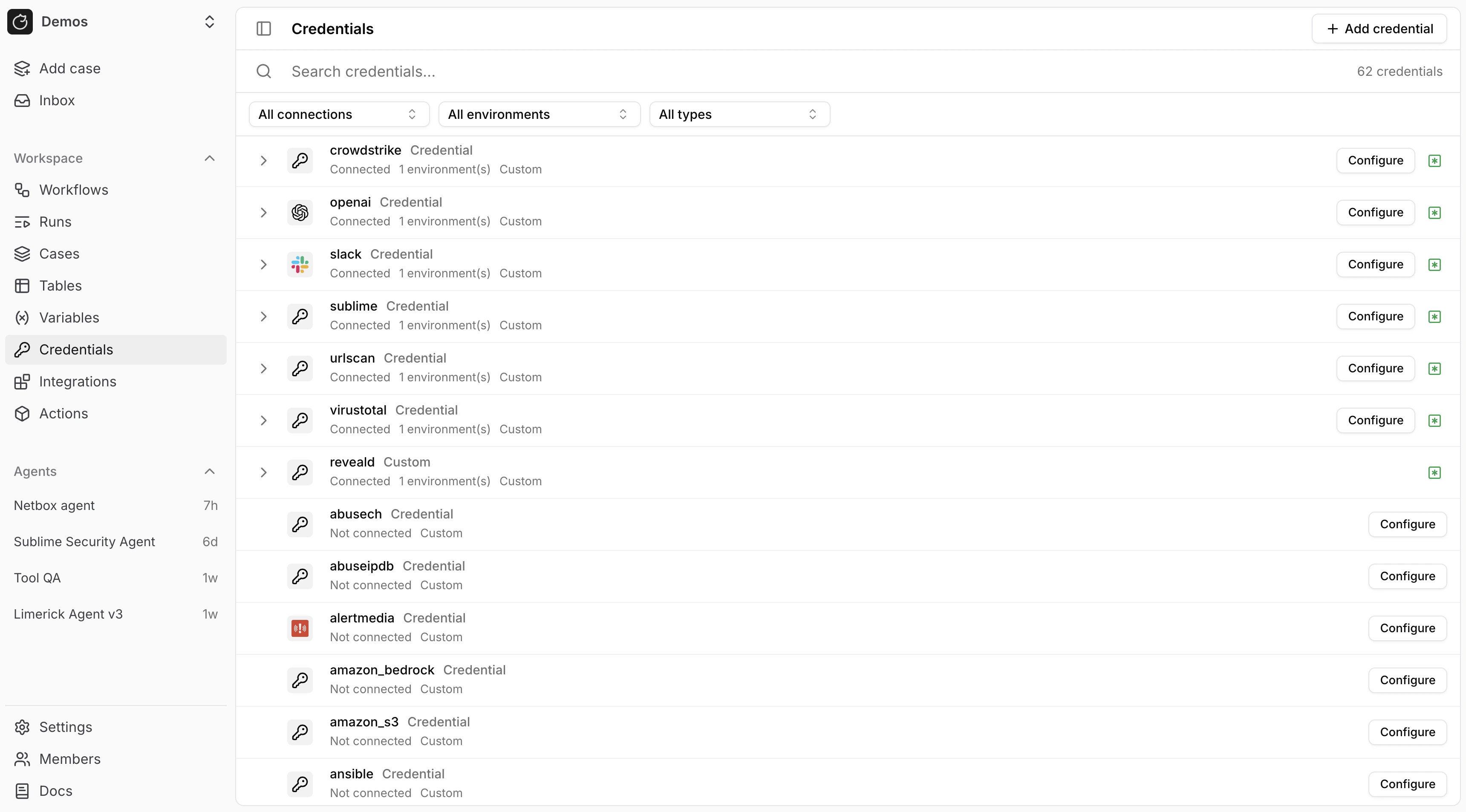
Pre-built credentials pre-fill the secret name and keys for built-in integrations.
 ## How pre-built credentials work
Built-in integrations expect fixed secret names and keys.
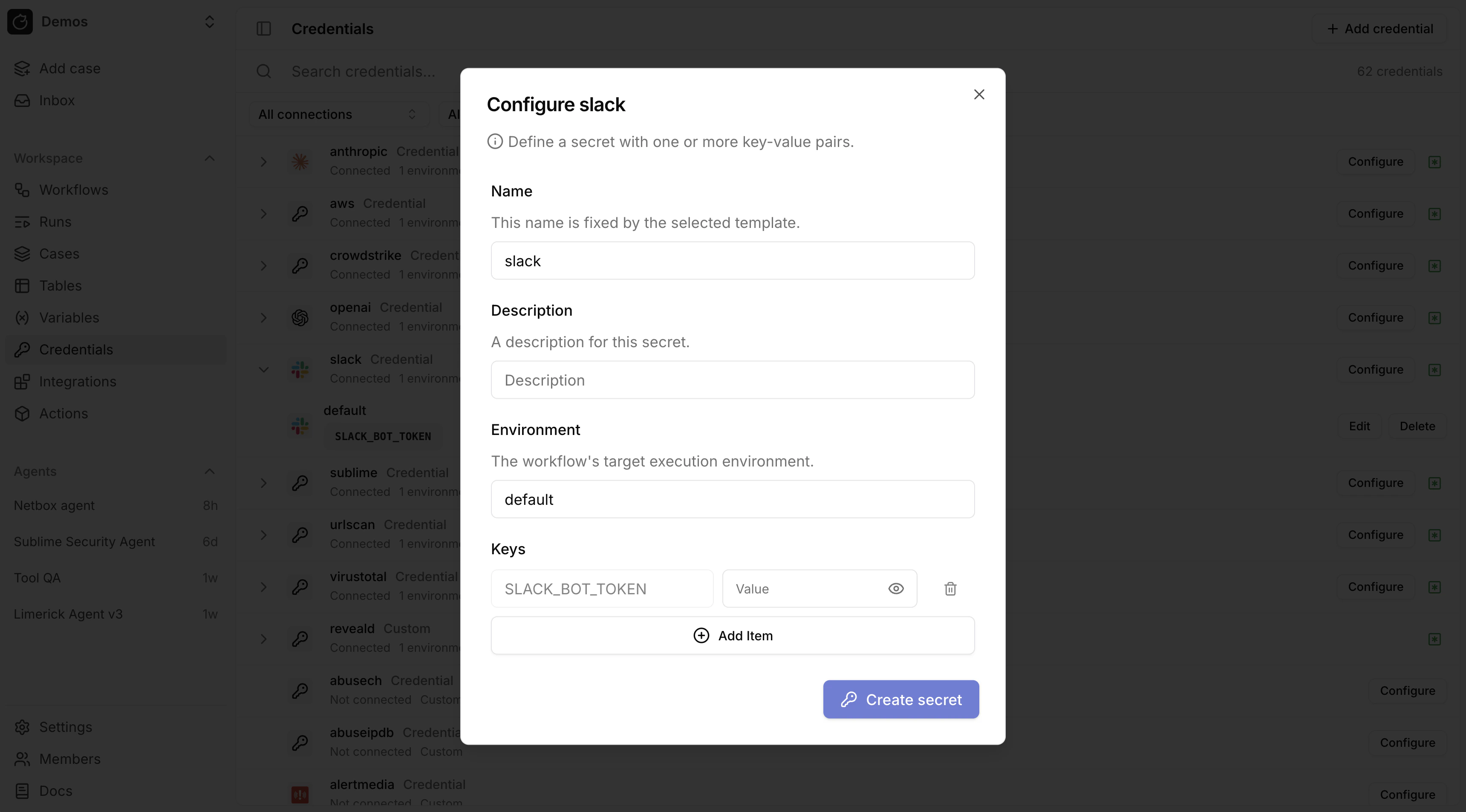
For example, Slack SDK actions use `slack` and `SLACK_BOT_TOKEN`.
`${{ SECRETS.slack.SLACK_BOT_TOKEN }}` resolves from the workflow default environment unless overridden in action control flow.
## Use environments
Store the same credential name in different Workflow environments:
* `slack` in `default` for one Slack app
* `slack` in `staging` for a second Slack app
* `slack` in `customer_acme` for a customer-specific Slack app
Then set the Workflow environment in [Workflows](/automations/workflows#environments) or override it on a specific action in [Actions](/automations/actions#environment):
```yaml theme={null}
${{ SECRETS.slack.SLACK_BOT_TOKEN }}
```
## Configure a credential
In `/Credentials`, click `Configure` for the credential. Tracecat pre-fills the keys.
## How pre-built credentials work
Built-in integrations expect fixed secret names and keys.
For example, Slack SDK actions use `slack` and `SLACK_BOT_TOKEN`.
`${{ SECRETS.slack.SLACK_BOT_TOKEN }}` resolves from the workflow default environment unless overridden in action control flow.
## Use environments
Store the same credential name in different Workflow environments:
* `slack` in `default` for one Slack app
* `slack` in `staging` for a second Slack app
* `slack` in `customer_acme` for a customer-specific Slack app
Then set the Workflow environment in [Workflows](/automations/workflows#environments) or override it on a specific action in [Actions](/automations/actions#environment):
```yaml theme={null}
${{ SECRETS.slack.SLACK_BOT_TOKEN }}
```
## Configure a credential
In `/Credentials`, click `Configure` for the credential. Tracecat pre-fills the keys.
 ## FAQ
Check these in order:
* Use prebuilt credentials for fixed secret names and keys such as `${{ SECRETS.slack.SLACK_BOT_TOKEN }}`.
* Use OAuth integrations when the provider issues managed tokens such as `${{ SECRETS.microsoft_teams_oauth.MICROSOFT_TEAMS_USER_TOKEN }}`.
* Use custom secrets when an action expects your own secret name and keys.
* Make sure the secret exists in the same environment that the workflow or action is using.
* Make sure the expression path matches the configured secret name and key exactly.
For example, this action reads the `slack` credential from the `customer_acme` environment, not from `default`:
```yaml theme={null}
- ref: notify_customer
action: tools.slack.post_message
environment: customer_acme
args:
channel: ${{ SECRETS.slack.ALERTS_CHANNEL }}
text: "New finding: ${{ TRIGGER.finding_id }}"
```
If `slack` only exists in `default`, the action will not resolve it while running in `customer_acme`.
## Related pages
* See [Secrets](/automations/core-concepts/secrets) for the core secret model and secret expression syntax.
* See [OAuth](/automations/integrations/oauth-integrations) for integrations that issue managed OAuth tokens instead of static keys, and for the same `${{ SECRETS... }}` patterns in custom registry actions.
* See [MCP servers](/automations/integrations/mcp-integrations) for MCP-specific integration setup and secret-backed `stdio` configuration.
## FAQ
Check these in order:
* Use prebuilt credentials for fixed secret names and keys such as `${{ SECRETS.slack.SLACK_BOT_TOKEN }}`.
* Use OAuth integrations when the provider issues managed tokens such as `${{ SECRETS.microsoft_teams_oauth.MICROSOFT_TEAMS_USER_TOKEN }}`.
* Use custom secrets when an action expects your own secret name and keys.
* Make sure the secret exists in the same environment that the workflow or action is using.
* Make sure the expression path matches the configured secret name and key exactly.
For example, this action reads the `slack` credential from the `customer_acme` environment, not from `default`:
```yaml theme={null}
- ref: notify_customer
action: tools.slack.post_message
environment: customer_acme
args:
channel: ${{ SECRETS.slack.ALERTS_CHANNEL }}
text: "New finding: ${{ TRIGGER.finding_id }}"
```
If `slack` only exists in `default`, the action will not resolve it while running in `customer_acme`.
## Related pages
* See [Secrets](/automations/core-concepts/secrets) for the core secret model and secret expression syntax.
* See [OAuth](/automations/integrations/oauth-integrations) for integrations that issue managed OAuth tokens instead of static keys, and for the same `${{ SECRETS... }}` patterns in custom registry actions.
* See [MCP servers](/automations/integrations/mcp-integrations) for MCP-specific integration setup and secret-backed `stdio` configuration.