> ## Documentation Index
> Fetch the complete documentation index at: https://docs.tracecat.com/llms.txt
> Use this file to discover all available pages before exploring further.
# Webhooks
> Trigger Tracecat workflows from external systems with webhooks: configure secret URLs, parse JSON or form payloads, and validate inbound requests.
## Overview
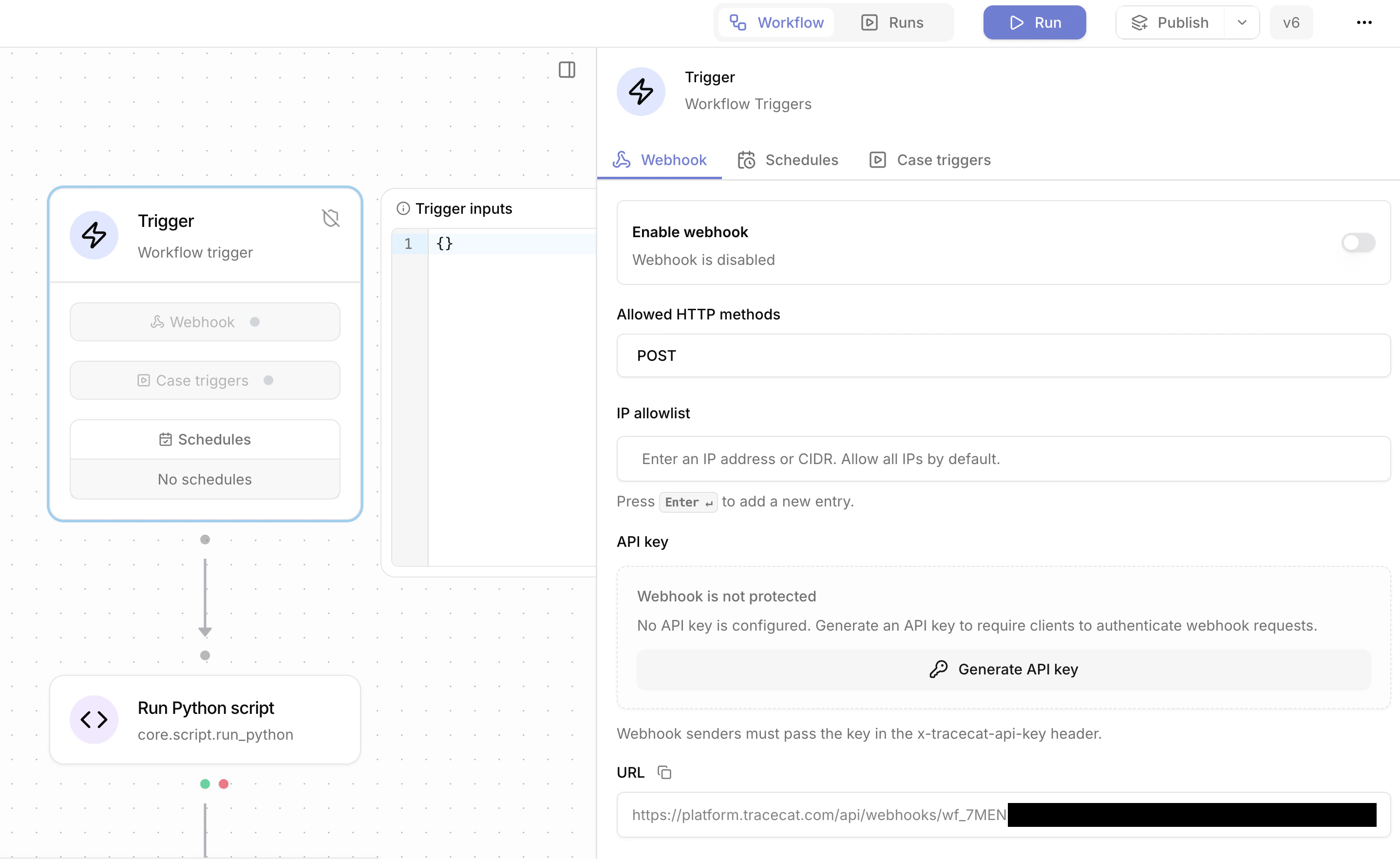
Webhooks start a workflow from an external system. The URL includes the webhook secret. `POST` is the primary method. `GET` also works for verification flows. The workflow must be published before the webhook runs.
 ## Using webhook payloads
The request body becomes `TRIGGER`, for example `${{ TRIGGER.alert_id }}`.
## Supported request formats
Parsing:
* Empty body: no trigger payload is created.
* JSON by default: the body is parsed as JSON and becomes `TRIGGER`.
* Form payloads with `application/x-www-form-urlencoded`: the body is parsed as a dictionary. Form field names become keys on `TRIGGER`.
* NDJSON payloads with `application/x-ndjson`, `application/jsonlines`, and `application/jsonl`: Tracecat starts one workflow run per JSON line. `TRIGGER` is that line, not the full request body.
## Securing webhooks
### Allowed HTTP methods
Allowed methods can be `GET`, `POST`, or both. Requests that use a method outside the allowed list are rejected.
### API key authentication
Webhook API keys are optional. If configured, the sender must include `x-tracecat-api-key`. The UI supports generate, rotate, revoke, and delete. A revoked key blocks requests until a new key is generated or API key protection is removed.
### IP allowlist
Requests can be restricted to specific IPs or CIDR ranges. The allowlist is IPv4-only.
## Response
Default response:
```json theme={null}
{
"message": "Workflow execution created",
"wf_id": "wf_3mYp8JkL2nQr7sTu9vWx0Z",
"wf_exec_id": "wf_3mYp8JkL2nQr7sTu9vWx0Z/exec_7aBcDeFgHiJkLmNoPqRsTu"
}
```
Query parameters:
* `echo=true`: add the original request body to the response under `payload`.
* `empty_echo=true`: return an empty `200` with no body. Implies `echo=true`.
* `vendor=okta`: handle Okta verification challenges. See [Okta verification](#okta-verification).
## Synchronous execution with /wait
Use `POST /webhooks/{workflow_id}/{secret}/wait` to run a workflow and receive its `return` value in the response. The request blocks until the workflow finishes. The workflow must be published. The request body becomes `TRIGGER` exactly as with the default webhook.
This endpoint is designed for workflows-as-APIs: the caller treats the workflow like a synchronous HTTP handler.
### Response schema
The response is an envelope with a `kind` discriminator:
```json theme={null}
{
"kind": "value",
"value": { "status": "ok" }
}
```
```json theme={null}
{
"kind": "download_file",
"download_url": "https://...",
"expires_in_seconds": 10,
"content_type": "application/json",
"size_bytes": 262144
}
```
### Kinds
* `value`: inline result. The body has `value` set to the workflow's `return` value.
* `download_file`: externalized result. The body has a presigned `download_url`, plus `expires_in_seconds`, `content_type`, and `size_bytes`.
* `download_export`: materialized collection result. Same fields as `download_file`; `content_type` is always `application/json`.
Results over `TRACECAT__RESULT_EXTERNALIZATION_THRESHOLD_BYTES` (default 128 KiB) are stored in object storage and returned as a short-lived presigned URL (default 10-second expiry). This keeps the webhook response small and predictable, so synchronous callers never stream megabytes of workflow state through a single HTTP response.
### Query parameters
* `unwrap=true`: return the workflow's `return` value directly as the response body, with no envelope. Requires the result to fit inline.
If the result was externalized (kind `download_file` or `download_export`), `/wait?unwrap=true` returns `413 Payload Too Large` with the download envelope under `detail`, so the caller can still fetch the data.
Example:
```bash theme={null}
curl -X POST "https:///webhooks///wait?unwrap=true" \
-H "Content-Type: application/json" \
-d '{"alert_id": "A-001"}'
# 200 OK
# {"status": "ok"}
```
If the workflow returns a result larger than the externalization threshold:
```json theme={null}
{
"detail": {
"kind": "download_file",
"download_url": "https://...",
"expires_in_seconds": 10,
"content_type": "application/json",
"size_bytes": 262144
}
}
```
## Slack event subscriptions
Slack event subscription verification uses `?echo=true`.
## Slack modal close and fast acknowledgements
Slack interactive flows that need a fast empty acknowledgement use `?echo=true&empty_echo=true`.
## Okta verification
Okta verification requests use `vendor=okta`. Tracecat reads `x-okta-verification-challenge` and returns:
```json theme={null}
{
"verification": ""
}
```
## Using webhook payloads
The request body becomes `TRIGGER`, for example `${{ TRIGGER.alert_id }}`.
## Supported request formats
Parsing:
* Empty body: no trigger payload is created.
* JSON by default: the body is parsed as JSON and becomes `TRIGGER`.
* Form payloads with `application/x-www-form-urlencoded`: the body is parsed as a dictionary. Form field names become keys on `TRIGGER`.
* NDJSON payloads with `application/x-ndjson`, `application/jsonlines`, and `application/jsonl`: Tracecat starts one workflow run per JSON line. `TRIGGER` is that line, not the full request body.
## Securing webhooks
### Allowed HTTP methods
Allowed methods can be `GET`, `POST`, or both. Requests that use a method outside the allowed list are rejected.
### API key authentication
Webhook API keys are optional. If configured, the sender must include `x-tracecat-api-key`. The UI supports generate, rotate, revoke, and delete. A revoked key blocks requests until a new key is generated or API key protection is removed.
### IP allowlist
Requests can be restricted to specific IPs or CIDR ranges. The allowlist is IPv4-only.
## Response
Default response:
```json theme={null}
{
"message": "Workflow execution created",
"wf_id": "wf_3mYp8JkL2nQr7sTu9vWx0Z",
"wf_exec_id": "wf_3mYp8JkL2nQr7sTu9vWx0Z/exec_7aBcDeFgHiJkLmNoPqRsTu"
}
```
Query parameters:
* `echo=true`: add the original request body to the response under `payload`.
* `empty_echo=true`: return an empty `200` with no body. Implies `echo=true`.
* `vendor=okta`: handle Okta verification challenges. See [Okta verification](#okta-verification).
## Synchronous execution with /wait
Use `POST /webhooks/{workflow_id}/{secret}/wait` to run a workflow and receive its `return` value in the response. The request blocks until the workflow finishes. The workflow must be published. The request body becomes `TRIGGER` exactly as with the default webhook.
This endpoint is designed for workflows-as-APIs: the caller treats the workflow like a synchronous HTTP handler.
### Response schema
The response is an envelope with a `kind` discriminator:
```json theme={null}
{
"kind": "value",
"value": { "status": "ok" }
}
```
```json theme={null}
{
"kind": "download_file",
"download_url": "https://...",
"expires_in_seconds": 10,
"content_type": "application/json",
"size_bytes": 262144
}
```
### Kinds
* `value`: inline result. The body has `value` set to the workflow's `return` value.
* `download_file`: externalized result. The body has a presigned `download_url`, plus `expires_in_seconds`, `content_type`, and `size_bytes`.
* `download_export`: materialized collection result. Same fields as `download_file`; `content_type` is always `application/json`.
Results over `TRACECAT__RESULT_EXTERNALIZATION_THRESHOLD_BYTES` (default 128 KiB) are stored in object storage and returned as a short-lived presigned URL (default 10-second expiry). This keeps the webhook response small and predictable, so synchronous callers never stream megabytes of workflow state through a single HTTP response.
### Query parameters
* `unwrap=true`: return the workflow's `return` value directly as the response body, with no envelope. Requires the result to fit inline.
If the result was externalized (kind `download_file` or `download_export`), `/wait?unwrap=true` returns `413 Payload Too Large` with the download envelope under `detail`, so the caller can still fetch the data.
Example:
```bash theme={null}
curl -X POST "https:///webhooks///wait?unwrap=true" \
-H "Content-Type: application/json" \
-d '{"alert_id": "A-001"}'
# 200 OK
# {"status": "ok"}
```
If the workflow returns a result larger than the externalization threshold:
```json theme={null}
{
"detail": {
"kind": "download_file",
"download_url": "https://...",
"expires_in_seconds": 10,
"content_type": "application/json",
"size_bytes": 262144
}
}
```
## Slack event subscriptions
Slack event subscription verification uses `?echo=true`.
## Slack modal close and fast acknowledgements
Slack interactive flows that need a fast empty acknowledgement use `?echo=true&empty_echo=true`.
## Okta verification
Okta verification requests use `vendor=okta`. Tracecat reads `x-okta-verification-challenge` and returns:
```json theme={null}
{
"verification": ""
}
```