> ## Documentation Index
> Fetch the complete documentation index at: https://docs.tracecat.com/llms.txt
> Use this file to discover all available pages before exploring further.
# Custom roles and groups
> Create custom roles, groups, and scopes for your organization, and assign roles to users and groups organization-wide or per workspace.
Enterprise Edition
## Overview
Roles bundle scopes, groups bundle users, and assignments bind a role to a user or a group.
Open Members in the organization sidebar. With the entitlement active the page reads `Members and access control` and gains Roles and Groups tabs beside Members.
In a workspace, open Members and switch views with the Members, Roles, and Groups toggle in the control bar at the top right, beside the action button.
## Turn it on
Custom roles, groups, and scopes require the `rbac_addons` entitlement. A single-tenant deployment turns it on with `TRACECAT__FEATURE_FLAGS=rbac`, and a multi-tenant deployment reads it from the organization's tier.
Without the entitlement the pages are absent rather than locked. The Members page shows a plain member list, Access control redirects to it, the workspace Roles and Groups pages redirect to workspace Members, and the Members, Roles, and Groups toggle disappears from the workspace navigation.
## Create a role
Open the Roles tab and select `Create role`. The dialog takes a `Role name` and `Description`, then a permission picker with one row per category: Workflows, Cases, Data, Agents, Secrets, Integrations, Workspace, Organization, and Actions.
Each row sets a level of None, Read, Write, Execute (workflows and agents only), Admin, or Custom for individual scopes. The Actions category takes a namespace selector instead.
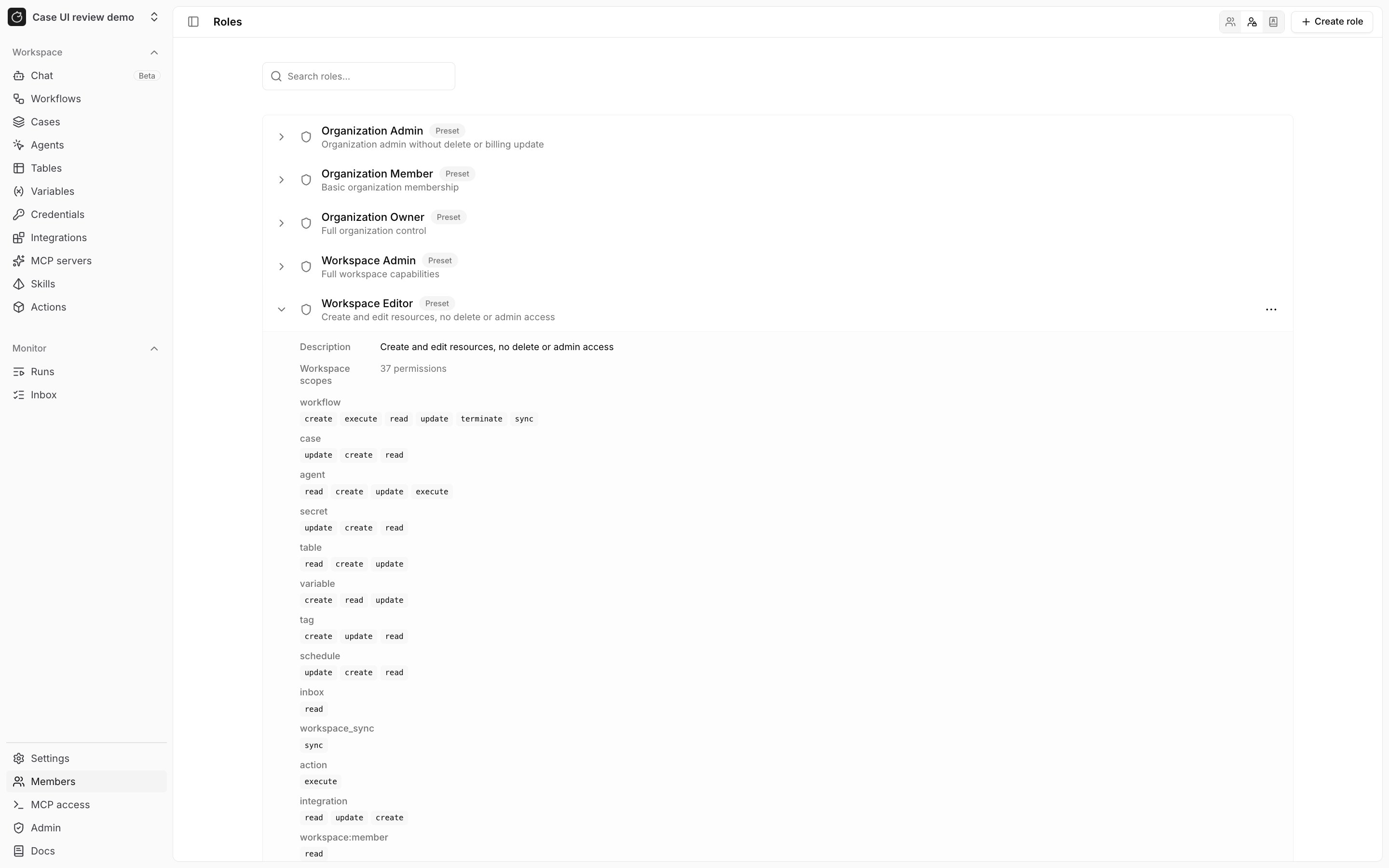 You can grant only scopes you hold yourself, and Tracecat refuses the rest with `Cannot grant scopes not held by the caller`. Built-in roles have no Edit or Delete in their row menu.
Tracecat refuses deleting a role that is still assigned with `Cannot delete role that is assigned to groups. Remove all group assignments first.`, or the user-assignment equivalent — remove the role's assignments, then delete it.
## Custom scopes
The Scopes tab lists every scope in the organization by name, and Filter by source narrows it to Platform or Custom scopes. It lives on the Access control page at `/organization/settings/rbac`, alongside Group assignments and User assignments tabs that list every assignment in one place.
Select `Create scope` to add your own: names follow `resource:action` and use only lowercase letters, numbers, colons, underscores, dots, asterisks, and hyphens.
You can delete a custom scope; platform scopes have no Delete action.
## Groups
Open the Groups tab and select `Create group`, which takes a name and a description. Tracecat refuses a duplicate name with `A group with this name already exists`.
`Manage group` opens Members and Roles tabs. Membership is flat — there is no group nesting — and every member inherits the group's roles.
## Assign roles
Assign a role to a user from the Members tab: open the member's row menu, choose `Manage roles`, then pick a role and a scope of Organization-wide or a single workspace under `Add role assignment`. Assign a role to a group from `Manage group` on the Groups tab.
Effective permissions are the union of direct and group assignments; no assignment overrides another.
## In a workspace
The control bar toggle switches between Members, Roles, and Groups, and the action button beside it becomes `Create role` or `Create group` for those views. Creating either still requires `org:rbac:create`.
Assignments made here apply only to that workspace, and the scope picker hides organization-only scopes.
## Related pages
* See [Roles and permissions](/manage-platform/rbac) for the built-in roles and how assignments compute effective permissions.
* See [Service accounts](/manage-platform/service-accounts) for machine identities that hold scopes directly, with no role.
* See [Organization audit logs](/audit-logs/organization) for the `rbac_role`, `rbac_group`, `rbac_assignment`, and `rbac_user_assignment` events.
You can grant only scopes you hold yourself, and Tracecat refuses the rest with `Cannot grant scopes not held by the caller`. Built-in roles have no Edit or Delete in their row menu.
Tracecat refuses deleting a role that is still assigned with `Cannot delete role that is assigned to groups. Remove all group assignments first.`, or the user-assignment equivalent — remove the role's assignments, then delete it.
## Custom scopes
The Scopes tab lists every scope in the organization by name, and Filter by source narrows it to Platform or Custom scopes. It lives on the Access control page at `/organization/settings/rbac`, alongside Group assignments and User assignments tabs that list every assignment in one place.
Select `Create scope` to add your own: names follow `resource:action` and use only lowercase letters, numbers, colons, underscores, dots, asterisks, and hyphens.
You can delete a custom scope; platform scopes have no Delete action.
## Groups
Open the Groups tab and select `Create group`, which takes a name and a description. Tracecat refuses a duplicate name with `A group with this name already exists`.
`Manage group` opens Members and Roles tabs. Membership is flat — there is no group nesting — and every member inherits the group's roles.
## Assign roles
Assign a role to a user from the Members tab: open the member's row menu, choose `Manage roles`, then pick a role and a scope of Organization-wide or a single workspace under `Add role assignment`. Assign a role to a group from `Manage group` on the Groups tab.
Effective permissions are the union of direct and group assignments; no assignment overrides another.
## In a workspace
The control bar toggle switches between Members, Roles, and Groups, and the action button beside it becomes `Create role` or `Create group` for those views. Creating either still requires `org:rbac:create`.
Assignments made here apply only to that workspace, and the scope picker hides organization-only scopes.
## Related pages
* See [Roles and permissions](/manage-platform/rbac) for the built-in roles and how assignments compute effective permissions.
* See [Service accounts](/manage-platform/service-accounts) for machine identities that hold scopes directly, with no role.
* See [Organization audit logs](/audit-logs/organization) for the `rbac_role`, `rbac_group`, `rbac_assignment`, and `rbac_user_assignment` events.