> ## Documentation Index
> Fetch the complete documentation index at: https://docs.tracecat.com/llms.txt
> Use this file to discover all available pages before exploring further.
# Updating tracecat
> Learn how to safely update versions and run data migrations.
Updates and data migrations can be tricky business. We'd love to help on [Discord](https://discord.gg/n3GF4qxFU8).
If you want to migrate secrets, please make sure to save your database
encryption / decryption Fernet key. You can find this key in your `.env` file
assigned to the environment variable: `TRACECAT__DB_ENCRYPTION_KEY`.
## Docker Compose
Fetch the latest environment variables migration script `env-migration.sh`
and template `.env.example` to ensure compatibility with the new Tracecat
version.
```
curl -o env-migration.sh https://raw.githubusercontent.com/TracecatHQ/tracecat/1.0.0-beta.50/env-migration.sh
curl -o .env.example https://raw.githubusercontent.com/TracecatHQ/tracecat/1.0.0-beta.50/.env.example
```
Run the environment variables migration script to update your existing
`.env` file with any new or changed variables.
```
chmod +x env-migration.sh && ./env-migration.sh
```
Download the latest Docker Compose file.
```
curl -o docker-compose.yml https://raw.githubusercontent.com/TracecatHQ/tracecat/1.0.0-beta.50/docker-compose.yml
```
Download the latest Caddyfile.
```
curl -o Caddyfile https://raw.githubusercontent.com/TracecatHQ/tracecat/1.0.0-beta.50/Caddyfile
```
Run `docker compose up` using the new Docker Compose and `.env` files.
## Update Integrations
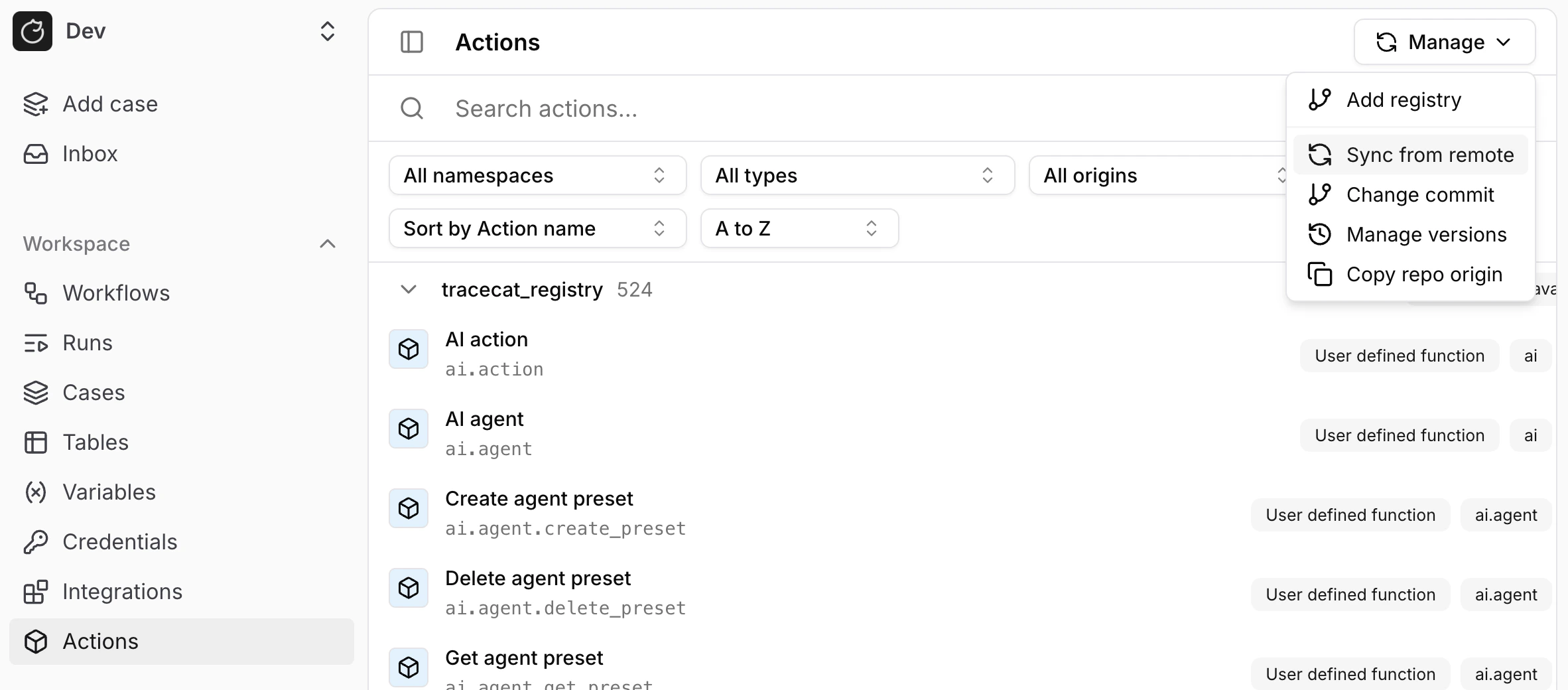
Integrations are not automatically updated when you update the Tracecat version.
You will need to manually sync the `tracecat_registry` repository from the **Registry** page:
 ## Terraform Deployments
All of Tracecat's Cloud deployments are configured using Terraform.
To update Tracecat, update the Terraform variable `tracecat_image_tag` to the latest version and run `terraform apply`.
## Data Migration
Data migrations are non-trivial operations.
We recommend backing up your database before running migrations, especially in a production environment.
If the API service fails to spin up due to a data migration error, do not worry.
Your data is still intact. Make sure you backup the core Tracecat database:
* For Docker Compose and AWS EC2 deployments, this would be the `core-db` volume in Tracecat's Docker stack.
* For AWS ECS Fargate deployments, backups are created automatically as part of the RDS postgres service. Just run `terraform apply` with `var.restore_from_backup` set to `true` to restore the latest RDS snapshot.
If you need live migration support, contact us on [Discord](https://discord.gg/n3GF4qxFU8) or email [founders@tracecat.com](mailto:founders@tracecat.com)!
## Terraform Deployments
All of Tracecat's Cloud deployments are configured using Terraform.
To update Tracecat, update the Terraform variable `tracecat_image_tag` to the latest version and run `terraform apply`.
## Data Migration
Data migrations are non-trivial operations.
We recommend backing up your database before running migrations, especially in a production environment.
If the API service fails to spin up due to a data migration error, do not worry.
Your data is still intact. Make sure you backup the core Tracecat database:
* For Docker Compose and AWS EC2 deployments, this would be the `core-db` volume in Tracecat's Docker stack.
* For AWS ECS Fargate deployments, backups are created automatically as part of the RDS postgres service. Just run `terraform apply` with `var.restore_from_backup` set to `true` to restore the latest RDS snapshot.
If you need live migration support, contact us on [Discord](https://discord.gg/n3GF4qxFU8) or email [founders@tracecat.com](mailto:founders@tracecat.com)!