

Routing model
Each agent uses its own model configuration to decide where its LLM requests go.
Root agents and subagents follow the same rule. A root agent can use a custom passthrough gateway while a subagent uses managed LiteLLM, or a subagent can use its own passthrough gateway while the root agent uses managed LiteLLM.
Tracecat strips the trailing version segment from the base URL before forwarding sandbox requests because SDK clients append paths such as
/v1/messages. This prevents doubled paths such as /v1/v1/messages.
Root agents
For a root agent, Tracecat keys direct passthrough routing by the model string the root agent sends.model: customer-alias go directly to https://customer-litellm.example.
Subagents
For a subagent, Tracecat keys direct passthrough routing by the subagent’s scoped model route. This lets Tracecat route each preset agent independently, even when several agents share the same sandbox process.https://child-litellm.example. Requests for other subagents fall back to managed LiteLLM unless those subagents also enable passthrough.
Credentials
Tracecat resolves passthrough credentials from the custom provider selected by the agent’s model configuration. If a root agent and subagent use different passthrough providers, each route uses its own provider credentials. Managed LiteLLM requests keep the sandbox’s managed gateway token.Add a custom source
Go to Organization settings, open Agent, then go to Custom sources and click Add custom source.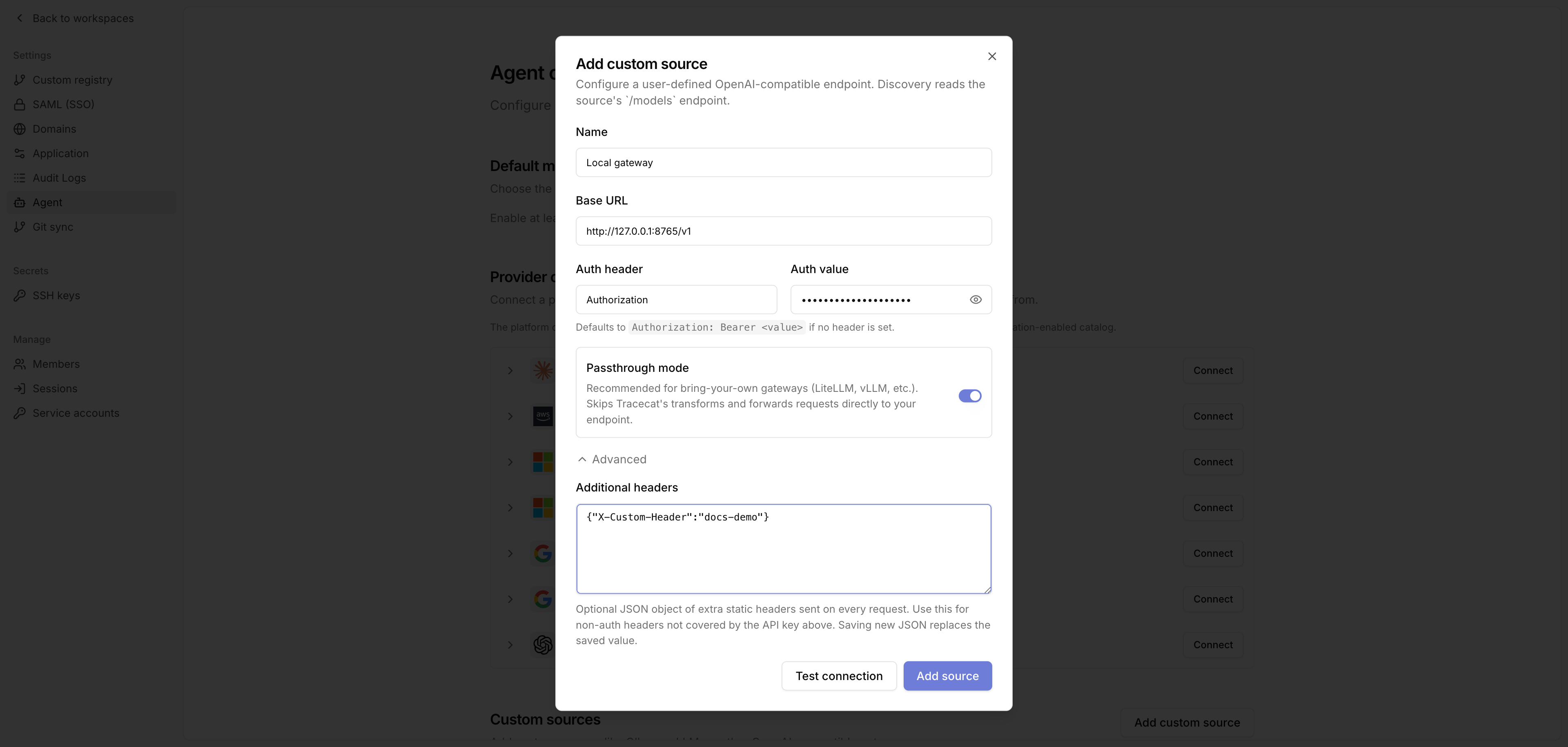
- Name: A readable label, such as
Local gateway. - Base URL: The OpenAI-compatible API base URL, e.g.
https://gateway.example/v1. - Auth header: Leave blank to use
Authorization. - Auth value: The provider credential. If Auth header is blank, Tracecat sends
Authorization: Bearer <value>. - Passthrough mode: Enable this to route agent requests directly to this gateway instead of Tracecat’s managed LiteLLM. Required for bring-your-own gateways such as LiteLLM, vLLM, and Ollama-compatible endpoints.
Discover and enable models
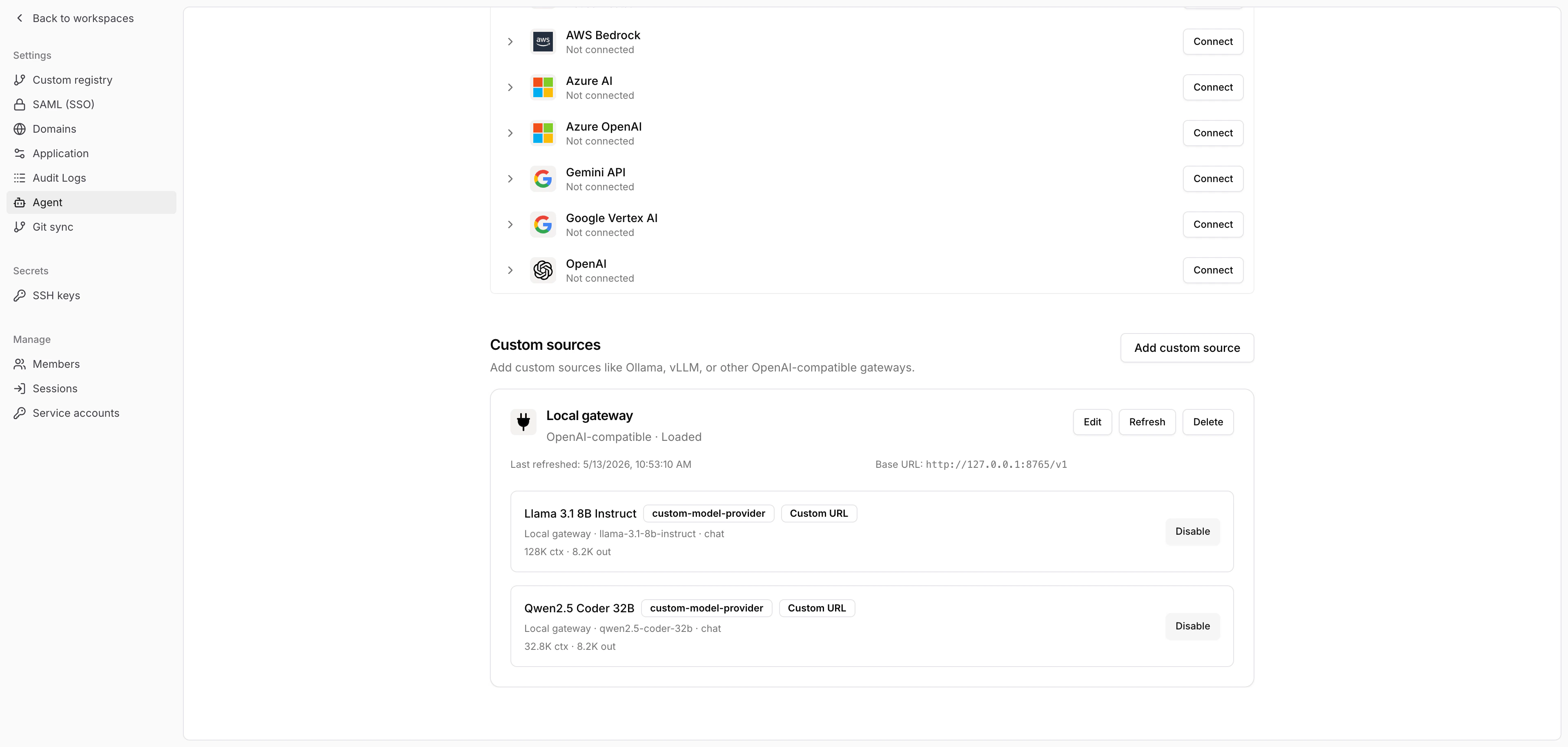
After you save the source, click Refresh. Tracecat calls the source’s/models endpoint and adds the returned models to the organization catalog.
Discovery confirms that the gateway exposes a model ID. It does not confirm that the gateway has local weights or can serve the model without internet access. For an air-gapped deployment, stage every model artifact and send a representative inference request after you remove egress. Ollama models tagged :cloud require the Ollama cloud service and cannot run air-gapped.
Use the provider
Choose the enabled custom source model anywhere Tracecat lets you select an agent model, such as the default model selector or a preset agent configuration. Refresh the source again after you add or remove models from the upstream gateway. Edit the source when you rotate credentials, change the base URL, or update static headers.Troubleshooting
Test connection or Refresh that fails withHost is not allowed means the base URL resolves to a private, loopback, or link-local address. Tracecat blocks these by default. Add the gateway’s IP or CIDR to TRACECAT__OUTBOUND_ALLOWED_PRIVATE_CIDRS on the Tracecat services and restart them. See Private endpoints for the Docker Compose, Kubernetes, and Fargate settings.
A run that fails with Model response timed out after <duration> without receiving data (or Gateway timeout on a non-streaming request) hit TRACECAT__LLM_PROXY_READ_TIMEOUT, the read timeout between the sandbox LLM proxy and the gateway. The variable takes seconds, defaults to 600, and applies to both passthrough and managed routes.
A run that fails with Agent execution timed out after 7200s hit the action’s timeout, which caps active runtime at 7200 seconds (2 hours) when unset. Tracecat clamps explicit values between 1800 seconds and TRACECAT__AGENT_SANDBOX_TIMEOUT (default 10800). A lower ceiling caps both the default and the minimum. See Actions.
Related pages
- See AI agent for the
ai.agentandai.preset_agentaction reference. - See AI action for single-call LLM workflow actions.
- See Secrets and variables for agent secret handling.
- See MCP servers for connecting MCP tools to agents.
- See Environment variables for the agent and proxy timeout settings and the private endpoint allowlist.
- See Air-gapped deployment for disconnected Kubernetes and self-hosted inference architecture.