

Overview
A tunnel lets actions in one workspace reach hosts on a private network without opening inbound firewall ports. Tracecat uses Pangolin:- A site connector (Newt) runs inside your network and opens an outbound tunnel to the Pangolin server.
- Pangolin grants the tunnel’s machine client access to each allowed target, on its listed TCP ports only. UDP and ICMP are off.
- A tunnel gateway runs the machine client and forwards action traffic. It accepts only short-lived tokens for its own tunnel and workspace, connects only to the tunnel’s allowed targets, and logs every connection.
Requirements
- The
tunnelsEnterprise entitlement. tunnel:readto list tunnels and check status, andtunnel:create,tunnel:update, ortunnel:deleteto manage them. Workspace admins and organization owners and admins hold all four; workspace viewers holdtunnel:read.- A Pangolin server: Pangolin Cloud for Tracecat Cloud, or your own Pangolin deployment for self-hosted Tracecat. See Configure Pangolin for self-hosted Tracecat.
Set up a tunnel from start to finish
This guide takes you from nothing to a workflow that calls an internal URL, using an on-premises Splunk athttps://splunk.internal:8089 as the example. On Tracecat Cloud you only run the site connector inside your network; Tracecat runs the gateway.
Before you start
- The
tunnelsentitlement and thetunnel:createscope in the workspace. - The internal hostname or IP address and TCP port of each service, such as
splunk.internal:8089. - A Linux host inside your network, with Docker or the ability to run a binary, that can resolve and reach every service. It needs outbound access to the Pangolin endpoint,
https://app.pangolin.neton Tracecat Cloud, and no inbound ports. The connector uses TCP 443 and UDP 51820 to the Pangolin endpoint. - The PEM-encoded CA certificate if an internal CA signs the service’s certificate.
1
Create the tunnel
In the workspace sidebar, open Tunnels and select Create tunnel. Enter a name, such as 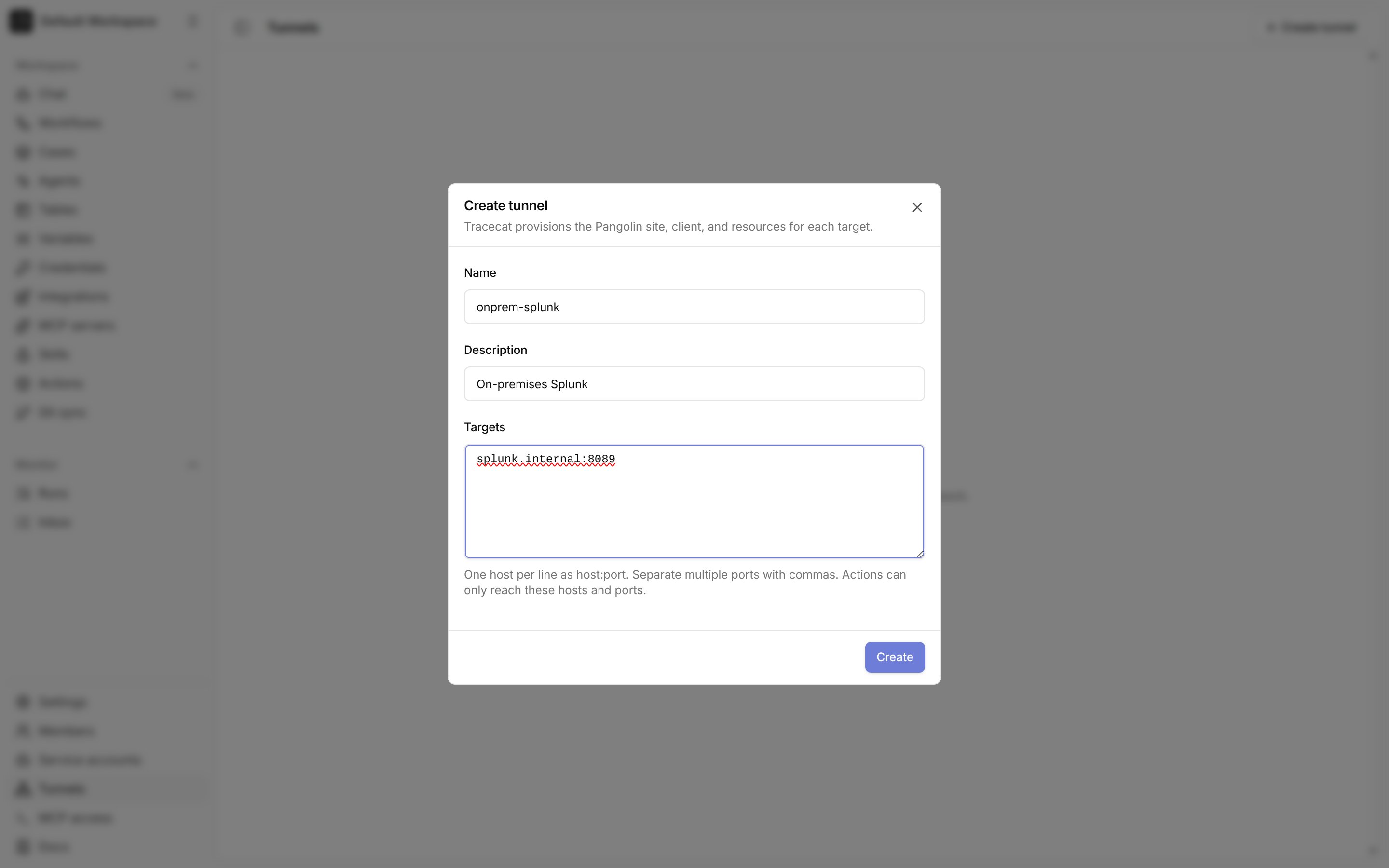
onprem-splunk, and list one target per line as host:port, or host:port,port for several ports. Use the exact hostname your workflows will call; wildcards and CIDR ranges are rejected. Select Create tunnel.2
Copy the site connector credentials
Tracecat shows the site connector command once. It contains the site ID, the site secret, and the Pangolin endpoint. Copy it, and store the secret in your secrets manager.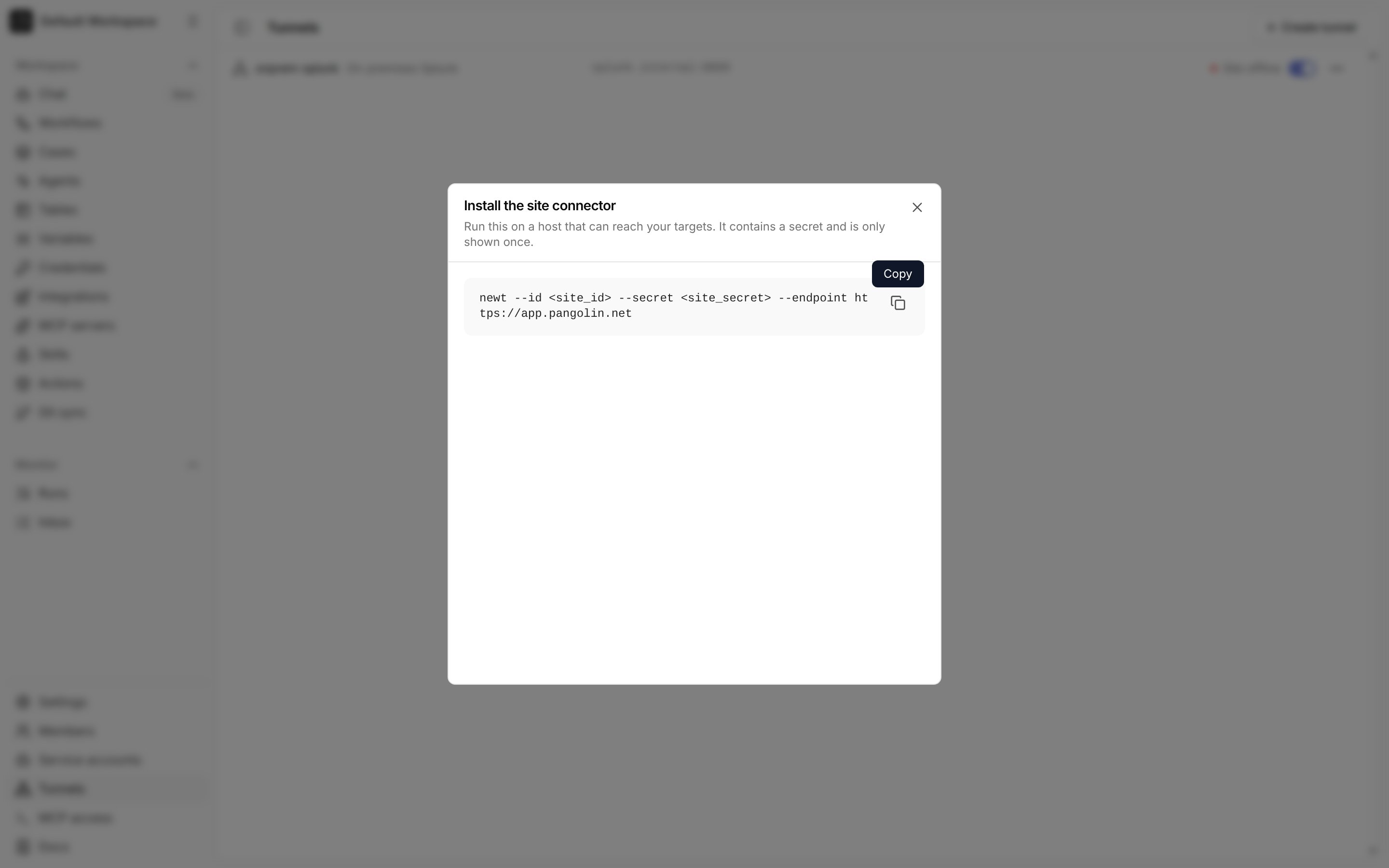
3
Run the site connector on your host
On the host inside your network, run the connector (Newt) with the values from the command. With Docker:Without Docker, install the
newt binary from the Newt releases and run the copied command, newt --id <site_id> --secret <site_secret> --endpoint https://app.pangolin.net, under a service manager such as systemd so it restarts with the host.4
Check the tunnel status
Back on the Tunnels page, the tunnel shows Site online once the connector connects and Gateway ready once Tracecat’s gateway for the tunnel is running. Both must be green before actions can use the tunnel.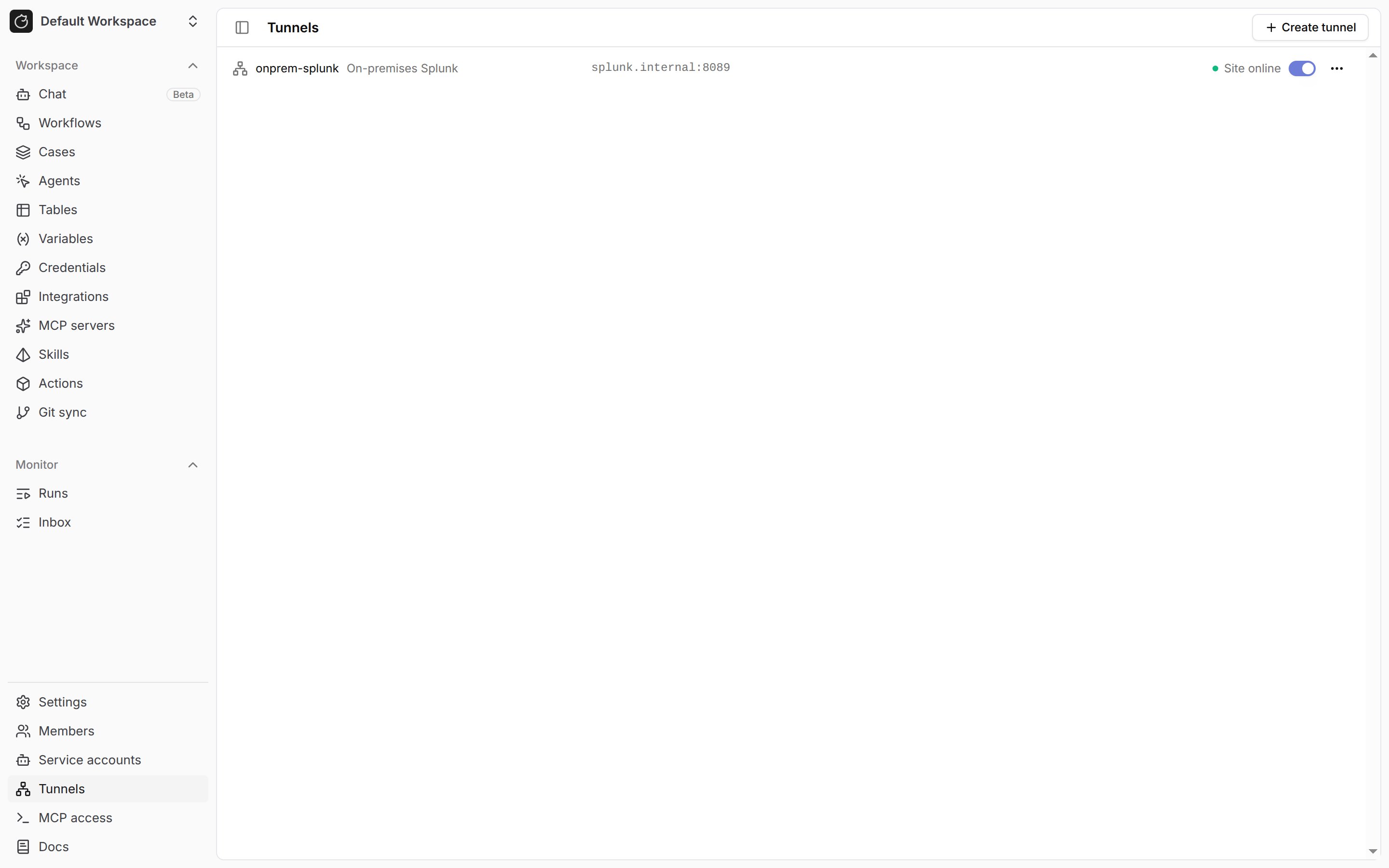
5
Add your internal CA
If an internal CA signs the service’s certificate, open Credentials, select Add credential, name it
ca_cert, set Type to CA certificate, and paste the PEM certificate. See Use TLS with private services.6
Call the internal URL from a workflow
In a workflow, add a HTTP request (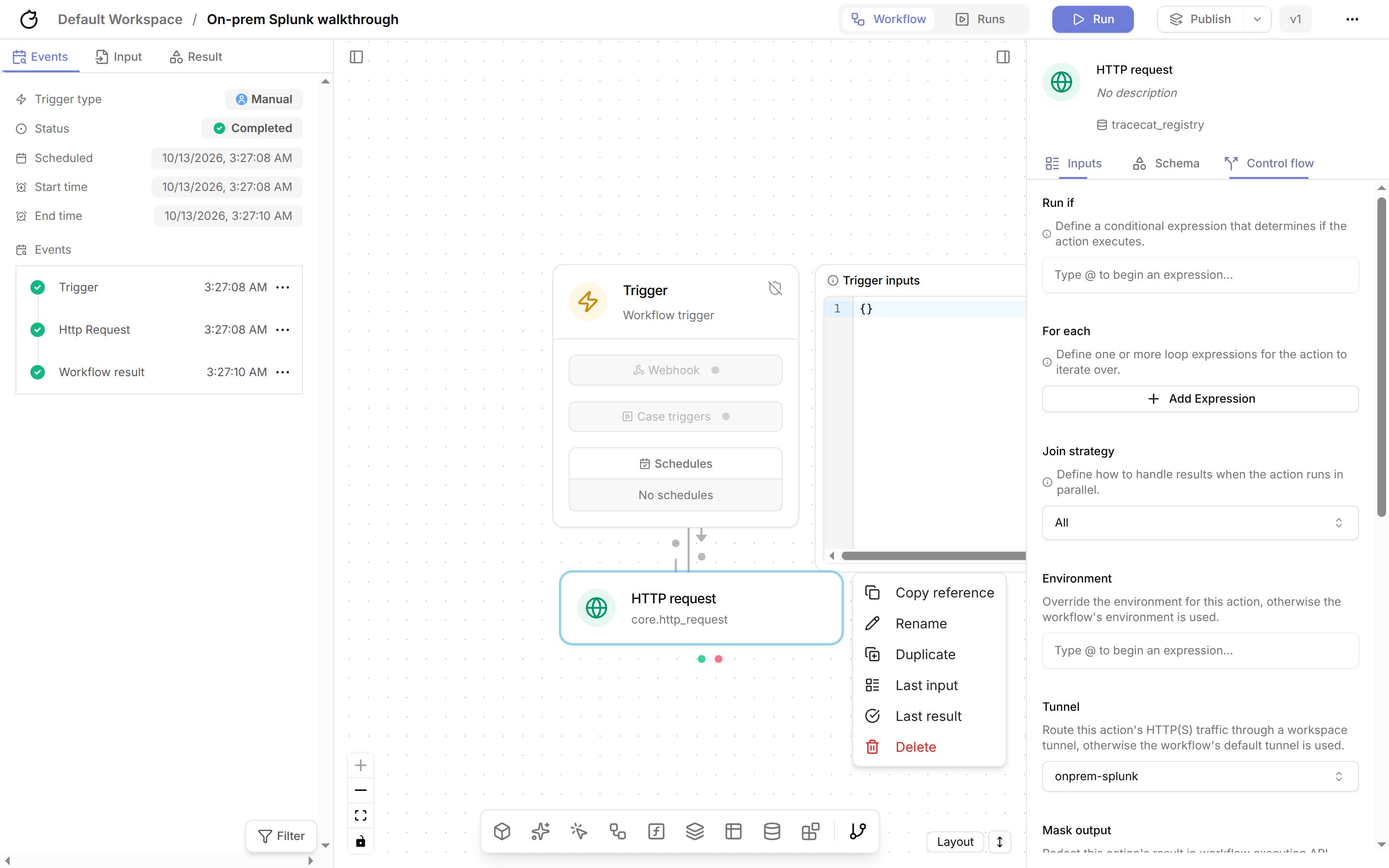
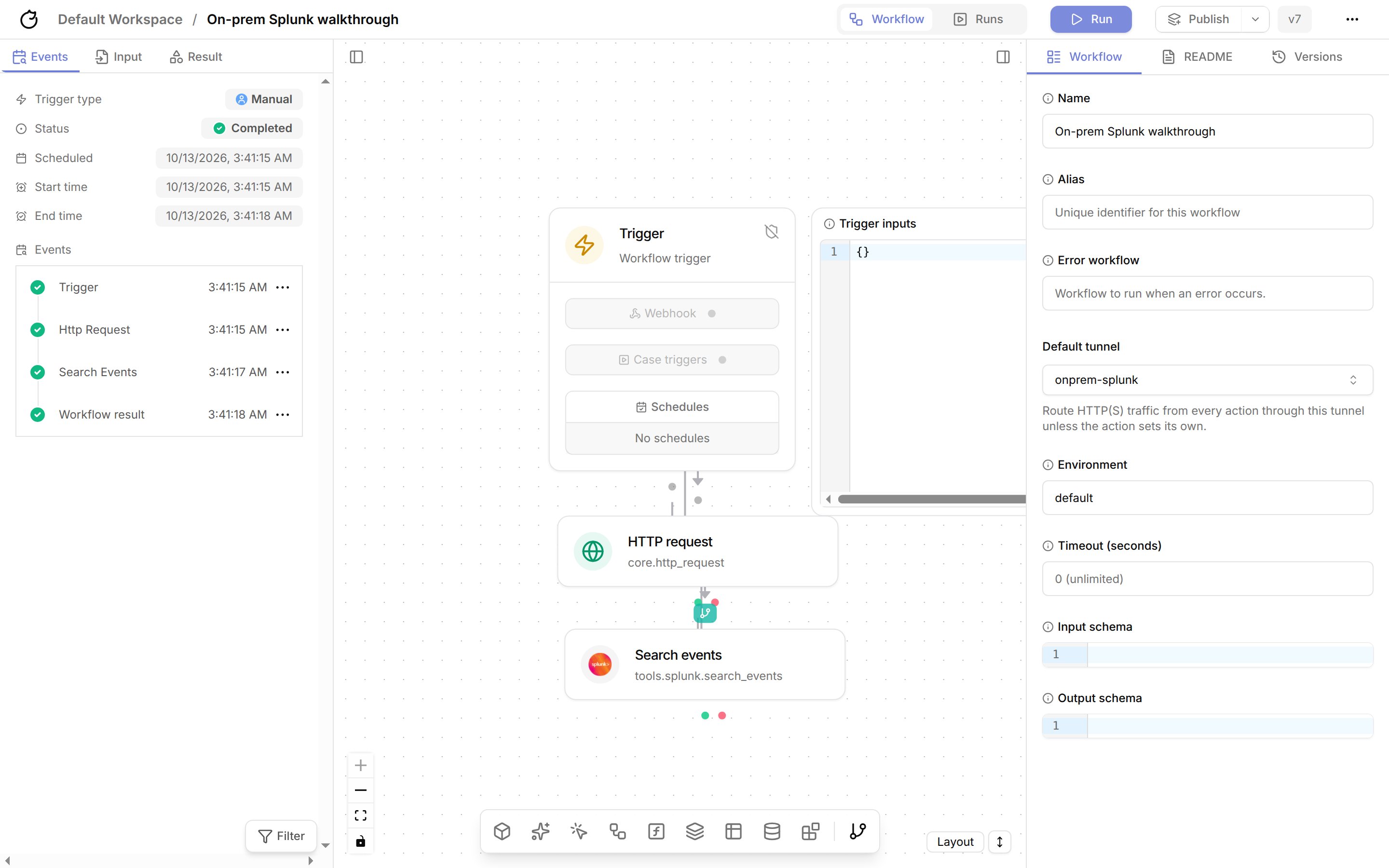
core.http_request) action. Set URL to the internal URL, such as https://splunk.internal:8089/services/server/info?output_mode=json, and Method to GET. In the action’s Control flow tab, set Tunnel to onprem-splunk.7
Run the workflow
Save, then run the workflow. The action’s result shows the response from the internal service.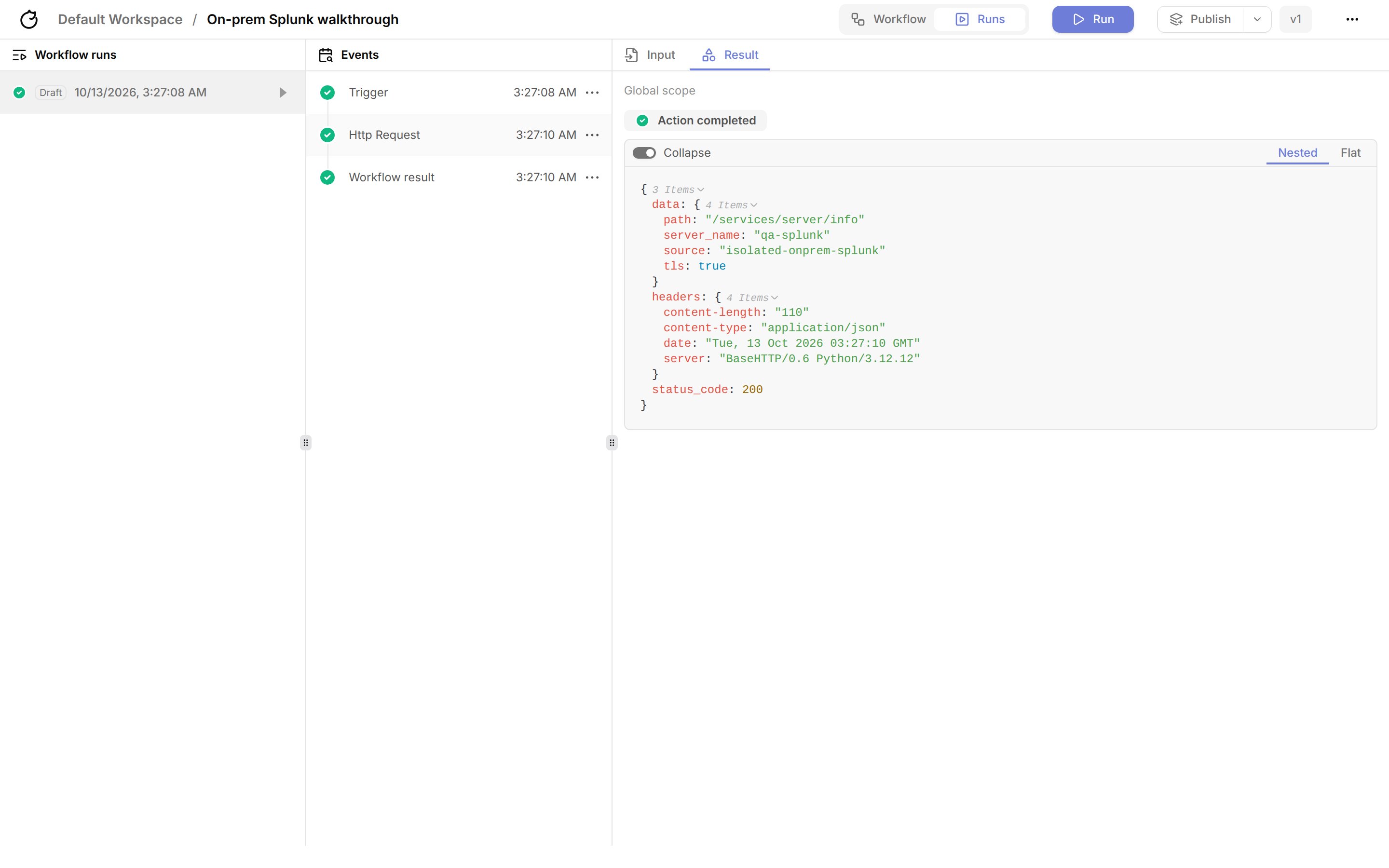
Run a Splunk search through the tunnel
Integration actions that make HTTP requests, such as Splunk: Search events (tools.splunk.search_events), use the tunnel the same way.
1
Add the Splunk credential
In Credentials, add a credential named
splunk with the key SPLUNK_API_KEY set to a Splunk authentication token.2
Add the search action
Add Splunk: Search events. Set
base_url to https://splunk.internal:8089, query to a search that starts with search, such as search index=main | head 10, and the start and end times. In the Control flow tab, set Tunnel to onprem-splunk, or rely on the workflow’s Default tunnel.3
Run the workflow
The action returns the search results.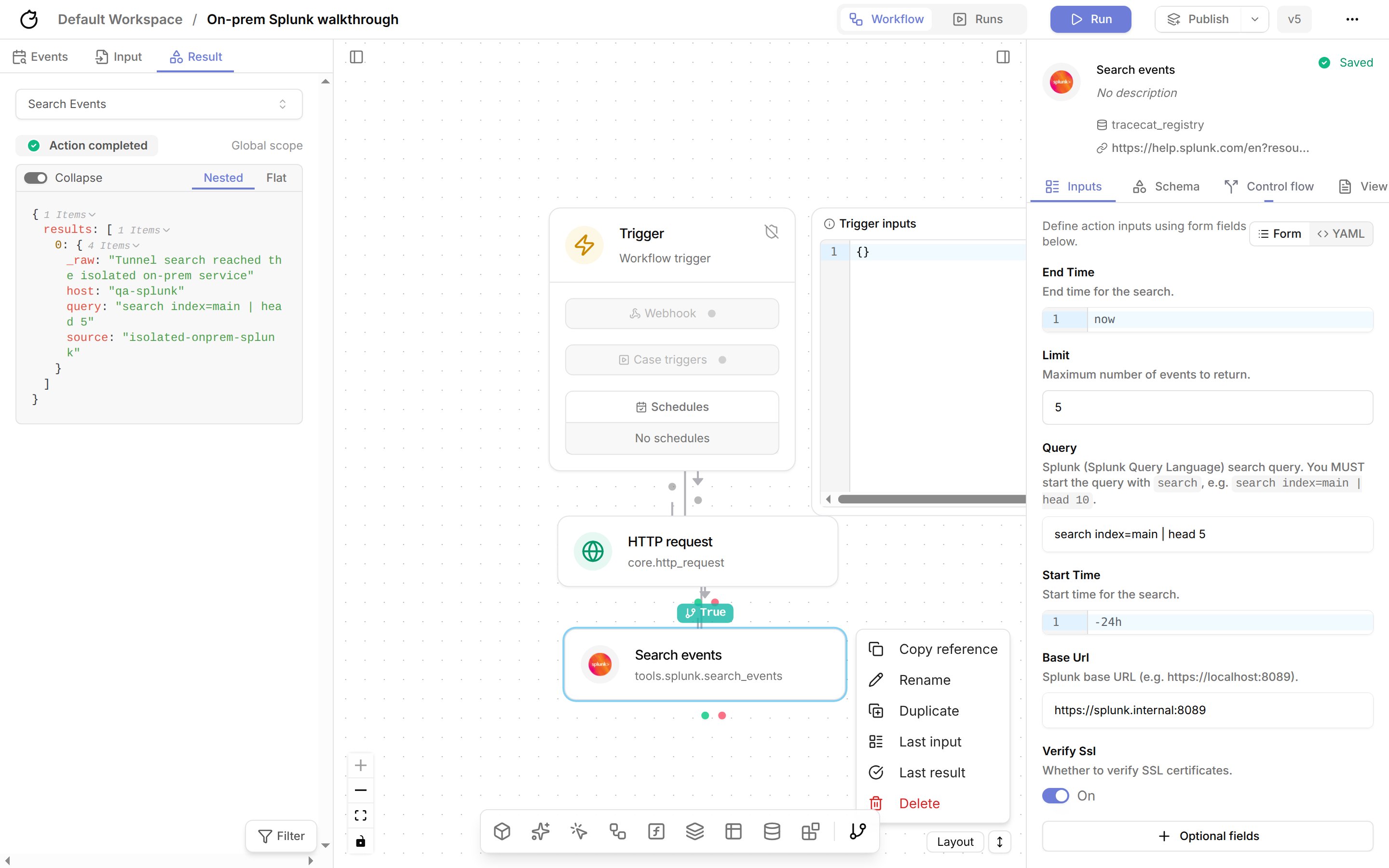
Troubleshoot
Create a managed tunnel with the API
Call the API with a service account API key and passworkspace_id as a query parameter on every request.
1
Create the tunnel
List every private host the workspace may reach, with its exact TCP ports:
host is an exact hostname or IP address; wildcards and CIDR ranges are rejected. Each target takes 1 to 64 unique ports, and a tunnel takes up to 100 targets.Tracecat creates a Pangolin site, one machine client for the tunnel, and one private resource per target granted only to that client. If any step fails, Tracecat deletes what it created and returns 502.2
Save the site credentials
The Store
201 response returns the site credentials once:site_secret in your secrets manager. Tracecat does not return it again.3
Install the site connector
Run the connector on a host inside your network that can reach every target:To run the binary directly, use
site_install_command. The connector needs outbound access to the Pangolin endpoint only.4
Check the site status
site_online turns true once the connector connects.Bring your own Pangolin
If you already run Pangolin and manage the site, resources, and access yourself, create a machine client in Pangolin, grant it only the resources Tracecat needs, and register it:endpoint must use https. Tracecat encrypts client_secret and never returns it. Keep allowed_targets in step with the Pangolin resources; Tracecat enforces both, so a port must appear in each.
Route actions through a tunnel
Set the tunnel in the action’s Control flow tab, or set Default tunnel in the workflow settings to route every action. An action’s own tunnel overrides the workflow default. In a workflow definition, usetunnel on the action or config.tunnel:
tunnels entitlement when you save, publish, and run the workflow. At runtime, the executor issues a short-lived token for the tunnel, sets HTTP_PROXY and HTTPS_PROXY to the tunnel’s gateway, and limits the action’s network to that gateway. The action fails if the tunnel is disabled or its gateway isn’t available; it never falls back to direct egress. The gateway’s allowed targets decide which hosts the action may reach, including private addresses.
Subflows, scatter, gather, loops, AI agent actions, and core.script.run_python reject an explicit tunnel and ignore the workflow default.
Route agents through a tunnel
Agents reach private services through the same tunnels as workflows. Pick the tunnel in one of two places:- On an MCP server: all traffic to that server goes through the tunnel.
- On an agent tool: only that tool’s calls go through the tunnel. The agent’s other tools still connect directly.
First add the private host and port to the tunnel’s allowed targets. For example, add
mcp.internal:8443 for an MCP server at https://mcp.internal:8443/mcp.Connect a private MCP server
1
Open the MCP server
Go to MCP servers in the sidebar. Click Add MCP server for a new server, or click Configure on an existing one.
2
Pick the tunnel
Set Server URI to the server’s private URL. Under Use tunnel (optional), pick your tunnel. Click Test to check the connection, then click Connect for a new server or Update for an existing one.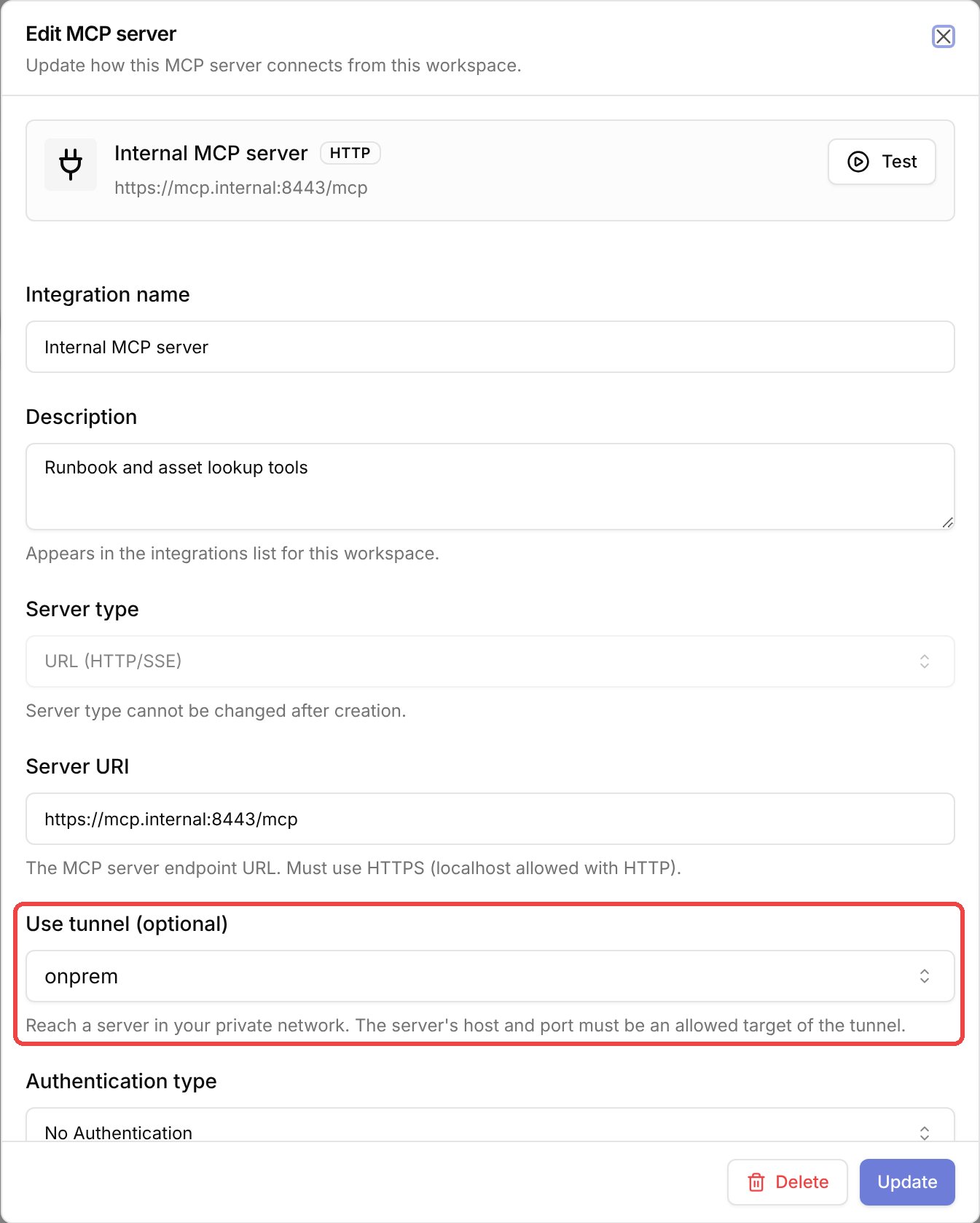
3
Use the server in an agent
Add the server to an agent as usual. Every agent and chat that uses the server goes through the tunnel. That includes connection tests, tool discovery, OAuth sign-in and token refresh, and tool calls.
An OAuth server behind a tunnel must sign in through its own OAuth flow. Tracecat rejects reusing an OAuth connection from another integration, because that connection’s token refresh doesn’t go through the tunnel. MCP servers that share an OAuth connection must use the same tunnel.
Route one agent tool through a tunnel
1
Open the agent
Go to Agents in the sidebar and open the agent.
2
Open the tool's integration
In the right-hand panel, click the Tools tab. Under Tools, click the integration that has the tool, for example Sublime.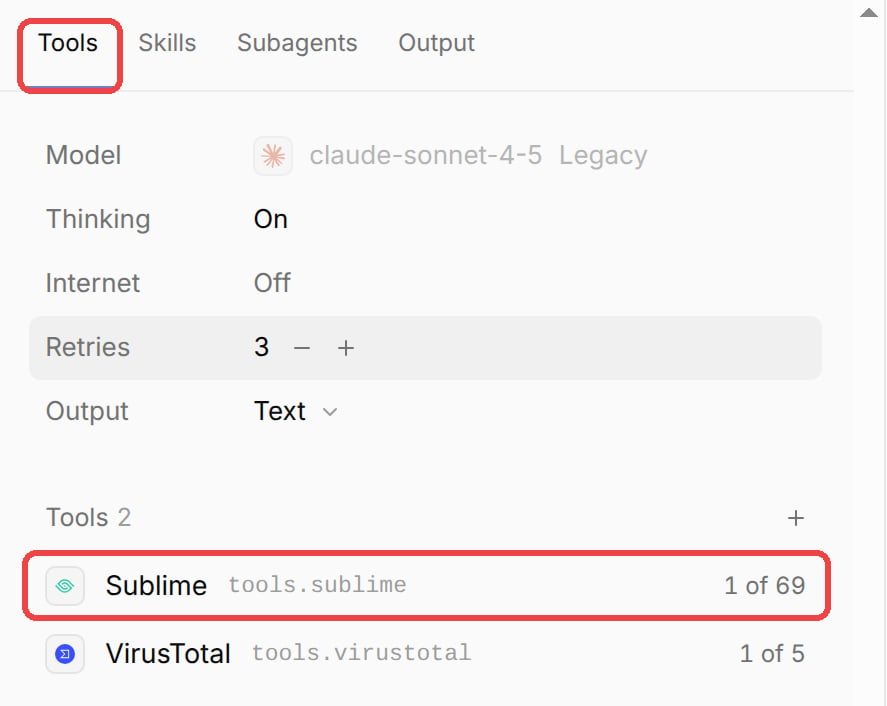
3
Pick a tunnel next to the tool
Each tool has a tunnel menu between its name and its approval setting (Auto or Needs approval). Open the menu and pick your tunnel. To go back to connecting directly, pick No tunnel.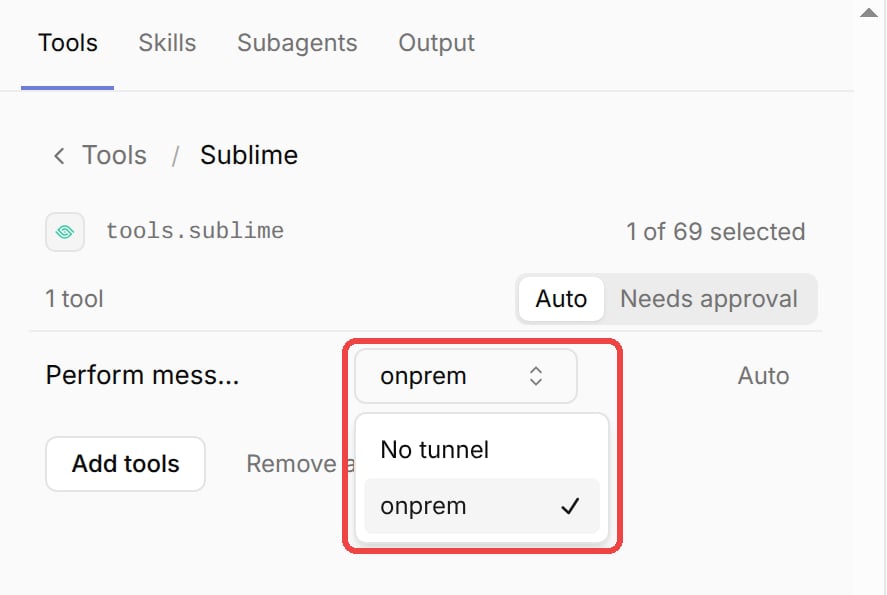
4
Save the agent
Click Save version. New runs and chats with the agent use the tunnel for that tool.
ai.agent action in a workflow, set tool_tunnels to a map from each action name to a tunnel name:
tunnel field and the workflow’s default tunnel don’t apply to an agent’s tool calls.
Delete a tunnel that’s in use
1
Delete the tunnel
On the Tunnels page, open the tunnel’s menu and click Delete.
2
Remove the tunnel where it's used
If the tunnel is still in use, Tracecat lists every MCP server, agent, and workflow that uses it, and Delete stays disabled. For each agent and workflow, the list also shows which tool or action uses the tunnel. Click each one to open it, then remove the tunnel or pick another one.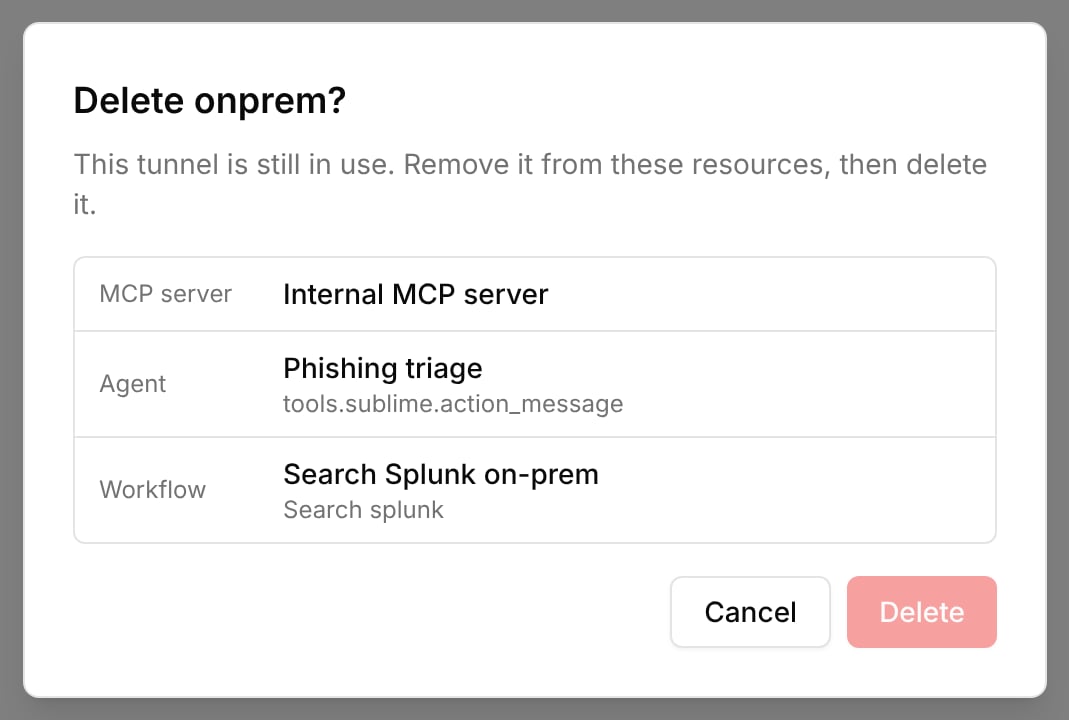
3
Delete it
Once nothing uses the tunnel, open its menu again and click Delete.
Run the tunnel gateway
Each tunnel has one gateway that forwards traffic through Pangolin. Tracecat Cloud runs gateways for you. If you self-host, the Helm chart runs them on Kubernetes; see Tunnels.Tunnels require Kubernetes. On Docker Compose and AWS ECS Fargate,
TRACECAT__TUNNEL_GATEWAY_BACKEND is none. Tracecat rejects creating a tunnel or issuing a gateway key there. Any action, agent tool, or MCP server set to use a tunnel fails instead of connecting directly.Use TLS with private services
Allowed targets limit which host and TCP port a connection opens to, not which application answers on it. The gateway relays TLS without decrypting it, so a client can pick another virtual host on the same IP address and port with SNI or theHost header. Don’t rely on allowed targets to isolate applications behind a shared reverse proxy; give each one its own address or port, or restrict access at the proxy.
HTTPS through a tunnel stays encrypted end to end. The gateway relays the TLS connection without decrypting it, and the action verifies the server certificate against the hostname in the URL, such as splunk.internal. Issue the certificate for the hostname you list in allowed_targets.
If an internal CA signs the certificate, add the CA to the workspace:
1
Create a CA certificate credential
In the workspace, open Credentials and select Add credential. Name the secret 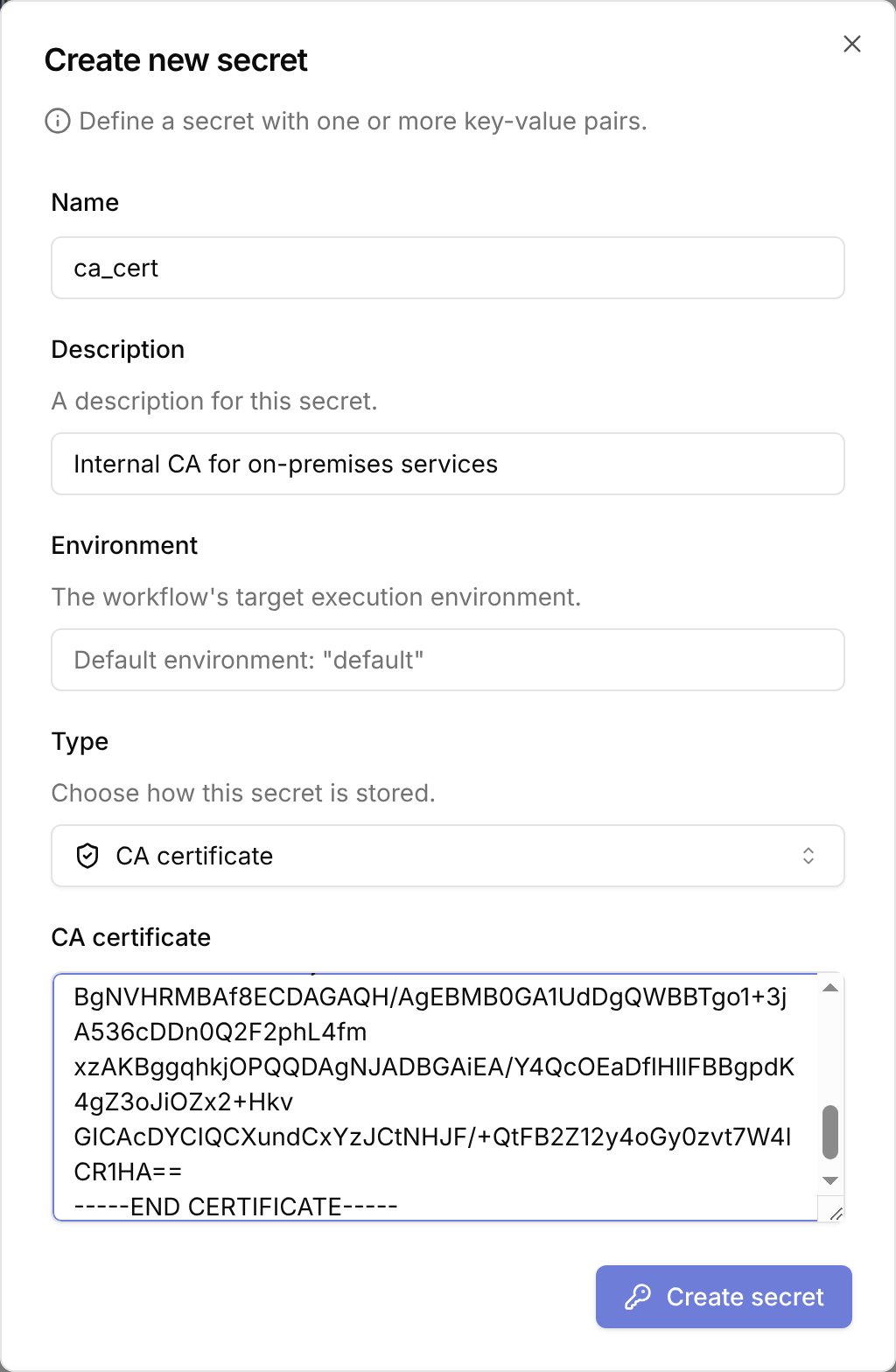
ca_cert, set Type to CA certificate, paste the PEM-encoded CA certificate, and select Create secret. Tracecat stores it as the CA_CERTIFICATE key.2
Keep certificate verification on
core.http_request, core.http_poll, and core.http_paginate load the ca_cert credential automatically. Leave verify_ssl set to true; requests then fail if the certificate does not chain to your CA or does not match the hostname.mtls with the mTLS certificate + key type. See Secrets for every credential type.
Plain http:// requests are encrypted inside the Pangolin tunnel, but not between the site connector and the target, and the gateway can read them. Prefer https:// for anything that carries credentials.
Manage tunnels
- List tunnels with
GET /tunnelsand read one withGET /tunnels/{tunnel_id}. - Rename, describe, or disable a tunnel with
PATCH /tunnels/{tunnel_id}. Managed tunnels reject changes toendpoint,client_id,client_secret, andallowed_targets; create a new managed tunnel to change targets. Agents and workflows refer to a tunnel by name, so a rename returns409with codetunnel_in_usewhile any of them still use it. - See what uses a tunnel in the
referenced_byfield ofGET /tunnels/{tunnel_id}. It lists MCP servers, agents, and workflows that use the tunnel, limited to those you can view. Older agent versions pinned by a workflow aren’t listed; if one still uses a deleted tunnel, that tool call fails with a “Tunnel not found” error. - Delete a tunnel with
DELETE /tunnels/{tunnel_id}. A tunnel that is still in use returns409with codetunnel_in_useand the samereferenced_bylist; remove it from those resources first. For managed tunnels, Tracecat deletes the Pangolin resources, machine client, and site first. If Pangolin cleanup fails, the request returns502and keeps the tunnel so you can retry. Stop the site connector afterwards.
Configure Pangolin for self-hosted Tracecat
Tracecat Cloud manages Pangolin for you, so this section applies only to self-hosted Tracecat. Managed tunnels provision Pangolin through its Integration API.1
Enable the Integration API
Deploy Pangolin separately and enable its Integration API. The API base URL ends in
/v1.2
Create an organization API key
In the Pangolin dashboard, open your organization’s API keys and create a key with these permissions:
- Sites: pick site defaults, create, get, and delete.
- Clients: pick client defaults, create, get, and delete.
- Private resources: create, get, delete, and list resource clients.
3
Set the Tracecat environment variables
Set these on the Managed tunnels stay off until all four are set. See Environment variables.
api service and restart it:Related pages
- See HTTP for calling private services with
core.http_request. - See Python UDFs for keeping custom actions compatible with tunnels.
- See Roles and permissions for which built-in roles hold the
tunnel:*scopes.