

Overview
An IP allowlist limits an organization to requests from approved IP addresses and CIDR ranges, such as your corporate VPN egress. While enforcement is on, Tracecat rejects every sign-in and every organization-scoped REST API request from an address outside the allowlist with403 and Access from your IP address is not permitted by your organization's IP allowlist.
The allowlist lives under IP allowlist in the organization sidebar at /organization/settings/security. Reading it needs org:settings:read and changing it needs org:settings:update, which organization-admin and organization-owner hold.
Enforcement is off for every organization until you turn it on, and an organization with enforcement on but no allowlists admits every address.
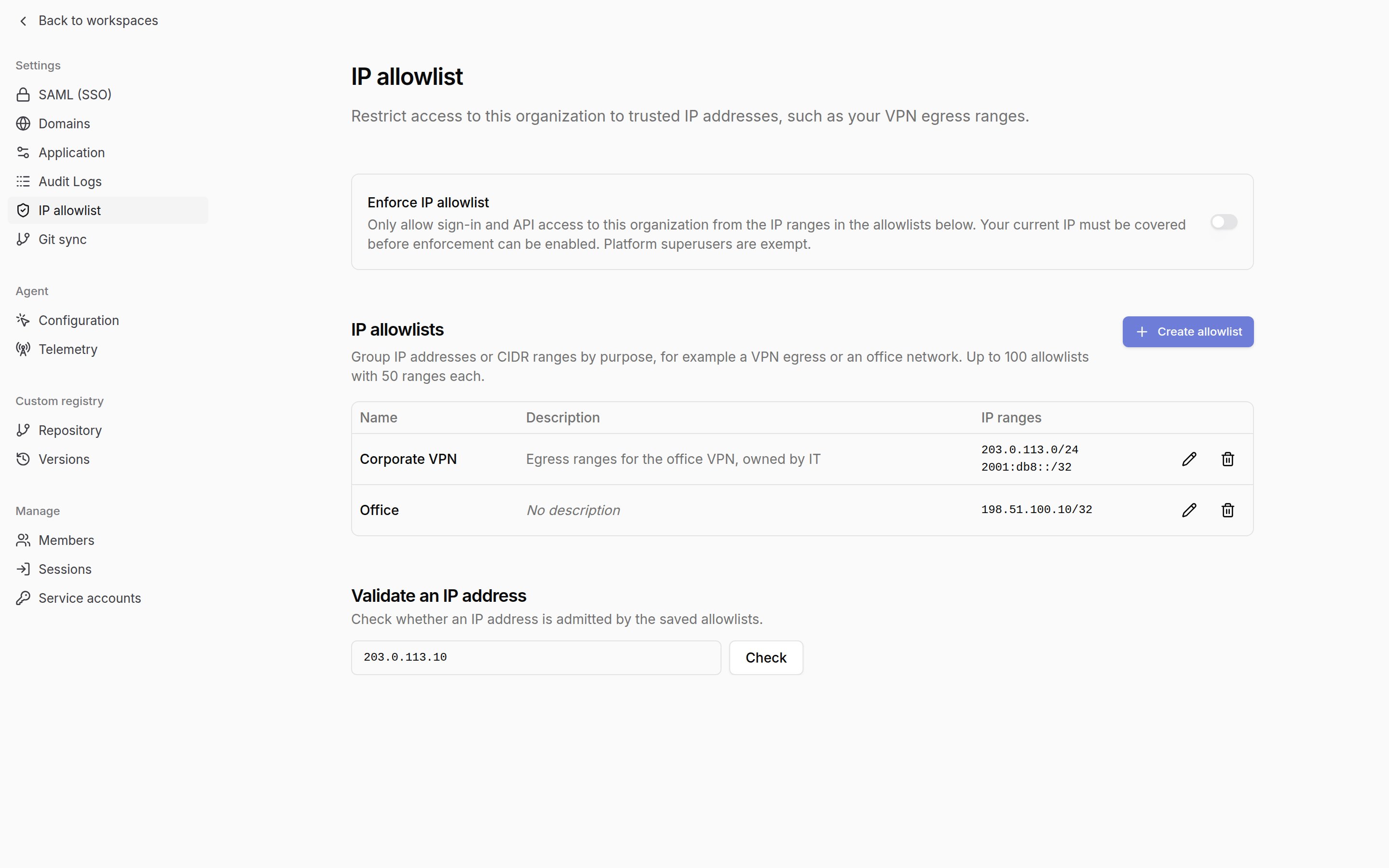
Create an IP allowlist
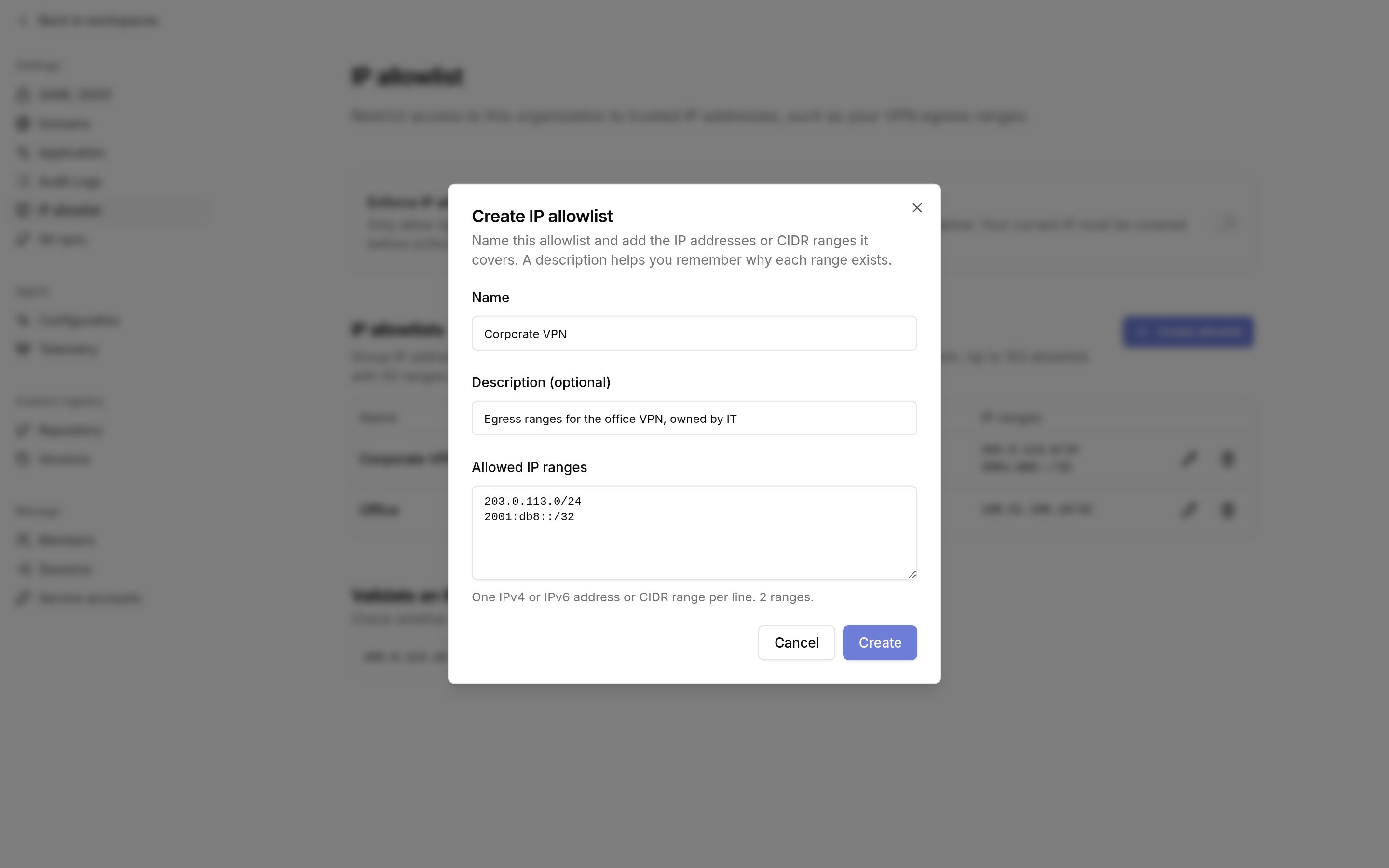
SelectCreate allowlist. The dialog takes:
Name: required, unique within the organization ignoring case.Description: optional. Record the owner and purpose so you can retire the entry later.Allowed IP ranges: one or more IPv4 or IPv6 addresses or CIDR ranges, one per line. Tracecat canonicalizes each range, so10.0.0.5/8becomes10.0.0.0/8, and drops duplicates.
Enforce the allowlist
Turn onEnforce IP allowlist once at least one allowlist contains your own address. Tracecat rejects enabling an allowlist that excludes the address you are connecting from with Your current IP address (<ip>) is not in the allowlist. Add it before enabling., so an administrator cannot lock the organization out.
Use Validate an IP address to check any address before or after enabling. The result reports whether the address is allowed, the range and allowlist it matched, and whether enforcement is on.
Turning enforcement off restores access from every address and keeps the allowlists.
What the allowlist applies to
- Sign-in: password, OIDC, and SAML sign-in fail after credentials are verified when the address is denied. SAML checks the organization the connection belongs to. Password and OIDC sign-in succeed when at least one of the user’s organizations admits the address; requests to a denying organization still fail.
- REST API: every request that resolves to the organization, whether it authenticates with a session cookie, a service account API key, or a SCIM token. Requests from a denied address fail after the credential is verified and before the endpoint runs.
- Not covered: the Tracecat MCP server, which authenticates with its own OAuth tokens, inbound workflow webhooks, and Tracecat’s internal service calls. Use webhook CIDR allowlists to restrict webhook senders.
- Platform superusers bypass the allowlist for break-glass access.
Platform admin IP allowlist
Platform superusers can restrict the platform admin console and admin API to approved addresses under Security in the platform admin sidebar at/admin/security. It takes the same allowlists, limits, lockout check, and Validate an IP address tool as an organization allowlist, and is off until you turn it on.
While enforcement is on, every superuser-only request from an address outside the allowlist fails with 403 and Access from your IP address is not permitted by the platform admin IP allowlist. This covers every /admin endpoint and the superuser-only /users/{id} endpoints. It does not restrict organization access: organization-scoped requests, including those from superusers, are never checked against the platform admin allowlist.
If every platform admin is locked out, set TRACECAT__PLATFORM_ADMIN_IP_ALLOWLIST_BYPASS=true on the API service and restart it. Tracecat then skips the platform admin allowlist, so you can sign in to /admin/security and fix or disable it. Remove the variable afterwards. It has no effect on organization allowlists.
Client IP resolution
Tracecat resolves the client address fromX-Forwarded-For, skipping hops listed in TRACECAT__AUDIT_TRUSTED_PROXY_CIDRS. The default covers loopback and private ranges, which includes the bundled reverse proxy, the UI container, and load balancers on private subnets. Add any proxy with a public address to that variable before enabling enforcement; otherwise Tracecat treats the proxy address as the client and denies every request. A hop outside the trusted list can never inject a forwarded address, so a client cannot spoof its way onto the allowlist.
Confirm what Tracecat resolves before you enable enforcement: open Sessions in the organization sidebar and check the IP column for your own session.
Sessions
Sessions at/organization/sessions lists every active sign-in session in the organization with the account email, the resolved IP address, the browser user agent, when the session was created, and when it was last seen. GET /organization/sessions returns the same fields as ip_address, user_agent, created_at, and last_seen_at.
Tracecat records the address and user agent at sign-in and refreshes last_seen_at at most every 5 minutes per session. Users with org:member:remove see these fields for every session and can revoke any session; other members see them for their own sessions only and null for everyone else’s.
Related pages
- See Roles and permissions for which built-in roles hold
org:settings:updateandorg:member:remove. - See Environment variables for
TRACECAT__AUDIT_TRUSTED_PROXY_CIDRS. - See Security architecture for how the allowlist fits the identity controls.
- See Organization audit logs to stream settings changes to your SIEM.