

Overview
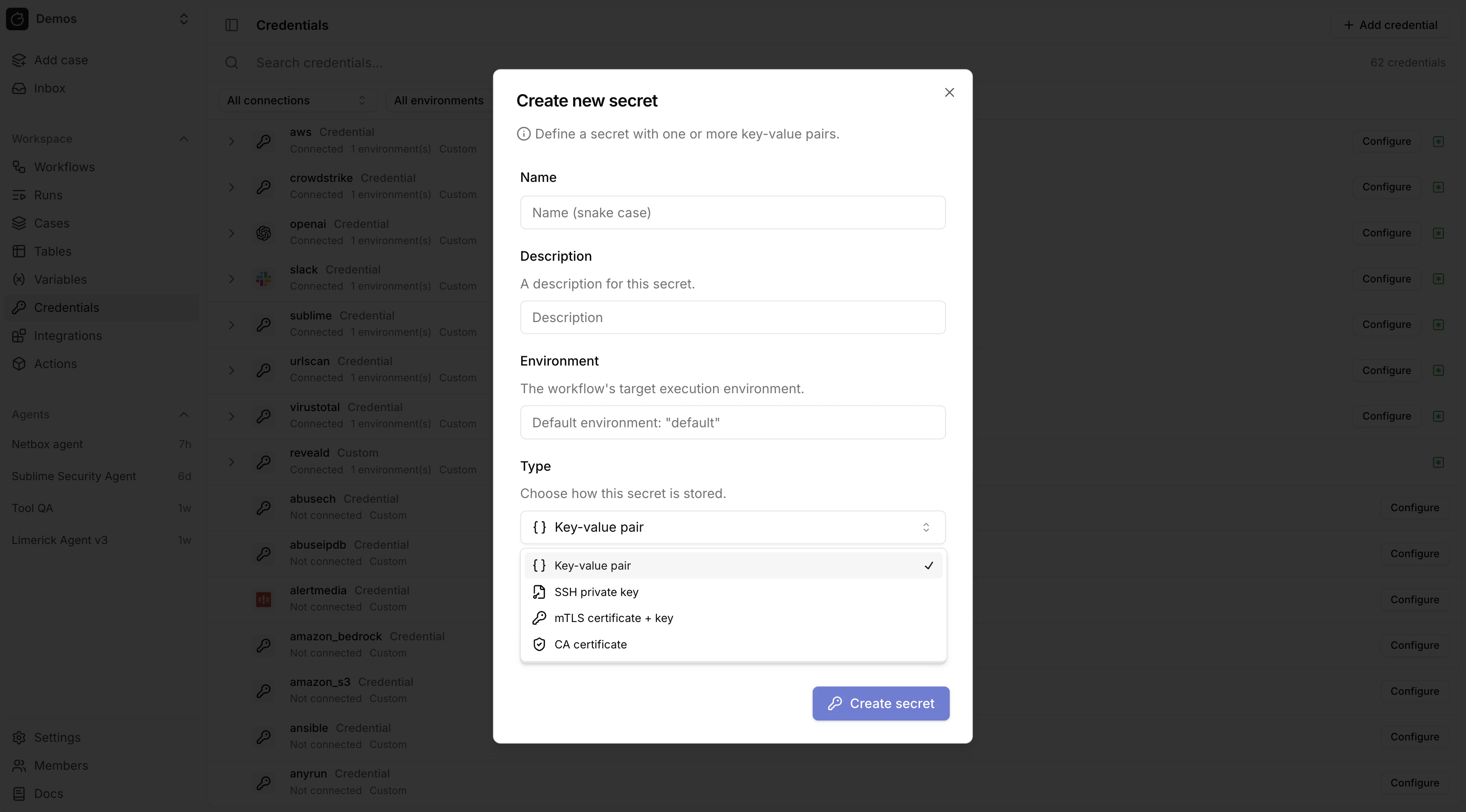
Secrets store sensitive values. Create them in/credentials.
A secret either holds its values in Tracecat, encrypted at rest, or references a value that stays in AWS Secrets Manager. See External secret stores for the AWS-backed path.
Using secrets in expressions
Access a secret in expressions with:Secret types
Tracecat supports these workspace secret types:Custom credentials
Custom credentials store arbitrary key-value pairs. Any keys can be used.Structured secret types
SSH key, mTLS, and CA certificate secrets use fixed key names. The credentials UI renders a specialized form for each type (e.g. a PEM textarea for SSH keys instead of generic key-value inputs).
Structured secret types cannot have
optional_keys. The key set is fixed by the type.
SQL action credentials
core.sql.execute_query uses a secret named sql with one required key: CONNECTION_URL.
Set CONNECTION_URL as a SQLAlchemy database URL:
- PostgreSQL (psycopg3):
postgresql+psycopg://user:pass@db.example.com:5432/app - MySQL:
mysql+pymysql://user:pass@db.example.com:3306/app - ClickHouse:
clickhouse+http://user:pass@clickhouse.example.com:8123/default
AWS credentials
Protected secret names
aws and amazon_s3 are protected secret names.
When a secret with either name contains AWS_ROLE_ARN, Tracecat automatically performs STS AssumeRole on the host before sandbox entry and injects temporary session credentials.
This applies to any registry action (built-in or custom) that declares a secret with one of these names.
tools.aws_boto3 actions use the aws secret. tools.amazon_s3 actions use the amazon_s3 secret. Both follow the same key schema.
Supported keys
AWS_ROLE_ARN— recommended; Tracecat assumes the role on the hostAWS_ROLE_SESSION_NAME— optional audit session labelAWS_ACCESS_KEY_IDAWS_SECRET_ACCESS_KEYAWS_SESSION_TOKENAWS_REGION
Credential resolution order
AWS_ROLE_ARN(STS AssumeRole with auto-injectedTRACECAT_AWS_EXTERNAL_ID)AWS_ACCESS_KEY_ID+AWS_SECRET_ACCESS_KEY+AWS_SESSION_TOKENAWS_ACCESS_KEY_ID+AWS_SECRET_ACCESS_KEY
Google credentials
Google Workspace actions resolve credentials from a chain and use the first credential that exists. An integration that is configured but not connected has no token, so the chain moves on to the next source. The chain is a priority order, not failover: an expired or revoked connection keeps its place, so re-authorize or disconnect it to move on.Credential resolution order
Workspace app actions (tools.google_drive, tools.gmail, tools.google_sheets, tools.google_docs, tools.google_slides, tools.google_forms):
- The service’s user OAuth integration (
authorization_code), such asgoogle_drivewith${{ SECRETS.google_drive_oauth.GOOGLE_DRIVE_USER_TOKEN }}. - The service’s service-account integration (
client_credentials), such asgoogle_drivewith${{ SECRETS.google_drive_oauth.GOOGLE_DRIVE_SERVICE_TOKEN }}. Set a subject on the integration for domain-wide delegation. - The
google_apicredential, keyGOOGLE_API_CREDENTIALS, with domain-wide delegation throughGOOGLE_API_SUBJECT. - The
google(Google Cloud) service-account integration, tokenGOOGLE_SERVICE_TOKEN.
tools.google_directory, tools.google_reports):
- The
google_adminuser OAuth integration (authorization_code),${{ SECRETS.google_admin_oauth.GOOGLE_ADMIN_USER_TOKEN }}. The signed-in account must be a Workspace administrator. - The
google_adminservice-account integration (client_credentials),${{ SECRETS.google_admin_oauth.GOOGLE_ADMIN_SERVICE_TOKEN }}, with domain-wide delegation through its subject. - The
google_apicredential, keyGOOGLE_API_CREDENTIALS, with domain-wide delegation throughGOOGLE_API_SUBJECT. - The
google(Google Cloud) service-account integration, tokenGOOGLE_SERVICE_TOKEN.
tools.google_alert_center) start at step 2: the Alert Center API requires a service account with domain-wide delegation.
Supported keys
Thegoogle_api credential is a workspace secret with these keys:
GOOGLE_API_CREDENTIALS— the service account JSON key, as a stringGOOGLE_API_SUBJECT— optional; the user email to impersonate with domain-wide delegation
subject key inside the JSON works too. GOOGLE_API_SUBJECT wins over it.
Service-account OAuth integrations take the JSON key as the client secret. The configure dialog has an assume user toggle that records the delegation subject, and one integration has one subject. To impersonate different users per action, call tools.google_api.call_api directly and pass subject; this needs the google_api credential.
Secret environments
Use secret environments to organize credentials by the boundary that matters to your workflow, not only by deployment stage. An environment can represent a customer or tenant, an application identity and its permission set, a deployment target, or another credential boundary. Set a workflow’s default environment in Workflows. When an action references a secret, Tracecat resolves it from that environment unless the action overrides it. If neither is set, Tracecat usesdefault.
Use an action’s environment override to select a
different environment. The override can be a literal name or a template
expression that resolves at run time, so you can reuse one workflow for
different credential contexts.
Use environments to separate:
- CrowdStrike MSSP customers or tenant IDs, such as
customer_acmeandcustomer_globex - Slack apps installed in different workspaces or granted different bot scopes
- Google service accounts with different OAuth scopes
- Sandbox and production credentials for the same provider
slack secret from the environment
named by TRIGGER.customer_environment.
Access secrets in agents
Agents can use secret expressions in tool arguments and integration configuration. Secret values are resolved during tool execution and are not sent to the LLM provider.Custom registry actions
Authors of Python UDFs and YAML templates declare required secrets in the registry (including OAuth and structured secret types). The same${{ SECRETS... }} syntax applies; see Use OAuth tokens in expressions on the OAuth page for token paths, RegistryOAuthSecret and YAML type: oauth, and Custom OAuth provider_id rules.
Related pages
- See Pre-built credentials for provider-specific credential templates for built-in integrations.
- See OAuth for integrations that authenticate with OAuth flows.
- See MCP for MCP integrations and secure environment-based settings.
- See External secret stores for referencing AWS Secrets Manager values instead of storing them in Tracecat.
- See Expressions for how expressions work across triggers, actions, secrets, and variables.