

Configure audit logs
1
Open organization settings
Open the workspace menu, select Organization, then open Audit Logs
under Settings.
2
Connect the endpoint
Click Connect and enter the HTTPS URL that accepts your audit events.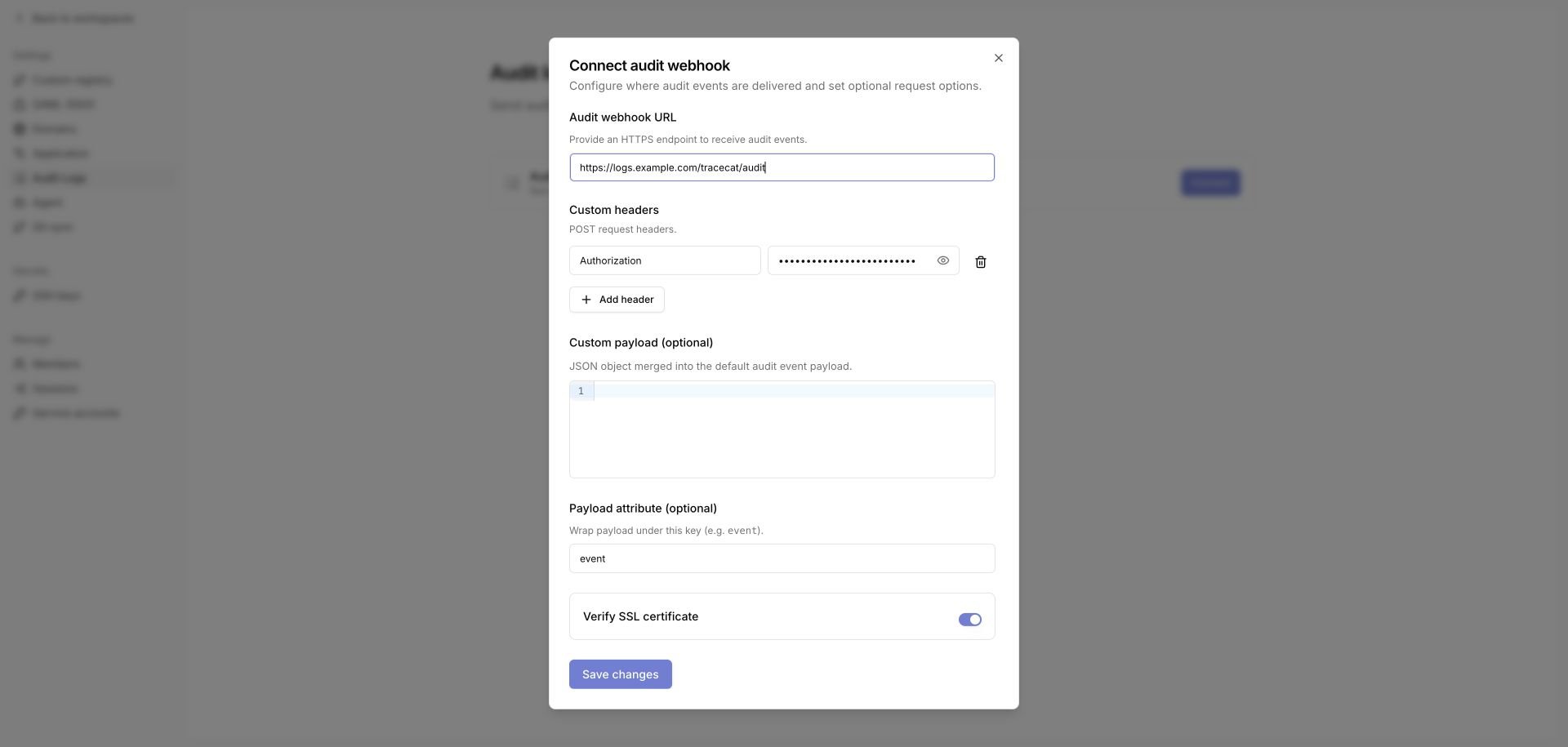
3
Configure the request
Set the request options your collector needs, then click Save changes.
organization_setting update, so your existing collector records the change before the stream moves.
Events can continue to reach the old endpoint for up to 30 seconds after the change while cached settings expire.
Request options
Tracecat encrypts the webhook URL, custom headers, and custom payload at rest.
Use the payload attribute when your collector expects the event under a specific key. Splunk HTTP Event Collector is the common case: it requires each event wrapped in an
event field.
Set the payload attribute to event, and Tracecat wraps the whole payload:
Logged events
An organization-scoped sign-in emits
auth sign_in to this sink and to the platform sink.
A superuser login that carries no organization context reaches the platform sink only.
Event payload
An audit event contains the actor, affected resource, action, result, and scope.Attribution
actor_type distinguishes a human from automation.
USER events carry the account’s email in actor_label, and SERVICE_ACCOUNT events carry the service account’s name.
Treat actor_id as the stable join key; actor_label is a display value that changes when a user’s email changes.
Scope
organization_id identifies the tenant and workspace_id identifies the workspace that owns the affected resource.
Organization-level resources such as organization_member and rbac_role have no workspace, so workspace_id is null.
If you index platform and organization events together, filter on organization_id being non-null to isolate tenant activity.
Status lifecycle
Most audited changes emit anATTEMPT event followed by SUCCESS or FAILURE.
An ATTEMPT with no matching terminal event does not always mean the request failed — the terminal event may have been shed or lost in delivery.
Delivery behavior
Tracecat posts each event as a JSONPOST request and does not block the audited action on the result.
- Delivery runs in the background, so a failing or slow collector does not prevent the audited change from completing.
- Each request times out after 10 seconds.
- Tracecat makes up to three delivery attempts per event — the initial request plus two retries with exponential backoff — on
429,500,502,503,504, and transport errors. Other4xxresponses are terminal. - A retry after a lost response can deliver a duplicate. Events carry no event ID and a retried event is byte-identical, so deduplicate on the full event body if you need exact counts.
- Under sustained backpressure Tracecat sheds events rather than buffering without bound.
Related pages
- See Platform audit logs to capture administration above the organization boundary.
- See Organization agent logs to export telemetry for agent runs.
- See MCP access logs to review external MCP clients acting as your users.
- See Architecture for the platform, agent, approval, and telemetry boundaries around audit events.
- See Security for deployment hardening guidance.