

Overview
A scope is one permission on one resource, namedresource:action. A role bundles scopes. You assign a role to a user or a group, organization-wide or on one workspace.
Open Members in the organization sidebar (/organization/members) to manage members and their roles. The sidebar entry needs org:member:read.
Built-in roles
Every organization has six preset roles. Tracecat rejects scope changes to a preset role and rejects deleting it.
The Scopes column counts the current definition. Startup seeding sets every preset role to that definition: it adds missing scopes and removes the rest.
Every member holds four baseline scopes without any role:
org:read, org:member:read, org:registry:read, and org:secret:read. The baseline grants no workspace access and no agent access.
organization-owner and organization-admin reach every workspace in the organization. Every other member needs a workspace role, assigned on that workspace or organization-wide.
Review members
The Members tab lists members and pending invitations.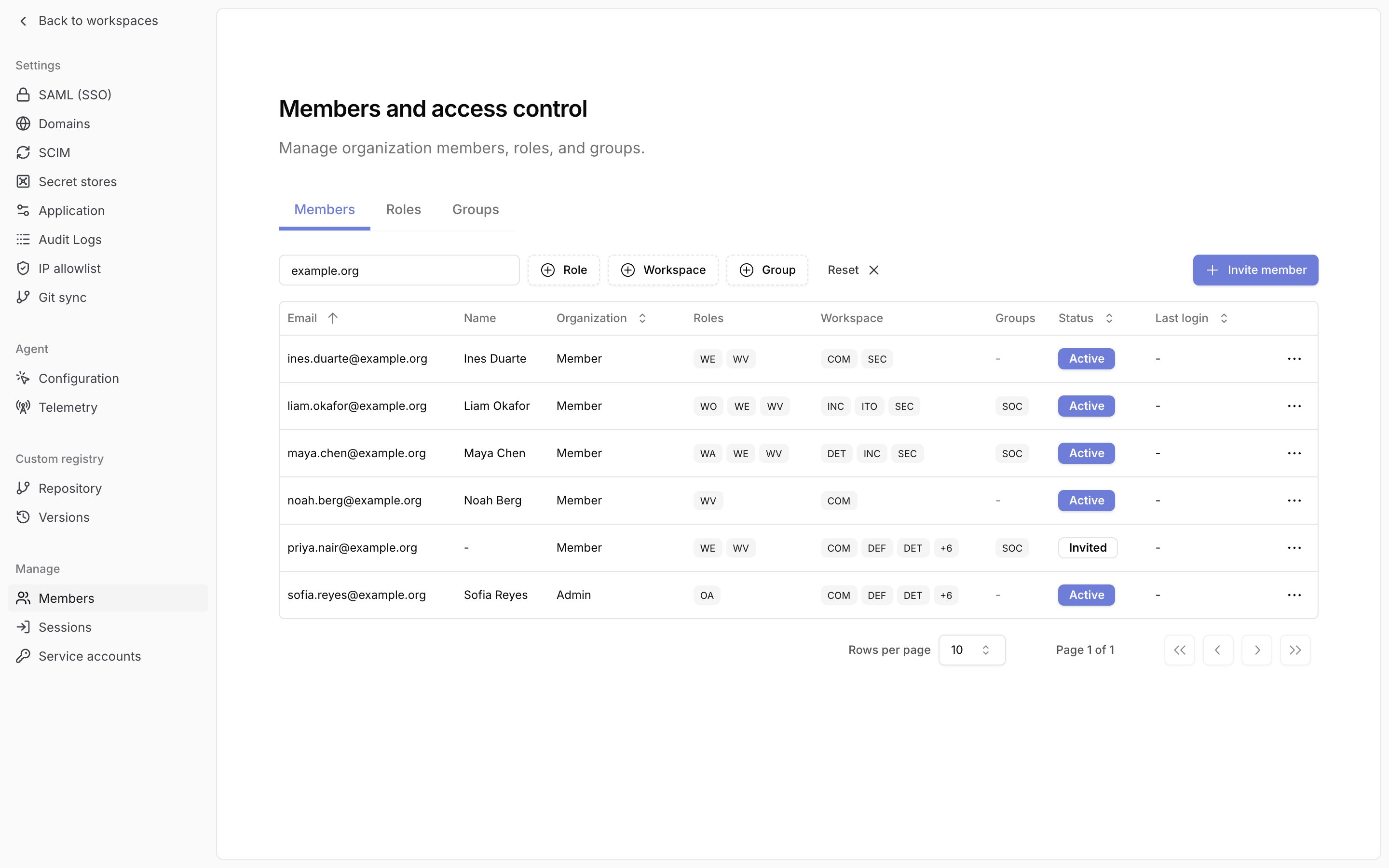
Badges are abbreviated: role names to their initials, workspace and group names to their first three characters. Hover a badge for the full name. A cell shows three badges, then
+N for the rest.
An invited row shows the roles, workspaces, and groups the invitation grants.
Filter by email... narrows the table by email. The Role, Workspace, and Group filters each take several values and match members that hold any of them.
Change a member’s roles
Changing roles requiresorg:rbac:read to open the dialog, org:rbac:create to add a role, org:rbac:update to replace one, and org:rbac:delete to remove one.
1
Open Manage roles
On the Members tab, open the member’s row menu and choose 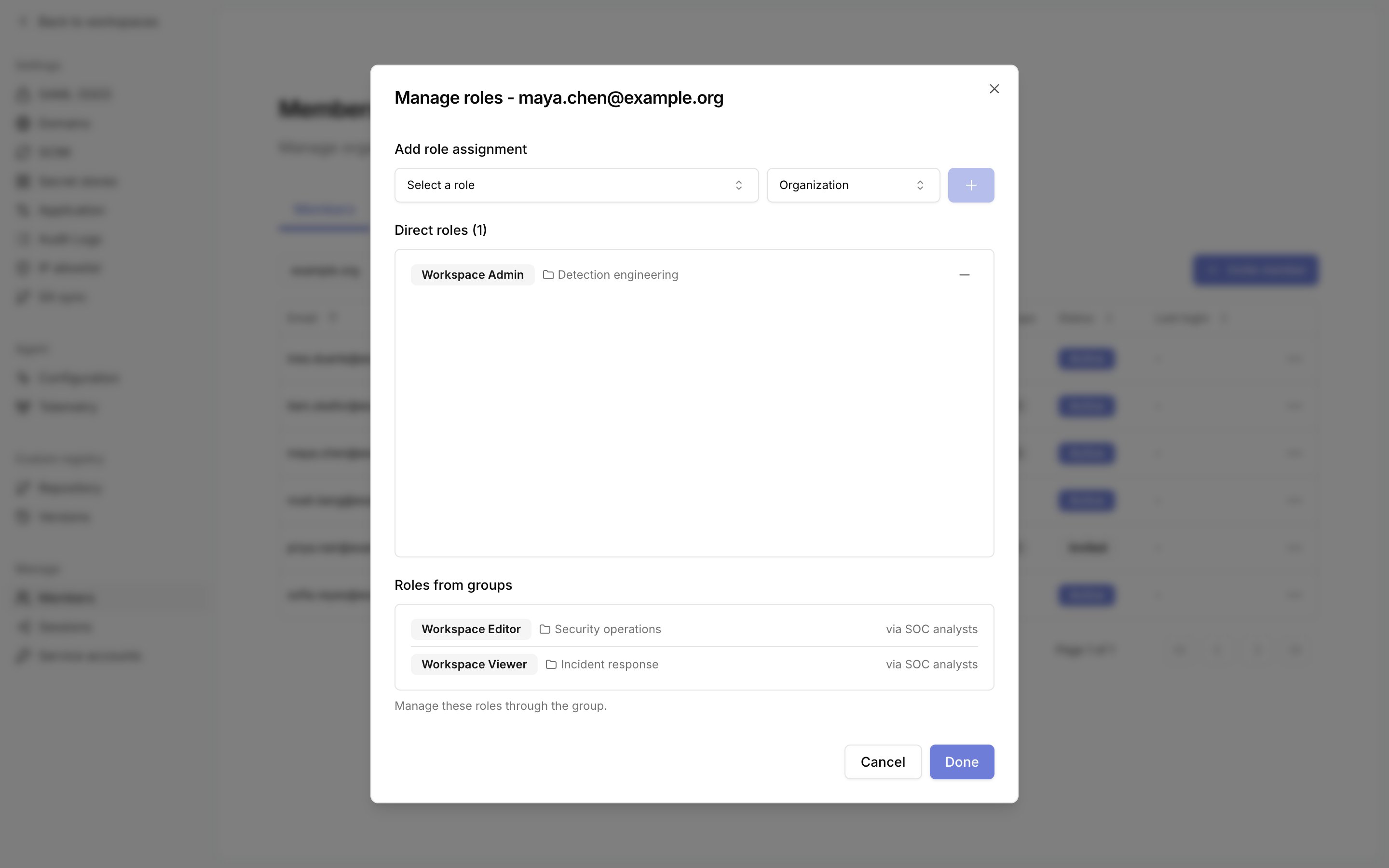
Manage roles.Direct roles lists roles assigned to the user. Roles from groups lists roles the user holds through a group, with the group name. Change those on the group.2
Add or replace a role
Under
Add role assignment, select a scope of Organization or one workspace, select a role, then click the plus button. A user holds one direct role per scope, so a new role replaces the existing one at that scope.3
Remove a role
Click the minus button on a direct role.
4
Save
Click
Done. Tracecat saves all staged changes together. When the changes remove a role, confirm with Confirm changes. Cancel discards the staged changes.Remove from organization in the row menu to remove them.
Assignment rules
Tracecat rejects a role edit that would switch a role between organization and workspace level while it is assigned or offered in a pending invitation.
Without Enterprise, you manage access with the preset roles. See Custom roles and groups for custom roles, groups, and scopes.
Organization membership
Registration and sign-in without an invitation create no membership. A signed-in user without a membership seesNo organization access yet, with any pending invitations listed. On a single-tenant deployment, registration or sign-in enrolls a superuser into the default organization.
Accepting an invitation creates the membership and applies its role grants at their selected scopes. Existing assignments at those scopes stay unchanged. A platform admin console invitation with the Organization member role creates the membership with the baseline scopes and no role. See User management for invitations.
Related pages
- See User management for registration, invitations, and organization membership.
- See Custom roles and groups for custom roles, groups, custom scopes, and inviting members into groups.
- See Service accounts for machine identities that hold scopes directly, with no role.
- See Architecture for how RBAC fits the identity and trust model.
- See Organization audit logs for the
rbac_role,rbac_group,rbac_assignment, andrbac_user_assignmentevents.