

Closed or Resolved.
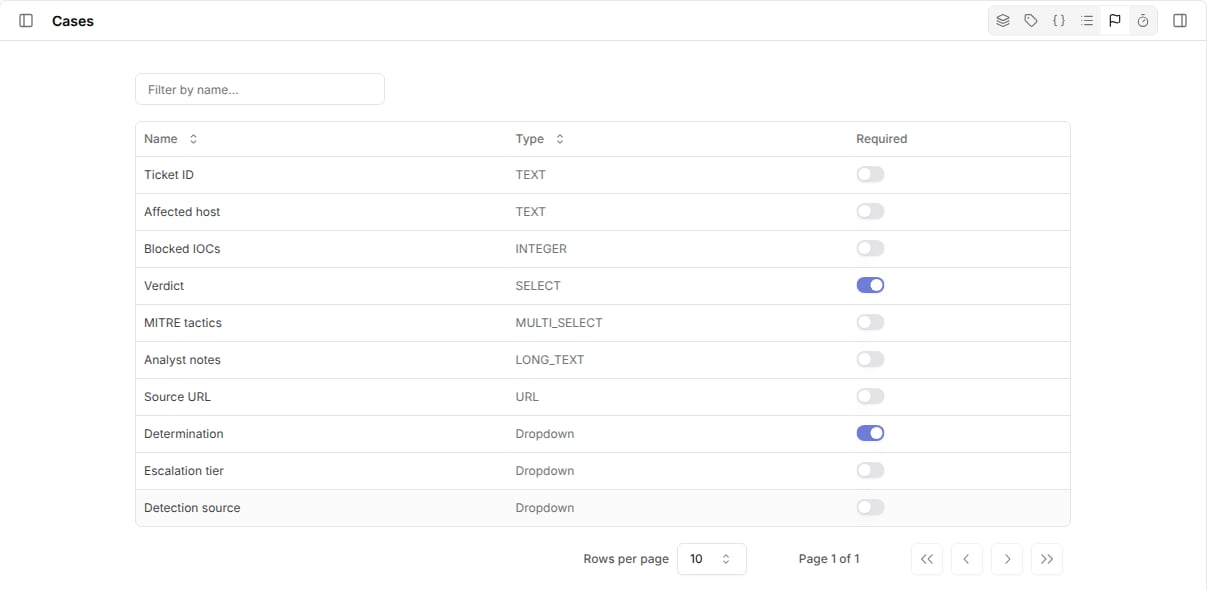
Use them to make sure every finished case records outcomes such as a verdict, determination, or root cause.
Choose required fields
- Go to
Casesand open the closure requirements view from the header toolbar. - Turn on
Requiredfor each custom field or dropdown that must have a value.
Close a case in the UI
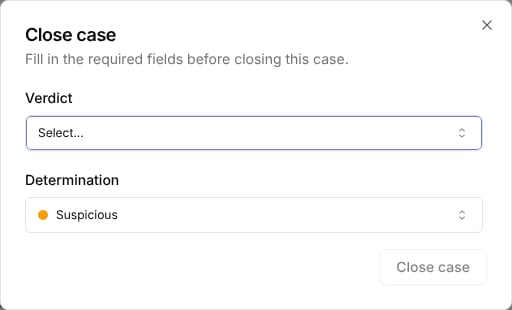
When you change a case toClosed or Resolved and a required value is missing, Tracecat opens a Close case or Resolve case dialog with every required field and dropdown.
Values that are already set are prefilled.
Fill in the missing values to finish the status change.
Close a case from a workflow
Tracecat checks the same requirements whencore.cases.update_case sets status to closed or resolved.
Pass the required values in the same call:
closure_requirements_not_met error that lists missing_fields and missing_dropdowns by name.
The case keeps its previous status.
What counts as a value
Tracecat treatsnull, whitespace-only text, empty lists, and empty objects as missing.
false and 0 count as values, so a required Boolean or Integer field accepts them.
Changes to other statuses, such as On hold, skip the check.
Related pages
- See Custom fields to create the fields you require.
- See Dropdowns to create the dropdowns you require.
- See Cases for the
update_caseinputs.